



Firm management made easy

You build your first concept sketches on an assessor's parcel map and a dozen phone photos when you skip the site study, then spend pre-design hours on rework. You study a site's physical, climatic, regulatory, infrastructural and social conditions before Schematic Design (SD), then turn those findings into diagrams.
Site Analysis Is the Pre-Design Study That Sets Up Every Design Decision
You diagram each layer of conditions, then combine the diagrams into one site strategy showing where you plan to place the building and why. The strategy drawing shows constraints and opportunities together. It comes before Schematic Design, so every later design decision has a base to answer to.
You set performance goals through that study before anyone models a wall. The American Institute of Architects (AIA) Framework for Design Excellence names orientation, window-to-wall ratio and exterior shading as key conceptual-phase strategies. You use the sun and wind study to guide those choices and manage cost too. A footprint across a drainage easement or a foundation sized without soil data costs you redesign hours the fee won't cover. Follow AIA's guidance on concealed site conditions and ask about site history at the start.
A Site Analysis Covers Six Layers of Site Conditions
Six layers cover the conditions that change what you can build and how the building performs. Each one below ends in a design move, which is the test of whether the data was worth collecting.
Climate: sun path, wind and temperature
You set orientation and glazing from the sun path. The Building America Solution Center recommends an east-west long axis because it minimizes solar gain on east and west walls, where summer gains are greatest, while maximizing winter gain on the south. Scope that convention to your climate: the AIA framework puts primary glazing south in cold climates and north in warm ones, with east and west glazing minimized everywhere.
Wind data needs a caveat on the diagram. The seasonal wind roses you pull come from airport data, so the Whole Building Design Guide (WBDG) warns they can differ at remote sites. Tolerance is generous: a building that sits up to 60° off the predominant wind still cross-ventilates, and shading wins when the two conflict. You check the temperature swing before counting on night-flush cooling. Night-flush cooling needs summer nights below 67°F and swings above 25°F, which makes it least effective in humid or heat-island settings.
Topography and physical site features
You read drainage, cut and fill, and the footprint location from the contours. The US Geological Survey (USGS) 3D Elevation Program (3DEP) supplies elevation as digital elevation models (DEMs). Its free DEMs come at 1/3 arc-second and 1 m, and its lidar carries 10 cm vertical accuracy. That's enough for a pre-design slope diagram and not enough for grading, since the 20-ft contours on a USGS quad are insufficient for detailed design. A commissioned topographic survey at 1-ft or 2-ft intervals closes that gap.
Water and soil belong in the same layer. The Federal Emergency Management Agency (FEMA) Special Flood Hazard Area zones mark the 1%-annual-chance flood, and the base flood elevation starts your finished-floor conversation. The Natural Resources Conservation Service (NRCS) Web Soil Survey gives drainage class and depth to water table in its free soil interpretations, with the caveat that onsite investigation is still needed for some engineering uses. Put the building where the ground already drains, keep cut and fill in balance, and leave the wet corner alone.
Zoning, codes and regulations
Zoning is the constraint layer, and floor area ratio (FAR) is its main lever. FAR is gross floor area divided by lot area, per New York City's FAR definition, so a 10,000 sq ft lot at FAR 1.0 allows 10,000 sq ft of floor area. The Urban Land Institute (ULI) report on ULI compact development shows the design consequence: a 40,000 sq ft site at FAR 1 can be two stories on half the lot or four stories on a quarter of it with three-quarters open. Then check height and setbacks against that volume. Check coverage too. Los Angeles R1 lots cap height at 33 ft, and New York's R1 and R2 districts limit coverage to 40% on interior lots.
Online zoning maps generally carry disclaimers, and NYC's ZoLa is informational only. Confirm the district with planning staff, then draw the zoning envelope in plan and section.
Context, neighbors and social considerations
Context data splits into hard and soft. First In Architecture's guide draws the line between hard data you can verify and soft data you observe, such as views and sounds. Observe how people move through the block too. Put both kinds of data on the diagram. Check where the neighbors' windows face and which direction traffic noise arrives from. Note which approach gives the first view of the site. Use those observations to place the entry and quiet rooms, then step the massing toward smaller neighbors. Kevin Lynch's The Image of the City and Gordon Cullen's serial vision in Townscape are useful when a site reads as a sequence rather than a parcel.
Legal, geotechnical and utility layers
The legal layer starts with the boundary survey, and the American Land Title Association/National Society of Professional Surveyors (ALTA/NSPS) Land Title Survey is the one commercial clients request. The 2026 edition took effect February 23, 2026, and NSPS calls it explicitly a boundary survey. Its optional Table A items add flood zone, vertical relief, zoning data and underground utilities from client plans or private locates. Easements limit the footprint as hard as setbacks do. Boone County, Illinois, for example, bars any structure on or over an easement without utility consent.
The structural engineer designs the foundation from the geotechnical report. The Federal Highway Administration (FHWA) lists the report's contents in its FHWA review checklist: boring logs, lab results, groundwater levels and design recommendations. The 2024 International Building Code requires the report to state bearing capacity and settlement, and flags expansive soil at a plasticity index of 15 or more. AIA B101-2017 has the Owner furnish both the survey and geotechnical services in §5.4 and §5.5, so ask for them in the first meeting. Water, sewer, power and telecom close the layer: locate each main and check its capacity. Then decide which side of the site the service entry belongs on.
Traffic, access, circulation and parking
Peak-hour volume triggers traffic studies, and driveway spacing limits where access can sit. State Department of Transportation (DOT) access-management guides set that spacing. Indiana DOT (INDOT) requires adjacent driveways 200 ft apart at 30 mph in its INDOT driveway guide. Texas DOT calls for a formal traffic impact analysis at 100 peak-hour trips or more. Trip counts draw on the Institute of Transportation Engineers (ITE) Trip Generation Manual.
You need fixed dimensions for pedestrian access. The 2010 Americans with Disabilities Act (ADA) Standards require an accessible route from parking, the public sidewalk and transit stops to the entrance, with one accessible space for lots of 1 to 25 spaces and van spaces 132 in. wide. Cities and states are changing parking requirements. The state's AB 2097 guidance explains California's ban on minimum parking within a half mile of transit since January 1, 2023, and Austin removed citywide minimums effective November 13, 2023 while keeping accessible spaces mandatory. Check the current ordinance before sizing the lot. The surface parking you drew last year is not required where the ordinance dropped its minimum, and you can put that land back into the program.
Work Through Site Conditions in Four Stages
Research, site visit, analysis and synthesis, in that order, keep you from walking a site without knowing what to look for and from drawing conclusions before you've stood on it. The sequence holds for a tenant improvement and a 40-acre campus. The depth of each stage flexes with the project.
1. Research before you arrive
Desk work comes first so the visit confirms rather than discovers.
- Pull the parcel record and zoning district from the county and city portals, and read the district rules for FAR, height, setbacks and coverage.
- Print a FEMA FIRMette, download USGS contours, and run the address through the Web Soil Survey.
- Scroll Street View's dated imagery to see what stood on the block before, and ask the client about site history.
- Request every survey and geotechnical report the Owner already holds.
2. Visit the site with a plan
Bring a printed base map at a scale you can mark up, a camera, a tape, a compass or sun app, and a notebook. Record first impressions in the first ten minutes, before familiarity flattens them.
- Walk the full perimeter and note where neighboring buildings sit and where the noise and the best views come from. Mark wet ground too.
- Photograph at eye level in every direction from several fixed points, and key each photo's location and bearing on the base map.
- Measure what the survey won't show: curb cuts and tree canopies. Check the height of the fence next door too.
- Scan if it helps. AEC Magazine's test of Polycam found phone light detection and ranging (LiDAR) accurate within a few millimeters in a room, with the warning that complex geometry can fool it.
3. Analyze each layer against a design question
Every finding needs a question it answers.
- Overlay every layer on one base drawing at one scale.
- Run the sun path for the solstices and equinoxes and do the zoning envelope math.
- Flag conflicts, such as the flattest corner carrying the drainage easement, and rank which constraint governs.
4. Synthesize one site strategy diagram
- Draw one strategy diagram showing constraints and opportunities together.
- File the layer diagrams behind it as backup.
- Use it as the first page of the concept presentation and the SD base.
A worked example on a 40,000 sq ft lot
A 40,000 sq ft infill lot zoned FAR 1 runs through the four stages like this.
- Research: FAR 1 allows 40,000 sq ft of floor area. A FEMA map and the Web Soil Survey show a poorly drained corner, and the parcel record shows a drainage easement along the low edge.
- Site visit: Walking the lot confirms the wet corner, a west-facing view and traffic noise from one street.
- Analysis: You set an east-west long axis for sun, keep the footprint off the easement, put the quiet rooms away from the noisy street, and limit west glazing despite the view, because sun control governs that conflict.
- Synthesis: A four-story massing on a quarter of the lot leaves three-quarters open, including the wet corner. All of it goes onto one strategy diagram that shows which constraint won each conflict.
Tracking Pre-Design Hours Against a Phase Budget Keeps Site Analysis Profitable
Site analysis sits in pre-design, and pre-design is where a fee gets spent before anyone draws a plan. The guide to design phases shows where it falls in the sequence. In the A&E firms we work with, teams log site visits and zoning research against "general" or against SD. They log diagramming there too, and the project lead can find out weeks later that the SD fee is already partly spent.
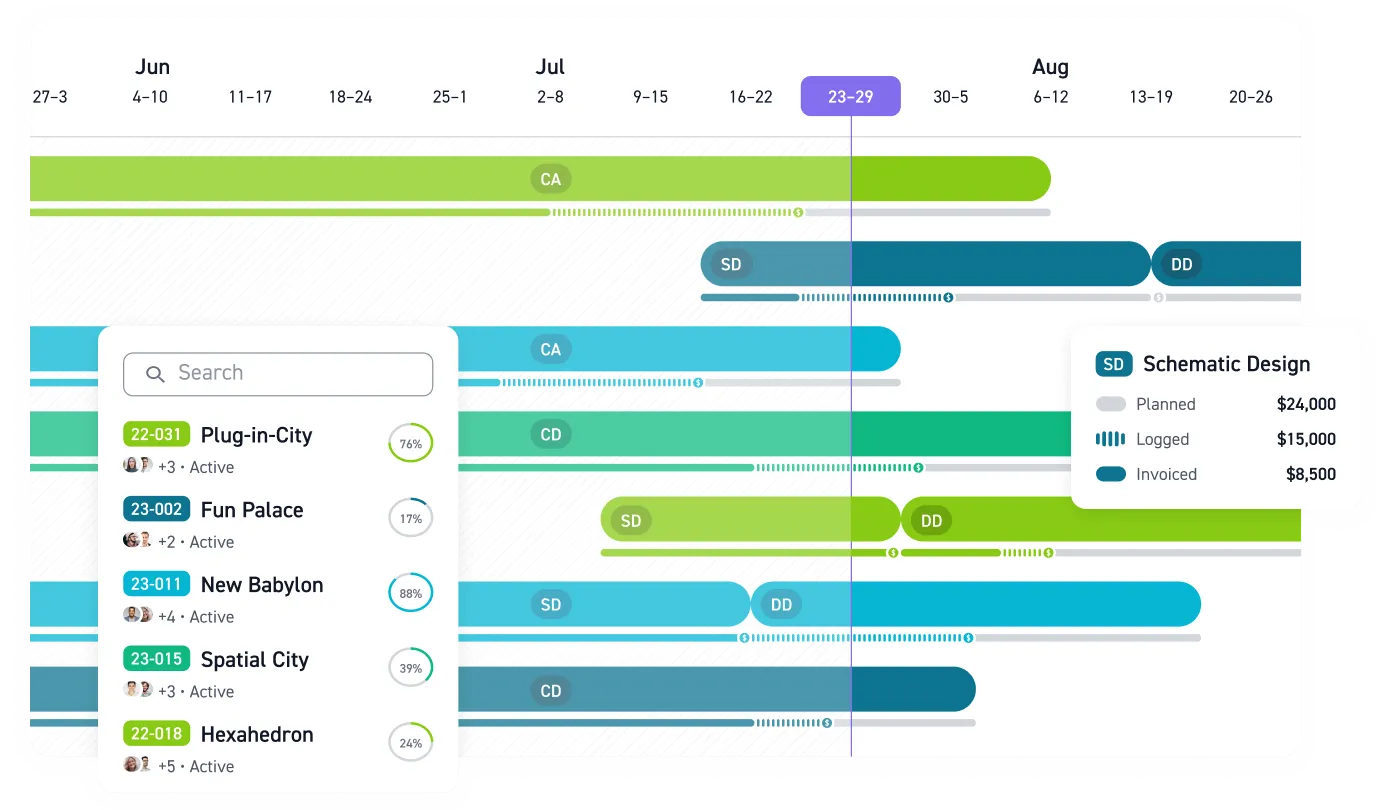
You can set pre-design up in Monograph as its own phase with its own budget. Site visits, zoning research and diagramming then land against that phase instead of against "general" or SD. The two features below show how.
- Phase budgeting: Define the phase budget as a fixed dollar amount or a percentage of the fee, then assign the team with planned hours. Watch burn at the phase level as hours land. MoneyGantt™, Monograph's signature view, puts the project timeline and budget-to-cash progression on one screen, so you can see whether pre-design hours are burning faster than the phase's share of the schedule without opening a separate financial report.
- Field and office logging: Use the web timesheet at your desk or start the desktop timer when you open the zoning code. On site, describe your time in your own words in the mobile app, and Monograph converts it into a structured entry. You confirm or adjust that entry before it counts against the phase.
The details are in time tracking. Entries from the web timesheet, the desktop timer and the mobile app all land against the pre-design phase. You confirm each mobile entry before it counts against the budget.
Monograph is built exclusively for A&E firms of 5 to 100 people, with 16,000+ architects and engineers across 2,000+ firms on it today. If your pre-design hours live in a spreadsheet nobody reconciles until invoicing, you can see it on a live project with your own phase structure.
Free and Paid Tools Map to the Layers You Are Studying
Each tool below serves one or two layers, and most of the useful ones are free.
- Google Earth and Street View, for context and history: Street View's "See more dates" button opens imagery back to 2007, and Google Earth on the web has a historical imagery toolbar, so you can date when the lot was cleared or the neighbor added a story.
- County and city property portals, for legal and zoning data: Assessor parcel layers give lot area and use codes for free, along with sale history. Each portal disclaims boundary accuracy. Los Angeles County says its data is not for property lines, and Maricopa County calls its lines illustrative, not survey. Start there, finish with a surveyor.
- CadMapper, for the context base drawing: Over 200 metro road networks download free with no account, and custom areas up to 1 km² are free with sign-up in AutoCAD (DXF) or SketchUp (SKP) format. Rhino (3DM) is another option. The files are not for engineering or surveying use.
- CAD-Earth, for topography in AutoCAD: Basic runs $149 a year for image import. Plus costs $249 for terrain meshes and contours pulled from Google Earth, and Premium costs $349 for cut-fill volumes. It runs on Windows with AutoCAD 2018–2026, with BricsCAD and ZWCAD versions; there's no Mac or Revit version. AutoCAD LT is also unsupported.
- SunCalc.org and Andrew Marsh's sun-path tools, for climate: SunCalc plots the sun's daily trajectory over a map with altitude and azimuth. It also shows shadow length for an object height you enter; it has no paid tier and runs on ads. Marsh's 3D Sun-Path adds a shadow-map generator and is free for commercial use.
- Climate Consultant, for climate: Free, reads a year of EnergyPlus Weather (EPW) data, and plots all 8,760 hours into 16 design-strategy zones to recommend sun shading or natural ventilation. Thermal mass is another strategy. It won't run on macOS Ventura. EPW files are available from Climate.OneBuilding.
- Ladybug Tools, for deeper climate study: The Grasshopper plugin is free and open source, and Ladybug Tools 1.10.0 runs in Rhino 6 through 8. Sun path, direct sun hours, wind rose and incident radiation are the site components. The cost is Rhino itself, $995 for Rhino 8.
- Public GIS portals, for terrain and environmental data: USGS National Map elevation is free with no account. The FEMA Map Service Center is the official source for FIRMettes and the National Flood Hazard Layer. The Web Soil Survey covers over 95% of counties, and the American Society of Civil Engineers (ASCE) Hazard Tool returns seismic, wind, snow and flood values in one report. The Environmental Protection Agency (EPA) EJScreen is gone; the agency disabled it in early 2025.
- Drones, for topography and context: Commercial flight needs a Federal Aviation Administration (FAA) Part 107 remote pilot certificate, a 400-ft ceiling above ground, visual line of sight and Remote ID. Registration is $5 per drone for three years.
Run the free federal portals, SunCalc and Street View history on every project; buy CAD-Earth or Rhino only when the team will reuse them, and commission a surveyor once boundary or grading accuracy matters.
Diagrams Turn Collected Data Into Design Decisions
You finish a site analysis when you turn the data into drawings you can use to argue for a design. Choose among three diagram types:
- Objective diagrams: Map verifiable data: sun angles, contours, setbacks, utility runs.
- Subjective and narrative diagrams: Use subjective diagrams to map views and noise you perceived on site. Record the quality of a street edge too. With narrative diagrams, tell the story of the site over time or along a path, following Cullen's serial vision.
Superimpose each data set on the same base drawing at the same scale, as Ian McHarg did in Design with Nature. He combined mapped elements through overlays into a hierarchy of opportunities. Match the drawing type to the data: use a plan for access and zoning, and a section for sun angles and slope. Show the approach through a sequence of perspectives.
Study four published examples:
- BIG's OPPO R&D headquarters in Hangzhou: The project page carries separate sun path, sun angle, daylight and water view OPPO diagrams, though the page shows the diagrams without the underlying data.
- Mt. Vernon by Todd Rader + Amy Crews: The Architizer entry for the Mt. Vernon project overlays Washington's original farm boundaries on a modern map beside topography, hydrology and slope. It's a clean narrative diagram built from historical data.
- Arbre Blanc in Montpellier by Sou Fujimoto with Manal Rachdi Oxo and Nicolas Laisné: Dezeen's coverage includes urban integration and water cycle diagrams credited to RSI Studio, plus an exterior spaces diagram.
- City Tech's site strategy handout: The City University of New York (CUNY) ARCH3612 site strategy handout shows a student team's synthesis of sun, wind, views, noise, traffic and zoning envelope on one plan, which is the closest thing to a template for the single strategy diagram from stage four. It's student work, so expect less detail than a professional set.
Treat every image above as copyrighted. Publishers' terms, such as ArchDaily's, bar reuse without written consent. Study them, then draw your own.
Surveyors and Engineers Supply the Technical Layers
Land surveyors own the boundary. NSPS states that boundaries are reserved to land surveyors, and New York's Education Law says boundary determination may be done only by a licensed land surveyor. The surveyor also delivers the topographic survey. The Unified Facilities Criteria (UFC) call it the foundation of the site map in their UFC site survey criteria.
Geotechnical engineers supply the subsurface, and timing matters. Engineering News-Record (ENR) reports that owners hire the geotechnical engineer before Schematic Design or earlier, and the AIA SD checklist asks the team to decide whether additional surveys and borings are needed. Civil engineers take grading, drainage, stormwater, utilities and roads. California's licensing board reserves grading plans to licensed civil engineers, with an exception for the architect responsible for the site plan. Bring in a traffic engineer when the trip count nears the study threshold. The community supplies the layer no consultant can: neighborhood meetings and planning staff conversations tell you which views and uses the block will defend.
Site Analysis Feeds the Proposal and the Schematic Design Phase
Include a page of site analysis in the project proposal to give a prospective client the first proof that you've looked at their land. Use the zoning envelope and strategy diagram to explain what's possible before you agree on the fee, and to estimate how many hours to put in the pre-design and SD phases.
From there, carry the analysis straight into the Schematic Design phase. AIA B101-2017 places the preliminary site evaluation in Schematic Design (§3.2.2), so use the analysis diagrams as the base for the first massing options. Keep the visual throughline: carry the same base drawing and line weights into the design proposal, along with the north arrow. Show the client how you address a condition they've already seen diagrammed with each massing move. Your team decides how early to share these drawings with a contractor through its project delivery method.
Site Analysis vs. Site Plan: Who Does What
A site analysis is a study. A site plan is a construction or permit drawing with a seal, and licensing law governs who may prepare it. Architects can prepare site plans tied to a building in most states. Texas puts site plans showing building location and orientation within the scope of both engineering and architecture, and California's practice act includes the planning of sites in architecture. An architect responsible for a California site plan may also prepare the grading and drainage plans, except under the Subdivision Map Act, but may not determine property lines.
The engineer's share grows with the hydrology. New Jersey assigns drainage design for sites of 10 acres or more, or any site with a detention facility, to an engineer only, while leaving building location open to the architect or engineer.
An architect can do a site plan for the building. Paving and utilities go to the civil engineer. The boundary comes from a surveyor, and the line moves by state, so read your board's guidance before you seal.
Track Your Pre-Design Phase Budget in Monograph
Set up the four stages as a template you reuse: a desk-research checklist, a site-visit kit, the layer diagrams on one base drawing, and a single strategy diagram at the end. Then give the work its own phase and budget so the hours show up where they're spent. Monograph tracks that pre-design phase budget against the timesheets your team fills in from the site. Get started with a demo built around one of your current projects.
Frequently Asked Questions
What does a site analysis include?
A site analysis covers six layers: climate, meaning sun, wind and temperature; topography and physical features; zoning and codes; context and neighbors; legal, geotechnical and utility data; and traffic, access and parking. Each layer ends in a design move, which is the test of whether the data was worth collecting. The diagrams overlay on one base drawing at one scale. In the 40,000 sq ft example, the single site strategy drawing keeps the footprint off the easement and limits west glazing, because sun control won over the view.
What's the difference between off-site and on-site research?
Off-site research is everything you can pull from a desk: parcel records, zoning, flood maps, soil data, elevation and historical imagery. On-site research is what the desk can't tell you: views, noise, first impressions, the neighbors' windows, the wet corner. Do the desk work first so the visit confirms and corrects instead of starting from zero.
Which site analysis tools are free?
Google Earth and Street View, county assessor portals, CadMapper up to 1 km² with a free sign-up, Andrew Marsh's sun-path tools, Climate Consultant, the Ladybug Tools Grasshopper plugin, and the USGS, FEMA, NRCS and ASCE public portals cost nothing. SunCalc.org has no paid tier. You pay for Rhino to run Ladybug, CAD-Earth for terrain inside AutoCAD, and larger CadMapper areas.
How do I present site analysis findings in diagrams?
Put every data set on the same base drawing at the same scale, then overlay. Use line weight so the governing constraint reads first. Match the drawing type to the data: plan for zoning and access, section for sun and slope, sequential perspectives for approach. Finish with one strategy diagram and keep that base drawing consistent into Schematic Design.


.png)