


Firm management made easy

AI adoption across architecture, engineering, and construction firms is accelerating. A global survey of over 1,000 AEC professionals found that only 27% of firms currently use AI in their operations, but 94% of those adopters plan to increase investment this year. Meanwhile, industry tracking from a separate survey of 1,227 architecture professionals puts the number higher: 46% already use AI tools, with another 24% planning to start soon. The gap between those two numbers tells you something important. Adoption varies wildly depending on firm size, digital maturity, and which tasks you count. But the direction is clear.
The impact shows up everywhere: massing studies that once took a week now generate in minutes, meeting notes draft themselves, and clients expect near-instant visuals. That speed comes with a critical decision for firm leaders: which tools actually pay for themselves? Cash flow is the backbone of every studio, and the wrong subscription can drain margins faster than a blown change order.
This guide covers the AI tools worth budgeting for in 2026. Each one was chosen because it helps you make more money while doing better work. Every pick proved its value on three fronts: measurable gains in design or operational efficiency, clean integration with daily workflows, and demonstrated adoption across A&E firms like yours.
How We Picked These Tools
Your workflow runs from napkin sketches to final pay applications, so your AI tools need to cover that same ground. We evaluated dozens of platforms across the A&E landscape and filtered for three criteria: measurable efficiency gains, native integration with tools architects already use, and real adoption among practicing firms. The eight tools below handle the major stops along that route, from quick concept generation and high-quality visualization to Building Information Modeling, or BIM, native rendering, feasibility studies, code compliance, agentic workflow automation, and the financial tracking that keeps projects profitable.
Best Overall AI Companion for Architects: Veras
Veras works inside Revit, Rhino, and SketchUp. It feels less like another app and more like an upgrade to tools you already use. The AI converts rough massing studies into detailed, material-rich images in seconds. That jump from gray geometry to polished visualization keeps you iterating where design momentum is strongest.
The core advantages include:
- Stay in your BIM or CAD file, adjust a form, and watch Veras update the view almost instantly
- Client meetings that used to require a week of rendering prep now happen the same day
- Subscription model includes a limited free tier, so you can scale costs with usage across your team
You will need decent GPU power and some time to learn effective prompting, plus visualization specialists for final marketing shots. But the daily workflow improvements are significant, and Veras is increasingly recognized as a leading visualization tool in architectural workflows.
Best AI for Practice Management and Profitability: Monograph
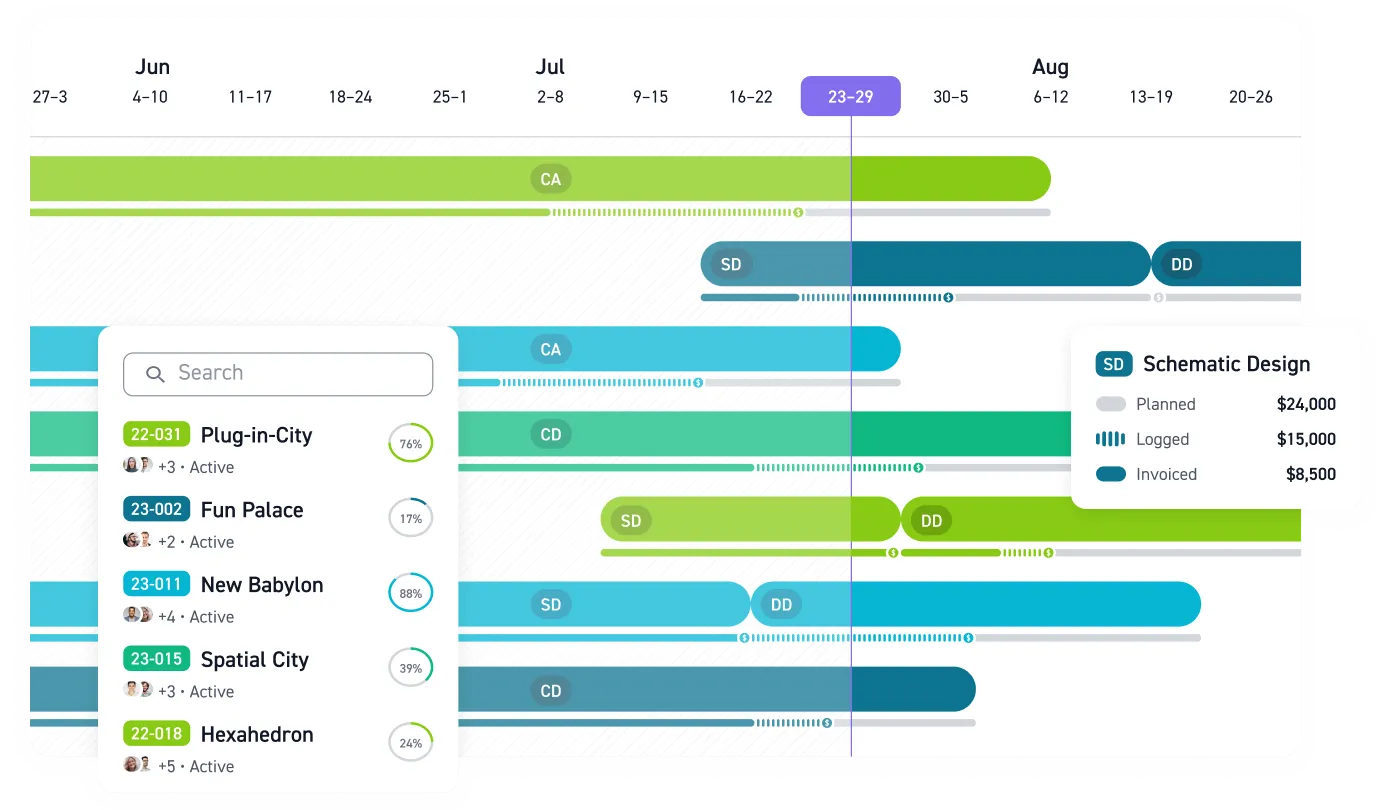
While Veras improves your design workflow, Monograph fixes the business side. The platform uses AI to build project budgets, staffing plans, and invoices automatically when you upload a signed contract. Monograph's MoneyGantt™ view connects schedules to dollars so you can see instantly whether work hours are tracking ahead of fee burn.
Key workflow improvements include:
- Stripe and QuickBooks integration cuts billing cycles nearly in half
- Fewer Friday nights digging through spreadsheets to check staff allocations
- More time focusing on design quality through automated administrative work
- Per-user SaaS pricing with custom plans means small practices can start lean and scale up
The trade-off requires a new routine: daily time entries and weekly project check-ins so the AI has good data. By handling administrative work automatically, Monograph's MoneyGantt™ makes profitability a daily metric you can actually manage instead of a quarterly surprise. Firms using the platform have reported significant results, including up to 50% profit growth and 4x faster billing processes.
Best AI-Powered BIM Innovation: Archicad AI Visualizer
Graphisoft's AI Visualizer integrates into the Archicad Technology Preview and bridges the gap between raw BIM geometry and presentation-ready images. You describe atmosphere, materials, and lighting through a prompt panel while generative algorithms apply those instructions to your live BIM model. Since everything stays native, changes to plans or sections update in the visualizer without export hassles. Early users report cutting study model production time dramatically, and new staff learn it in one afternoon thanks to the familiar Archicad interface.
The plug-in is still in technology preview, so expect some rough edges. Power users creating ultra-realistic marketing shots will still use dedicated renderers. But for design reviews and client check-ins, the speed is hard to beat. It ships free with the preview build right now, making it easy to experiment if you are already using Archicad and want to keep visualization integrated.
Best AI for Rapid Concept Modelling: Kaedim
Competitions require speed, and Kaedim delivers by converting 2D sketches or reference photos into textured 3D meshes within minutes. Upload a quick plan or hand-drawn elevation, and it returns a usable model you can import into Rhino, Blender, or Unreal. That single step eliminates hours of base-mesh modeling, letting you spend time refining form instead of clicking lines.
The output still needs cleanup: edge loops and UV maps will not always be production-ready, but Kaedim gets you 80% there faster than manual modeling. Subscription tiers scale from individual to enterprise, so costs match project load. Tool reviews consistently highlight Kaedim for early-stage 3D asset creation speed, reflecting how often firms now depend on quick, immersive visuals to win client approval.
Best AI for High-Fidelity Visualization and Rendering: Chaos AI Enhancer
Built into Enscape, Chaos AI Enhancer uses AI to improve the visual quality of certain assets such as people and vegetation within renderings. You can trigger the enhancement process with a button, which uploads the image to Chaos Cloud for processing. This feature is included with your standard Chaos Enscape subscription, so no additional software budget is required.
Studios with RTX cards see the biggest improvements; older GPUs may struggle. Good lighting and composition still matter. But when marketing deadlines approach, getting a clean hero shot from a noisy draft in seconds reduces stress significantly. The feature comes with your standard Chaos subscription, making it easy to test without budgetary friction.
Best AI for Construction Feasibility and Site Planning: TestFit
Before spending hours on schematics that will not work financially, TestFit lets you test the numbers. Input parcel boundaries, local parking requirements, and financial targets, and the algorithm generates dozens of massing options with yield, cost, and unit mix data.
The platform delivers several key advantages:
- Instant feedback turns a week-long feasibility study into a 30-minute desktop session
- Fast enough for real-time negotiations with developers
- Export connections to Revit and SketchUp work well for moving to full BIM documentation
- Subscription-based licensing with predefined pricing tiers aligns costs with project value
North American multifamily teams treat the tool as essential for go/no-go studies, which explains its frequent appearance in current tool roundups. The structure works perfectly for a platform where high value on a few critical projects beats constant low-level usage.
Best AI for Code Compliance: ARCHITEChTURES
Late-stage code problems destroy budgets, so Architechtures catches them early. You input site data, program requirements, and local regulations, and it generates compliant plan options in real time with energy and area calculations. Since every adjustment prompts instant recalculation, you can see how moving a core or adding stairs affects both sellable square footage and code compliance.
The system requires accurate zoning inputs: bad data still produces bad results, so you remain the final reviewer. But catching compliance issues during schematic design beats fixing them in a 90% construction document set. Pricing details for Architechtures are not publicly disclosed. Professional reviewers consistently praise the platform for reducing regulatory risk and accelerating approvals, two phrases every project manager appreciates.
New for 2026: Agentic AI and Workflow Automation
The biggest shift in 2026 is not a single tool but a new category. Agentic AI systems go beyond answering questions or generating images. They plan multi-step workflows, recover from errors, use tools autonomously, and adapt strategies based on intermediate results. For architecture firms, this means AI that can coordinate an entire visualization pipeline or structural evaluation without manual hand-offs between applications.
Emerging platforms now allow designers to type a prompt describing a code-compliant design requirement and receive a draft that aligns with the firm's standards. Larger firms are building custom pipelines using workflow aggregators that combine numerical evaluation with design visualization in a single automated sequence. Structural engineering firms are constructing engines that quickly evaluate the choice of structural system and then generate component options for selection.
This category is still maturing. Most agentic tools require technical setup and careful prompt engineering. But for firms that invest early, the payoff is substantial: less time spent shuttling data between applications and more time spent on the design judgment that only humans can provide. Keep an eye on tools like ComfyUI for visualization pipelines, GitHub Copilot for custom application development, and integrated AEC platforms that embed AI directly into daily project workflows.
Emerging Tools Worth Watching
Beyond the core picks above, several newer platforms are gaining traction in 2026 that did not exist or were too early-stage when we first published this guide.
A few standouts for different workflow needs:
- Archfine AI: A cloud-based rendering solution that transforms sketches, CAD exports, or basic massing models into detailed interior and exterior renders in seconds. It eliminates heavy hardware requirements and makes rapid visualization accessible to studios of all sizes.
- Arko AI and LookX: AI-powered rendering assistants tailored specifically for architecture. These tools apply style transfers or material swaps to your 3D model images, generating polished renderings in various styles with minimal effort.
- Rendair AI: Gaining traction for its balance of speed, control, and quality on architectural subjects. Particularly popular among firms that need realistic renders fast without deep technical setup.
- Nano Banana and Flux: Tools that enable a form of visual shorthand, allowing designers to sketch changes directly onto rendered images and then refine with language prompts. Image generators in this class are now expanding into video production and navigable 3D spaces.
None of these have the track record of a Veras or TestFit yet. But the visualization space is moving fast, and any of them could earn a core spot in your stack within the year.
2026 AI Tool Comparison Snapshot
When project deadlines pile up, you do not have time for lengthy tool reviews. This snapshot cuts straight to what matters: what each platform does best, where it fits your workflow, and what it costs. Use it as a checklist against your firm's specific bottlenecks and budget before committing to any pilot or subscription.
Veras — All-round AI companion. In-BIM image generation from concept through visualization. Tiered SaaS with free trial.
Monograph — Practice management and profitability. MoneyGantt™ budget tracking across project ops. Per-user subscription.
Archicad AI Visualizer — BIM innovation. Native generative preview from design through visualization. Bundled in Tech Preview.
Kaedim — Rapid concept modelling. 2D-to-3D mesh conversion for early 3D builds. Tiered SaaS.
Chaos AI Enhancer — High-fidelity rendering. One-click asset enhancement for visualization. Included in Chaos license.
TestFit — Construction feasibility. Live yield and pro-forma generation for site planning. Seat-based licensing.
ARCHITEChTURES — Code compliance. Generative layouts against local regulations for schematic design. Contact for pricing.
Agentic AI tools (new for 2026) — Workflow automation. Multi-step task execution across project phases. Pricing varies by platform.
The right combination can save weeks on project schedules while protecting profit margins, without destroying your software budget.
Building Your 2026 AI Stack Strategically
Every tool on this list solves a problem most A&E firms know too well. Veras transforms rough massing into client-ready visuals, TestFit turns site analysis into hard numbers, and Monograph's MoneyGantt™ stops project budgets from bleeding out mid-phase. Before adding anything to your software budget, map each solution back to where your workflow actually breaks down. If proposals die at the visualization stage, pair Veras with Chaos AI Enhancer. If billing chaos kills profitability, Monograph handles the financial tracking that spreadsheets cannot.
Structure your stack around your project workflow: concept tools for early phases, BIM intelligence for design development, and practice management systems that keep cash flow healthy. One data point worth noting: a benchmark study of early AI adopters in AEC found that 68% saved at least $50,000, and nearly half reclaimed 500 to 1,000 hours using AI tools. Those are not theoretical gains. They come from firms that committed to testing, tracked results, and scaled what worked.
Yes, software costs will increase, and team training takes time. Most vendors offer free trials, so test solutions on active projects before committing to annual contracts. Run short experiments to prove value. Firms that adopt first gain real advantages: faster feasibility decisions, fewer late-stage redesigns, and clearer financial visibility. The technology keeps advancing. The question is whether your practice advances with it.
Your firm's profitability depends on the systems you build today. Get started with Monograph.
Frequently Asked Questions
Which AI tool should I implement first in my architecture practice?
Start with your biggest pain point. If you spend hours creating visuals for client meetings, begin with Veras. If you are constantly chasing project profitability data, Monograph's AI-powered project management delivers immediate visibility into budgets and cash flow.
Will these AI tools integrate with our existing Revit and QuickBooks setup?
Most tools on this list were designed for seamless integration. Veras works directly inside Revit, while Monograph offers two-way QuickBooks sync that eliminates double-entry between project management and accounting. Always test integrations during free trials.
How long does it take to see ROI from AI tools in architecture?
Timeline varies by tool and firm size. Visualization tools like Veras can show immediate time savings on rendering cycles. Practice management platforms like Monograph typically deliver measurable results within 60 to 90 days as workflows stabilize and billing cycles accelerate.
What changed in the AI for architecture landscape between 2025 and 2026?
The biggest shift is the rise of agentic AI, systems that execute multi-step workflows rather than answering single prompts. Visualization tools have also matured, with newer platforms like Archfine AI and Rendair AI making high-quality renders accessible without expensive hardware. And the ROI data has gotten much stronger, giving firm leaders concrete numbers to justify AI investment.
Do I need technical expertise to implement these AI tools?
No programming required for most tools on this list. Today's AI tools for architects are designed for practitioners, not developers. Most platforms offer guided onboarding and integrate directly into software you already use daily. Agentic AI platforms may require more technical setup, but the core design and management tools are ready to use out of the box.