



Firm management made easy

Without a formal project prioritization framework, costs pile up fast: blown deadlines, resource conflicts, and the constant project juggling that kills design momentum.
A&E professionals feel this daily. One week you're finalizing construction documents; the next you're pulled onto a fast-track feasibility study because client priorities shifted and that project deadline just moved up. AIA's billings survey shows economic uncertainty leading some clients to pause new projects, so expect more of these swings. With engineering firms still turning down work for lack of staff, the same team covers every urgent request.
This seven-step system breaks that cycle. It's the same approach successful A&E firms use to keep strategic goals aligned with daily project execution. Work through it once and you'll have a repeatable method for the next time multiple projects compete for your team's attention.
Quick Start: The 7-Step Cheat Sheet
When deadlines stack up and everyone's yelling "urgent," you need a fast way to decide what actually gets built next. Keep this cheat sheet handy. Walk through it and you'll have a defensible priority list.
The seven essential steps that engineering teams use to maintain focus:
- Clarify strategic goals and constraints
- Build one unified project backlog
- Pick and tailor a scoring framework
- Score projects quickly and sanity-check estimates
- Run a resource and timeline reality check
- Validate rankings with stakeholders
- Review and reprioritize on a cadence
The sections that follow give you the exact formulas and real examples you can implement today.
Step 1: Clarify Strategic Goals & Constraints
When priorities flip overnight because of new code requirements or a client's revised program, the root cause is usually fuzzy goals. Every project needs a clear business outcome as your fixed reference point, especially as external pressures shift.
Start by framing each project against the six constraints that define your work: Time, Cost, Scope, Risk, Resources, and Quality. Think of them like load paths in a truss: ignore one and the whole structure buckles.
For every idea on your list, answer three questions:
- What's the primary objective?
- How will you measure success?
- Are there hard deadlines or resource limits?
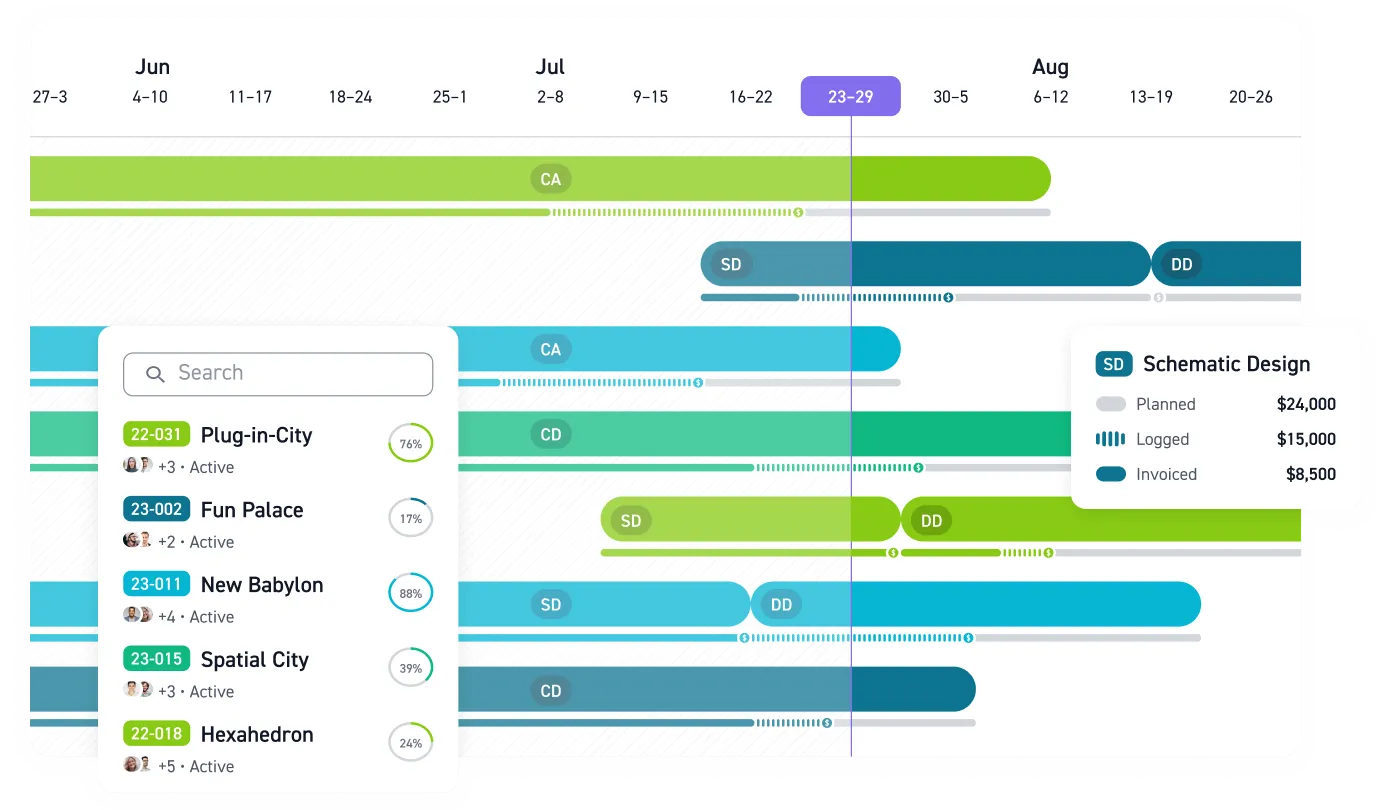
Keep the answers short enough to fit in a single project line item. Once a project makes the list, its budget and schedule can go into Monograph's MoneyGantt™, which tracks planned, logged, invoiced, and paid amounts against the timeline.
Making constraints explicit forces trade-offs on paper instead of in crisis mode. It also kills the "everything is high priority" syndrome that drains your team's limited bandwidth.
Step 2: Build One Unified Project Backlog
Nearly half the firms in Monograph's customer stories moved off Excel. When structural drawings live in one system, mechanical, electrical, and plumbing (MEP) coordination happens in another, and budget tracking sits in a third spreadsheet, work falls through the cracks. You waste time hunting for project status, duplicate coordination efforts, and end up with misaligned priorities that derail schedules before construction even starts.
Build one project backlog instead. Each entry needs three pieces: project name, clear objective, and the success metric you defined in Step 1. If a project can't pass that test, it stays off the list until someone clarifies what success looks like.
Gather every active project from wherever you're currently tracking them: Excel files, Revit project browsers, or sticky notes on monitors. Drop them into a single location, whether that's a consolidated spreadsheet or Monograph's platform. Consistent formatting makes the whole list sortable.
Merge duplicate entries, assign clear owners, and separate ongoing maintenance work from new construction projects. Keeping renovation work distinct from ground-up development prevents routine tasks from overshadowing your next major commission.
Step 3: Pick & Tailor a Scoring Framework
Once you've gathered every project in one place, you need a systematic way to compare them. A scoring framework converts subjective opinions into objective numbers. With one in place, you can weigh a quick tenant improvement (TI) package against a six-month seismic retrofit without endless debate.
Four proven frameworks work well for engineering teams:
- RICE (Reach, Impact, Confidence, Effort) works best when staff hours and reach, such as buildings or permits affected, are easy to estimate
- Value vs Complexity Matrix creates a two-axis chart that lets executives spot quick wins immediately
- MoSCoW sorts work into Must, Should, Could, and Won't categories, perfect when deadlines are fixed and scope needs cutting
- Kano separates what clients expect as a baseline from what wins repeat work
RICE demands solid data but produces a single sortable score. Value vs Complexity runs fast but oversimplifies complex initiatives. MoSCoW keeps stakeholders aligned, though it can become political when everything becomes a "Must." Kano helps with client-facing scope choices but adds little when codes or contracts already fix the scope.
Match the framework to your strategic goals from Step 1. If revenue growth tops your list, double the weight on Impact scores. If risk management drives decisions, add a risk multiplier to your calculations. Test two or three frameworks on the same backlog, see which ranking feels right, then stick with one method for consistency.
Mini-Guide: Build a Simple RICE Calculator
RICE condenses four variables into one number:
= (Reach * Impact * Confidence) / Effort
Define them in A&E terms: Reach = buildings or permits affected, Impact = size of the positive effect on a 1 to 5 scale, Confidence = your certainty as a percentage, Effort = person-hours.
Example: A seismic retrofit covering three buildings on a client's campus scores Reach = 3, Impact = 4 for its life-safety benefit, Confidence = 0.8 because you're 80% sure of the estimate, and Effort = 200 hours.
RICE = (3 * 4 * 0.8) / 200 = 0.048
A TI package for one tenant floor under a single permit scores Reach = 1, Impact = 2, Confidence = 0.9, and Effort = 60 hours.
RICE = (1 * 2 * 0.9) / 60 = 0.03
The retrofit ranks first even though it takes more than three times the hours. Drop that formula into a spreadsheet column, copy it down your backlog, and sort descending. Whatever lands at the top gets your team's hours first.
Step 4: Score Projects Quickly & Sanity-Check Estimates
With your project list and framework ready, assign numbers to each item. Start with a simple 1 to 10 scale or run a RICE calculation, then apply any custom weights you agreed on in Step 3. RICE evaluation keeps teams honest about reach, impact, confidence, and effort, even when you're working with incomplete project information.
For quick sizing, use top-down estimates: rough person-hours based on similar projects you've completed. It's schematic-design precision, accurate enough to sort your project pile before lunch. When details are unclear, capture a confidence score so your math reflects the uncertainty instead of hiding it.
To compare diverse projects, say, a building renovation against a new infrastructure design, calibrate with two or three benchmark projects first. Then bring in your subject-matter experts to challenge anything that feels way off. If someone questions why Project A scored twice as high as Project B, you want a solid answer.
Once every project has a score, sort by total and look for natural breaks. Those gaps become your "must do," "should do," and "nice to have" tiers.
Step 5: Run a Resource & Timeline Reality Check
Fifty-six percent of the A&E principals Monograph speaks with admit they can't see their staffing needs more than a week out, so pressure-test your roadmap against real capacity before locking it in. Start by checking the hours behind each score. If that retrofit scored high because of safety impact, estimate the 250 engineering hours it truly needs and replace the optimistic figure you scribbled during evaluation.
Next, overlay that demand on your team's actual calendar. Mark who's out on site visits, who's tied up in submittal reviews, and who has the rare skill set for those seismic calculations. When your capacity heat map lights up red, you have three options.
First, defer or drop low-tier work until the backlog matches the hours you have. Second, swap a bespoke façade study for a proven detail to trim scope and free dozens of hours. Third, tap outside help. Given today's talent squeeze, bringing in a specialist contractor often beats stretching your core team thin.
Before committing, switch from top-down guesses to bottom-up estimates. Pull historical timesheets, sanity-check unit rates, and load those numbers into a tool like Monograph's MoneyGantt™ so budget and schedule problems surface early. Unlogged hours make past projects look smaller than they were, so check for gaps. Monograph's AI-powered time tracking suggests entries from your Google or Outlook calendar. Remember to untangle dependencies: a structural package can't start if the survey team is still in the field.
Need a quick gut-check on throughput? A 6-person team working 40-hour weeks has 240 hours a week. Over a 13-week quarter at 80% utilization, that is about 2,500 usable hours: 240 x 13 x 0.8. If your ranked backlog totals 3,400 hours, roughly 900 hours of work needs new dates or outside help.
Step 6: Validate Rankings with Stakeholders
Evaluation feels scientific until the people who sign the checks weigh in. Bring project managers, principals, and finance into one room, physical or virtual, and walk them through the draft priority list. A tight feedback loop keeps you from building the wrong thing and cuts days of re-work because issues surface early.
Run a 45-minute session so the conversation stays focused:
- 15 minutes: Present the ranked backlog and the numbers behind it
- 20 minutes: Open floor for questions, risks, and missing context
- 10 minutes: Vote: color-dot on a whiteboard or an online poll to lock the final order
Agree upfront that the evaluation criteria are frozen for this meeting. Otherwise, every project owner will lobby to tweak the weights, and you'll end up rescoring the whole backlog. When preferences clash, fall back on the previously agreed objectives from Step 1: it shifts debate from personalities to principles. Finish by recording the final list, objections, and next review date in a shared doc; that paper trail saves you when the roadmap inevitably shifts next quarter.
Step 7: Review & Reprioritize on a Cadence
Priorities shift constantly in A&E practice. Monthly reviews keep projects profitable and on track.
Think of project reviews like design reviews: structured checkpoints that catch problems before they become expensive mistakes. Three situations demand immediate attention: major scope changes, consultant scheduling conflicts, and regulatory updates that affect building codes or permitting timelines. When these situations arise, gather your team for quick recalibration and address issues immediately rather than waiting for the next scheduled review.
Open Monograph's dashboard, check for utilization spikes or budget overruns, and let Monograph's MoneyGantt™ show where logged and invoiced amounts diverge from the plan. Your books stay in step with those numbers because Monograph syncs invoices, expenses, and consultant bills to QuickBooks Online. A 20-minute data review followed by decisive action works better than lengthy discussions about what might happen.
Communicate changes clearly to everyone affected. Instead of saying "priorities have shifted," explain the specific reasoning: "The hospital project moves ahead of the office building because the MEP consultant became available two weeks early, and delaying means losing their schedule slot for three months."
Take Control of Project Chaos
You now have a repeatable seven-step system that connects every project to strategy, resources, and stakeholder approval. Use it the next time two deadlines collide, and you'll have a ranked list to point to.
Schedule one hour this week for your first backlog evaluation session. Pull together your scattered project list, run it through your chosen framework, and let the scores determine what rises to the top. Dynamic Engineering, a 10-person Florida firm that moved off Excel, brought project tracking and staffing into one place with Monograph and reported 25% profit growth and a 2x efficiency gain.
Set the date for your first monthly review before that session ends. Book a demo to see how Monograph's MoneyGantt™ puts each project's budget and schedule side by side, so priority calls rest on real numbers.
Frequently Asked Questions
What if my team resists formal prioritization frameworks?
Start small with one project type where you have good historical data. Show quick wins on budget accuracy and timeline predictability before expanding to other work. Frame it as "protecting design time" rather than "adding process": A&E professionals respond better when they see how systems free them from administrative chaos.
How often should we reprioritize our project backlog?
Monthly for most A&E firms, but trigger immediate reviews when scope changes significantly, consultant availability shifts, or regulatory requirements update. The key is consistent cadence with flexibility for urgent changes that affect project sequences.
Can this system work for both architectural and engineering projects?
Yes. The framework adapts to both disciplines by focusing on shared constraints: time, cost, scope, risk, resources, and quality. Architectural teams might weight design impact higher while engineering teams emphasize technical complexity, but the underlying evaluation process remains consistent across both practices.