

Spreadsheet-based resource planning works fine until work spreads across several people and projects. Add more engineers, and the wheels fly off. Timesheets sit unapproved until payroll, and project updates arrive too late to help. If that sounds like your Monday morning, you already know the problem. The question is which tool actually fixes it.
After working with 13,000+ architects and engineers across 1,800+ firms, Monograph sees the same pattern: most firms don't fail because they lack software. They struggle because disconnected software systems split project management, time tracking, accounting, and billing into separate places. That gap creates decision lag: the time between spotting a problem and doing something about it.
What Resource Planning Software Needs to Do for Engineering Firms
Engineering resources are specialized and non-interchangeable, and committed across long project durations. A generic scheduling calendar won't cut it.
- Capacity forecasting: Compare forecasted project demand against confirmed team availability.
- Skill-based matching: Filter resources by certification, expertise, and proficiency instead of guessing from job titles.
- Time tracking tied to budgets: Connect logged hours directly to phase budgets and billing rates.
- Real-time budget alerts: Phase-based fee tracking flags overruns while there's still time to act.
- Connected accounting: Data flows to QuickBooks or a native ledger so you never enter it twice.
Keeping these systems connected is what makes resource planning stick. When resource planning lives outside the work, it goes stale fast.
Purpose-Built A&E Platforms
Generic tools don't understand design phases, consultant coordination, or fixed-fee margin pressure. These platforms were built for firms like yours.
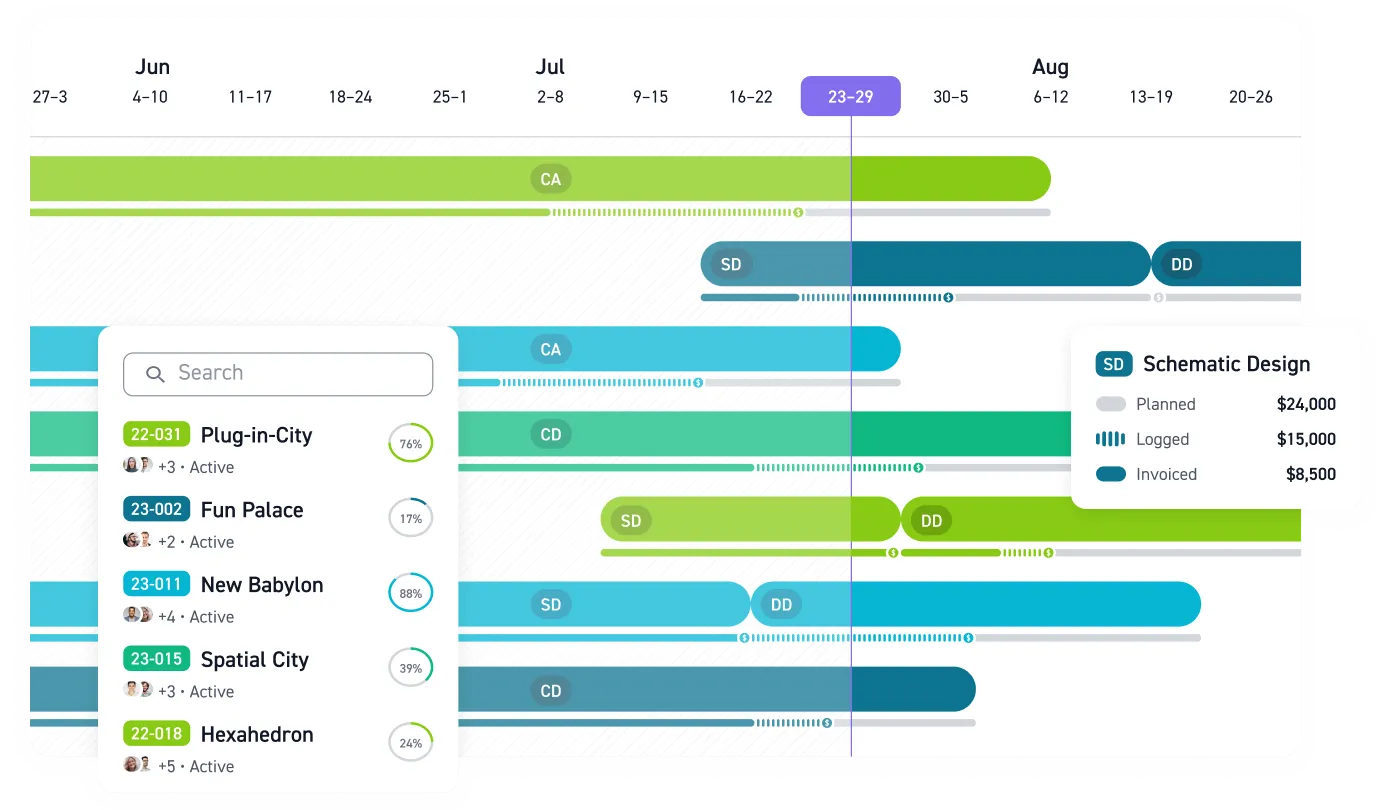
Monograph is a web-based platform built exclusively for architecture and engineering firms. It covers budgeting, staff assignment, project visibility, time tracking, client management, and QuickBooks Online accounting connection. Its graphical data display lets a project manager see budget and schedule together, so fees burning against the plan stay visible. Workbench, a 30-person practice that moved from BQE Core, reported 8x faster staffing, 4x faster billing, and 75% fewer unbilled fees after adopting Monograph. Best fit: small-to-mid-size US studios that want clarity without a heavy implementation.
BQE CORE is an all-in-one cloud platform covering project management, accounting, time and expense tracking, billing, and business intelligence dashboards. It works best as one platform rather than piecemeal. Best fit: established firms with complex billing and accounting needs.
Deltek Ajera is a project-based ERP with full native accounting, real-time dashboards, payroll, and staff utilization forecasting. Deltek Vantagepoint and Unanet ERP AE round out the ERP tier, with resource monitoring, utilization tracking, and capacity planning.
Mid-Market and Forecasting-Focused Options
Several platforms target the small-to-mid-size range directly.
- Factor AE connects projects, time, and billing with two-way QuickBooks Online sync and phase-based budgeting, priced at $30/user/month on an annual plan with onboarding included.
- Runn focuses on real-time resource management and forecasting with visual availability views, at $9 to $13 per user monthly.
- BigTime ties capacity planning to time, utilization, and financial outcomes, and ranks well for professional services firms.
- Projectworks and other stage-based delivery platforms serve multi-location delivery models.
For smaller firms, transparent pricing and QuickBooks integration are often the deciding factors, since cost and implementation complexity are real barriers.
Why Utilization Tracking Pays for the Software
The math justifies the whole exercise. For a 100-person A&E firm, a 1% increase in utilization equals roughly $225,000 in additional annual revenue.
Current utilization benchmarks put the sweet spot for technical staff at 75-85%. Above 90% risks burnout, and below 70% means you have unfilled capacity you are paying for. High utilization still leaves money on the table if billing rates or scope discipline slip. Software that connects hours to budgets to invoices is how you recover those cents.
Challenges the Software Actually Solves
Engineering resource planning breaks in predictable ways. Directors can't see capacity across the whole firm, senior staff get overloaded before anyone spots the pattern, and project plans change while the resource plan doesn't. Meanwhile, 56% of A&E principals admit they can't see their staffing needs more than a week out, which triggers reactive hiring and blown budgets.
Coordination adds another layer of risk. A single commercial project can involve 30 subcontractors and simultaneous structural, mechanical, and electrical work. When MEP teams come in after structural systems are fixed, rework becomes inevitable. Good software lets project managers track burn rate by phase and deliverable, catching overages early enough to matter.
Getting Implementation Right
Tools alone won't fix resource management. Success depends on people, processes, tools, and culture together. Firms that implement proper tracking systems, even simple ones, improve performance by 15-20% within the first year.
- Start simple. If you can't schedule in detail yet, begin with month-by-month planning, then compare scheduled to actual and iterate quarterly.
- Establish a single source of truth. Replace spreadsheets with a project-based system so everyone works from the same data.
- Invite feedback early. Work with your internal team first, then bring in clients as your process matures.
- Build in flexibility. Your scheduling process should absorb changes on the fly, because it will.
Firms that get this right are seeing the payoff. Median operating profit margins recently hit 20.5% on net revenue, the highest on record.
Stop Staffing From Stale Spreadsheets
By the time a capacity problem shows up in a spreadsheet, the damage is already moving. Someone is overloaded, a phase budget is burning too fast, or a hiring decision is being made from stale data.
Monograph connects staffing plans, time tracking, budgets, and QuickBooks Online in one system built for A&E firms. Project managers can see who is available, principals can see utilization risk, and operations leaders can keep the staffing plan tied to real project performance.
Your next staffing decision is already due. Make it with live data. Book a demo.
Frequently Asked Questions
What size engineering firm needs resource planning software?
Most firms feel the pain once several people share work across multiple projects. At that point, availability, budgets, and deadlines start changing faster than a spreadsheet can keep up. Smaller firms often need the visibility sooner because one overloaded senior engineer or one missed phase budget can hurt the whole month.
Do engineering firms need a full ERP for resource planning?
Not always. A full ERP makes sense when you need deep native accounting, payroll, and financial controls in one system. Many small-to-mid-size engineering firms get more value from a practice management platform that connects staffing, time tracking, budgets, billing, and QuickBooks Online without a heavy implementation.
How do we get engineers to keep staffing and time data current?
Make the system useful to the people entering the data. If engineers only see time tracking as payroll admin, accuracy will slip. When staffing plans feed timesheets and project managers use that data to prevent overload, the habit starts to make sense.
What should we connect first: staffing, time tracking, or accounting?
Start with staffing and time tracking because those numbers explain where project budgets are really going. Once hours are tied to phases and people, connect billing and accounting so the same data flows into invoices and financial reports. The goal is one source of truth, not another dashboard your team has to maintain by hand.