
An architecture firm bills a construction documents phase. The team logs hours in a spreadsheet, the finance manager reconciles against QuickBooks at month-end, and by the time anyone realizes the phase burned over budget, the fee is already spent. The firm that catches the overrun early uses project cost tracking software between its timesheets and invoices.
The Financial Case for Better Tracking
A&E firms operate on margins that punish delayed information. The median firm runs roughly 15.6% pre-bonus profit on net service revenue. Running a project without real-time cost data is like issuing a CD set without checking it against the structural model: you won't find what's wrong until it's too expensive to fix.
Industry benchmark data reveals that 52% of A&E firms report at least one in four projects going over budget, with scope creep as the primary driver. The chargeability gap, the difference between hours budgeted as billable and hours actually invoiced, widened from 2.2% to 2.9% between 2024 and 2025. That gap is real revenue disappearing between project setup and final invoice.
Monograph's 2026 Architecture & Engineering Business Benchmarks Report, built from real platform usage by 13,000+ architects and engineers across 1,800+ firms, shows the consequence clearly. Baseline firms lose 4 cents on every dollar of billable time and average 96% realization to write-offs and scope creep. Top firms close that gap by tracking costs in real time instead of waiting for month-end.
What Finance Managers Should Evaluate First
Generic project management tools miss the structural reality of A&E work. Projects move through contractually distinct phases, each with its own budget, timeline, and fee allocation. Phase-level budget tracking is what separates A&E-specific tools from generic systems.
If you've spent a Friday afternoon rebuilding an invoice because subconsultant costs landed in the wrong account, these criteria will look familiar:
- Real-time burn rate visibility: Live dashboards showing planned vs. actual vs. forecast costs at the phase level, not just the project level. Budget threshold alerts should fire before a phase is exhausted, not after.
- Subconsultant cost allocation: Structural, MEP, and civil consultant invoices must map to specific project phases rather than landing in generic expense accounts with no project linkage.
- QuickBooks Online integration: The question is whether the connection removes double entry or just exports data one way.
- Invoicing from live project data: Draft invoices should pull directly from approved time entries, subconsultant bills, and phase completion percentages without manual assembly.
These are workflow checks, not wishlist features. If the system cannot handle them cleanly, your team will still be patching together the month in spreadsheets.
These features matter because billing speed depends on clean project data. The 22-day collections for top firms and 42-day collections for low performers make the point. Woodhull's results show admin time dropping 66%, billing speeding up 50%, and budget overages falling 66% after Monograph tightened the link between project data and billing.
ERPs vs. Project Management Layers
The first decision is whether your firm needs a full ERP or software that works with QuickBooks. That choice affects implementation effort, cost, and how much accounting workflow you'll need to change.
Per an independent analysis by CFO consultant Hugh Glazer through PSMJ Resources, full ERPs like Deltek Vantagepoint and Unanet replace your accounting system entirely, handling GL, AP/AR, payroll, and project accounting in one platform. Platforms like Monograph keep QuickBooks as the accounting system and add A&E-specific financial tracking, invoicing, and reporting around it.
A simple comparison helps clarify the tradeoff:
- Full ERP: Replaces the accounting system entirely and handles GL, AP/AR, payroll, and project accounting in one platform.
- QuickBooks-connected platform: Keeps QuickBooks as the accounting system and adds A&E-specific financial tracking on top.
For firms that mainly need better project visibility, the QuickBooks-connected approach is often the better fit. PSMJ notes that QuickBooks works for smaller firms but that most outgrow it for project accounting as operational complexity rises.
Comparing the Major Platforms
For firms evaluating options in this category, a short list beats a long feature matrix. Focus on whether the platform replaces accounting or works with it, how pricing scales, and whether the workflows were built for A&E practice.
- Deltek Vantagepoint: Full ERP for large firms. Custom enterprise pricing.
- BQE CORE: All-in-one firm management with phased billing, built-in CRM, and real-time profitability reporting. Quote-based pricing.
- Deltek Ajera: Mid-market ERP with strong A&E practitioner endorsement for project time tracking and payroll. Custom modular pricing.
- Monograph: Built for small A&E firms. Phase-level budgeting, consultant cost tracking, and QBO integration. Firm-based pricing from $45 to $490/month.
- Factor AE: Alternative for firms comparing QuickBooks-connected options.
- Unanet ERP AE: Full ERP for mid-to-large firms. Custom pricing.
If QuickBooks already handles your general ledger well enough, a platform like Monograph gives you A&E-specific financial visibility without the disruption of a full ERP migration.
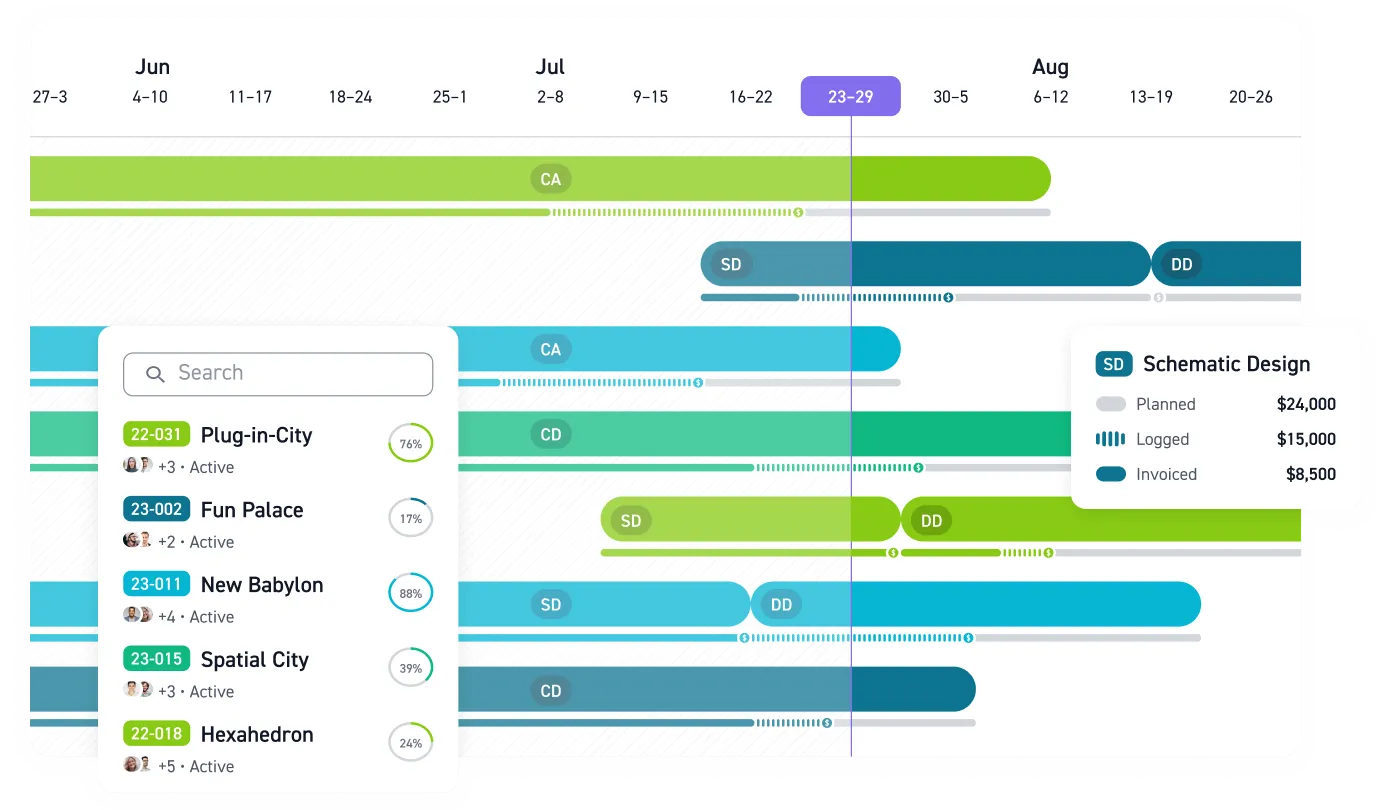
Monograph is a unified practice management platform that connects timesheets, budgets, invoicing, and reporting in one workflow. MoneyGantt™ addresses a specific problem finance managers describe all the time: weak visibility into where revenue sits between budget, time, billing, and payment. It combines project timelines with budget-to-cash progression so PMs and finance teams can see planned, logged, invoiced, and paid work in one view.
Where A&E Cost Tracking Is Heading
Two shifts are changing what finance managers should expect from tracking tools.
- AI-powered predictive forecasting is moving into regular use across AEC, flagging potential cost overruns and schedule risks before they compound.
- Platform consolidation is accelerating as firms are increasingly adopting unified financial systems.
Finance teams want fewer disconnected systems and earlier warning when a phase starts slipping. PSMJ's goal of 15-20% performance improvement within the first year points the same way.
Track Project Costs Before the Fee Disappears
If you're evaluating project cost tracking software today, test it against a real active project. Confirm that phase-level budget tracking matches how your jobs actually run, then run a parallel invoicing cycle before committing. That is the fastest way to verify whether the QuickBooks connection cuts reconciliation work or just moves data around.
Use a simple test process:
- Run one live project through phase budgets, time tracking, consultant costs, and invoicing.
- Check whether alerts surface overruns before the phase fee is gone.
- Compare the draft invoice against your current billing workflow before committing.
For firms that want better visibility without replacing QuickBooks, Monograph connects timesheets, consultant costs, phase budgets, and invoicing in one workflow. MoneyGantt™ gives PMs and finance teams a shared view of budget-to-cash status, so overruns show up while there's still time to act. Book a demo.
Frequently Asked Questions
How is project cost tracking different from standard project management software?
Standard project management tools track tasks, deadlines, and team activity. A&E project cost tracking software also needs to follow phase budgets, consultant costs, time entries, invoicing, and realization at both the project and phase level.
Do small A&E firms really need phase-level cost tracking?
Yes. Small firms have less room to absorb a bad phase, a missed consultant bill, or a slow invoice cycle. Phase-level tracking shows where the fee is holding and where it is slipping.
Can project cost tracking work if we already use QuickBooks Online?
Yes. The practical question is whether the connection removes double entry and supports invoicing from live project data.
What's the biggest mistake firms make when evaluating cost tracking software?
They evaluate features in isolation instead of testing the workflow against a live project. A parallel invoice cycle reveals whether the tool improves visibility and billing speed or just adds another layer of admin work.