
Most firms copy project data into QuickBooks every billing cycle. A project manager exports hours into a spreadsheet, someone reformats it, and finance keys it into the accounting system days later. By then the numbers are stale.
QuickBooks Online does what it was built to do well. It handles your general ledger, bank reconciliation, and tax prep. It can also track project income, costs, hourly cost rates, billable rates, and project profitability. The gap is depth. A&E firms need answers for fee proposals, staffing decisions, consultant costs, and whether specific phases are actually making money. Project accounting integration closes that gap by connecting project reality to financial records.
Why QuickBooks Alone Falls Short for A&E Firms
Phase profitability tracking shows which phases are profitable, which consultants are over budget, and whether schematic design or structural analysis is burning through fees too quickly. Each project becomes its own financial entity instead of a line buried in a firm-wide P&L.
In its default setup, QuickBooks puts all payroll into a single expense account, which makes direct labor and overhead labor hard to separate. Job costing stops at the project total instead of showing phase-level detail. The chart of accounts is built for retail and generic service businesses, not firms that separate net revenue from gross revenue on every project.
That structure creates blind spots that drain margin: hidden project costs like software subscriptions, consultant fees, and travel; delayed recognition of scope creep; and incomplete labor tracking that rounds or misallocates hours. When cost allocation drifts, your most important metrics drift with it. A firm can believe it runs a 3.1 effective multiplier when the real number is lower.
How Disconnected Systems Slow the Month-End Close
Month-end close is where disconnected systems do the most damage. When data lives across project tools, bank portals, and spreadsheets with no automated connection, every handoff risks numbers getting lost, duplicated, or mismatched. Across organizations, APQC benchmarking puts the median monthly close across nearly a full workweek, and firms relying on manual processes often take longer.
The most common close errors come from manual data entry, missed accruals, and reconciliation discrepancies that surface only when teams compare disconnected spreadsheets. A centralized system removes the handoffs where those errors take hold.
When project management and accounting share one source of data, the close gets faster. Firms automating reconciliations close within a week 72% of the time, making the close more predictable. The goal is a shorter close that frees your finance team to track firm KPIs instead of chasing data.
Connected Data Fixes the Cash Flow Gap
Architecture firms collected payments in an average of 73 days in 2025, well above a healthy DSO range. The revenue cycle runs labor to WIP to accounts receivable to cash. A break anywhere in that chain ties up money you have already earned.
Manual invoicing widens the gap. When time entries are late, partner review is pending, and finance is reconciling change orders, the invoice may not go out until 40 days after the work is done. Standard payment terms push collection even farther from the day your team delivered the work.
When timesheet data flows into billing and stays connected to accounting, the gaps start to close. Automating invoicing can cut billing time from 17 days to three, shaving two full weeks off DSO. Garrison Architects, a small New York firm, reported faster billing: a 1.5x faster billing process and 2.5x faster time-to-payment after using Monograph.
What to Look for in a QuickBooks Integration
For small A&E firms, pairing QuickBooks Online with practice management software gives you the strongest balance. QuickBooks handles the ledger and tax prep, while the practice management layer adds phase-based budgeting, time tracking, and invoicing built for how A&E firms work.
Look for five capabilities:
- Phase-based budgeting that tracks planned versus actual versus forecast at the project and phase level
- Time tracking sync that sends billable hours to invoice line items with no re-entry
- Flexible invoice generation for fixed fee, percent-complete by phase, time-and-materials, and milestone billing
- True two-way QuickBooks sync so changes in either system stay matched
- Phase-level reporting for profitability, WIP, and over/under billing beyond basic QuickBooks project reports
A native sync beats a third-party connector running through middleware. Before broad rollout, test the full workflow on a few active projects, from time entry through invoice generation through QuickBooks sync.
Rollouts succeed when staff adopt the connected workflow. Train finance staff and project managers on how the system replaces manual steps. Firms putting proper tracking systems in place, even simple ones, see measurable performance gains after rollout. Consistent use of a basic integrated system outperforms inconsistent use of a sophisticated one.
The Payoff: Real-Time Visibility Where It Counts
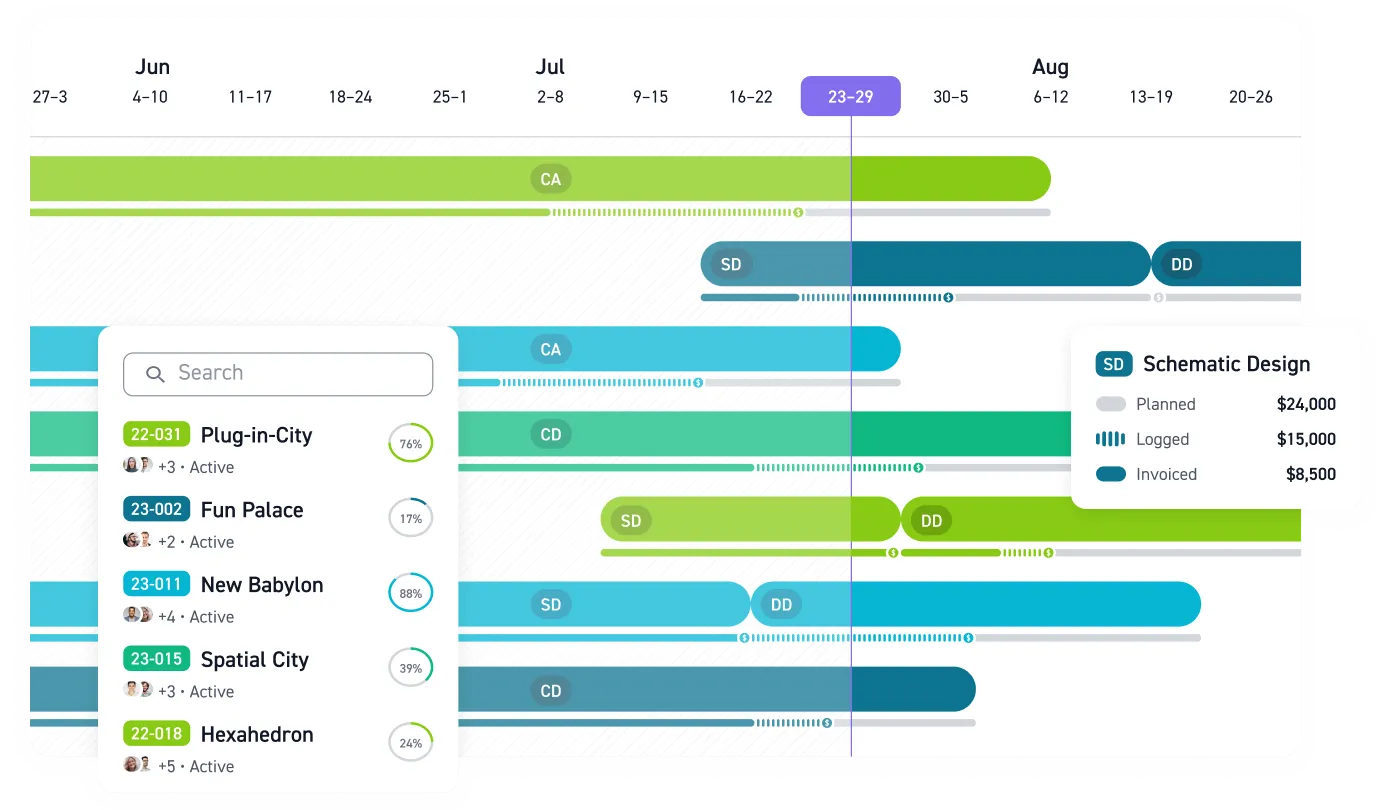
The case for integration comes down to three numbers that must always be visible: contracted fee, planned budget, and actuals to date. Monograph's signature MoneyGantt™ puts those numbers side by side on a single timeline, so a phase drifting over budget shows up in days rather than months.
The performance gap is measurable. Firms with dedicated project management software report real-time financial visibility more often than spreadsheet holdouts. Realization is where that visibility shows up on the bottom line. Monograph's 2026 Architecture & Engineering Business Benchmarks Report found that baseline firms lose billable value to write-offs and scope creep. That realization gap quietly erodes profit on every project.
Stop Rebuilding Your Project Finances by Hand
Connecting your budget data to QuickBooks gives you the financial foundation to do your best work without wondering which projects are actually profitable. Start by mapping one active project's full workflow, from time entry to paid invoice, and watch where the data breaks.
Monograph connects budgets, phases, time entries, invoices, payments, and QuickBooks sync in one workflow built for A&E firms. Principals get clearer profitability, operations leaders get cleaner billing cycles, project managers get phase-level budget visibility, and finance teams stop rebuilding the same numbers by hand.
Use it sooner. Your project data is already showing where profit is leaking, cash is stuck, and budgets are drifting. Book a demo.
Frequently Asked Questions
Does QuickBooks Online already handle project accounting?
Yes. QuickBooks Online can track project income, costs, hourly cost rates, billable rates, and project profitability. A&E firms still need phase-level budget context, consultant cost visibility, staffing data, and a clearer read on whether specific parts of a project are making money.
What should sync between Monograph and QuickBooks?
The most useful sync connects client contacts, consultant vendors, invoices, payment status, and real project costs. Time entries should connect to invoice line items, and project costs from QuickBooks should feed back into profitability reporting.
How do we avoid duplicate or mismatched data?
Use a native two-way QuickBooks sync instead of a third-party connector running through middleware. Clean project setup matters more than perfect historical data, so test the workflow on active projects before firm-wide rollout.
Is a two-way QuickBooks sync worth it for a small firm?
For small A&E firms, it is often the right balance. QuickBooks handles the ledger and tax prep, while the practice management system adds phase-level budgeting, time tracking, invoicing, and reporting that protect margin.
What is the first workflow to connect before a full rollout?
Start with one active project and trace the path from budget to time entry to invoice to QuickBooks. That workflow exposes late timesheets, missing phase data, broad consultant cost coding, and invoices waiting on manual review.