

A firm can post strong project margins all year and still scramble to make payroll in March. The disconnect between profitability on paper and cash in the bank is one of the most persistent frustrations in A&E practice management. Financial dashboards built for project-based work close that gap by surfacing the right numbers to the people who can act on them.
Every A&E firm needs a financial dashboard. The real question is which metrics belong on it and how to make them useful week to week.
The Metrics That Belong on an A&E Financial Dashboard
Not every KPI earns a spot on your dashboard. The ones that matter most fall into two categories: metrics that show how efficiently you turn labor into revenue, and metrics that show whether you're collecting what you've earned.
Three metrics anchor A&E financial reporting:
- Utilization rate: The percentage of total hours charged to billable projects.
- Net multiplier: Net operating revenue divided by direct labor cost. The industry median hit 3.28, reflecting stronger billing efficiency across the sector.
- Overhead rate: Total indirect expenses as a percentage of direct labor.
The break-even rate contextualizes all three. It shows whether your net multiplier is high enough to cover overhead before profit begins. Without this number, your net multiplier figure means nothing on its own.
These metrics should appear together on the same dashboard. A strong net multiplier can coexist with serious financial problems if overhead is out of control, a pattern documented in practice.
Realization rate deserves equal billing. Monograph's 2026 Architecture & Engineering Business Benchmarks Report shows that firms investing in AI tools achieve 100% realization versus a 96% baseline, meaning earned work translates into billed and collected revenue. Regular realization reviews help firms identify how much billable work is actually reaching an invoice.
Dashboard Views That Cover the Full Picture
A&E firms that stay ahead of financial surprises don't rely on a single dashboard. They organize reporting across distinct views, each tied to a different decision-making horizon:
- Project-level profitability tracks fee burn by phase, earned value against actual cost, and labor cost by role, with percent-complete tracking at each phase.
- Firm-wide financial health tracks operating profit margin, net multiplier, overhead rate, and revenue per employee.
- Cash flow and WIP surfaces collection speed, work-in-progress aging, and operating cash flow ratio. Garrison Architects, a 9-person New York firm, reported 1.5x faster billing and 2.5x faster time-to-payment after gaining that visibility.
- Backlog and pipeline measures contracted-but-unbilled work as a multiple of monthly revenue. Benchmark data recommends maintaining backlog coverage of at least 12 months of net revenue to absorb project pauses and seasonal dips.
Together, these views connect what is happening inside a phase to what is happening across the business.
What Phase-Level Tracking Looks Like in Practice
Firm-wide dashboards tell you whether the business is healthy. Phase-level tracking tells you where margin is being created or destroyed early enough to do something about it.
One of the most useful project health indicators is the gap between percent complete and percent spent. When percent spent runs ahead of percent complete, the project is trending over budget.
This tracking requires actual costs by project and a percent-complete estimate from each project manager on a regular cadence.
Tips for Building a Dashboard That Sticks
Anchor every metric to net revenue
The AIA defines net revenue as total revenue minus consultant fees, testing costs, travel, and reimbursables. A firm tracking gross revenue on its dashboard may be misreading its own profitability.
The difference matters because a project's margin can look very different on gross revenue versus net revenue once consultant pass-throughs are stripped out. The AIA documents that consultant fees can represent 40% or more of total project fees, so skipping this adjustment distorts the picture.
Set a defined update cadence and account for seasonality
A consistent rhythm matters more than real-time feeds. Close timesheets on a set schedule, review project health soon after, and run deeper margin forecasts on a regular monthly rhythm. Without timely time data, every other metric on the dashboard reflects old reality.
Billing volume swings by 34% between peak and trough months across A&E firms, based on the same benchmark analysis. Cash flow dashboards that ignore this seasonality trigger false alarms during slow stretches and mask real problems during busy ones.
Track consultant costs by phase, not just by project
Tracking consultant costs only at the total project level is too blunt to be useful. Your dashboard should display:
- Actual vs. budgeted consultant cost within each phase
- Markup consistency across projects
- Pass-through projects where consultants are billed at cost with no margin
That level of detail helps project managers catch margin erosion before it compounds.
Share the dashboard beyond the finance team
Firms that share key performance data openly with project managers on sales, backlog, profitability, and collections see behavior improve because people respond to knowing the score. When a project manager can see a phase burning faster than planned, they can adjust staffing and scope conversations before the overrun compounds.
Where Monograph Fits
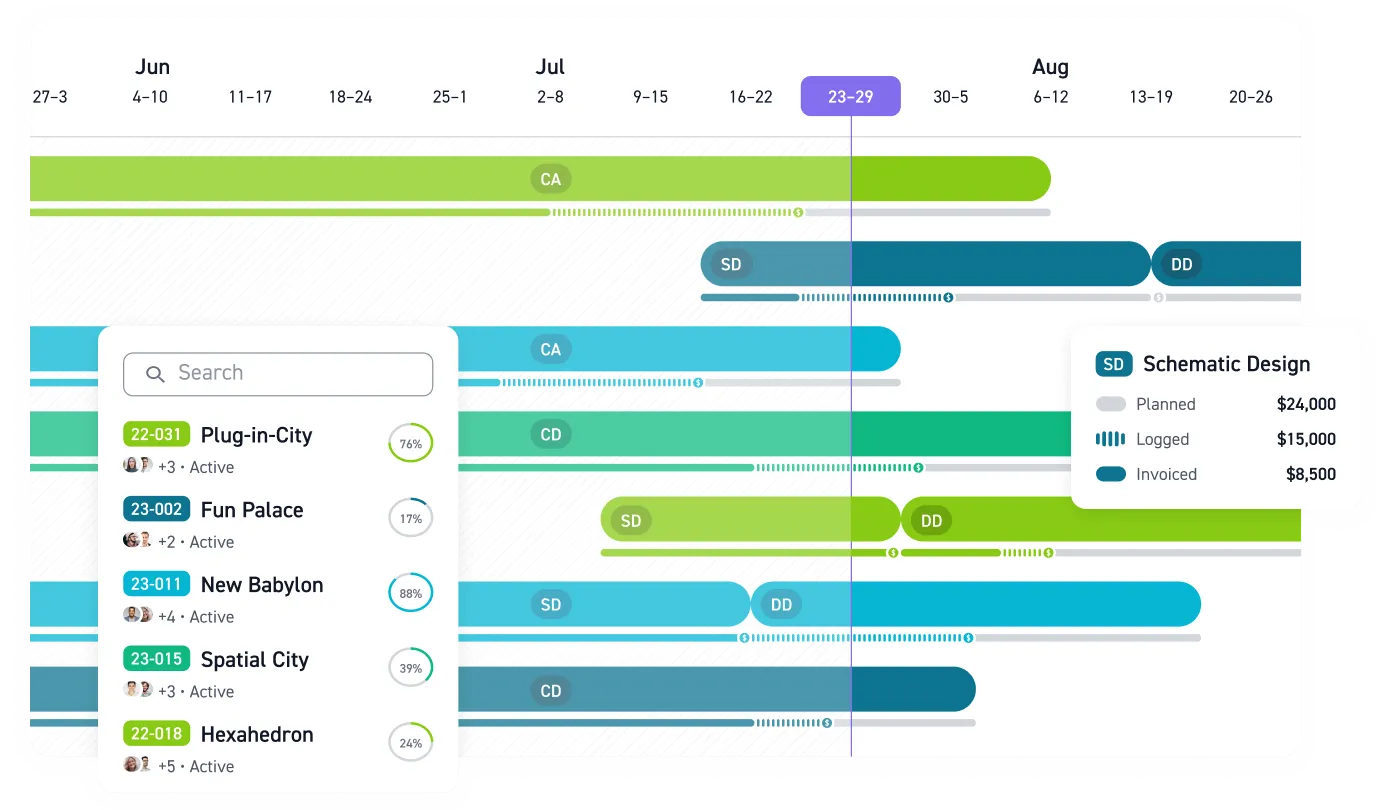
Monograph brings project budgets, schedules, and cash position into one view with Monograph's MoneyGantt™. It also connects project tracking with QuickBooks Online, so finance managers can spend less time bouncing between systems and more time acting on the numbers.
Firm-level dashboards in Monograph track utilization, realization, and profit and loss with views built for A&E work. 13,000+ architects and engineers across 1,800+ firms use it to manage their practices today.
See the Gaps Before They Hit Your Cash Flow
A dashboard should do more than report the past. It should help principals, operations leaders, and project managers see margin pressure early, catch billing delays before they become cash problems, and connect phase-level decisions to firm-wide performance.
Monograph brings those views together in one place. You can track utilization, realization, project burn, consultant costs, and firm-level financial health without bouncing between spreadsheets, project files, and accounting reports. Monograph's MoneyGantt™ adds the visual layer that helps teams understand where a project stands before the overrun shows up at closeout.
Small delays compound fast. Get the visibility to act sooner. Book a demo.
Frequently Asked Questions
Which metrics should a small A&E firm track first?
Start with utilization rate, net multiplier, overhead rate, and realization rate. Those metrics show whether your labor is turning into revenue and whether earned work is becoming billed and collected cash. If you add one project-level metric to that set, make it percent complete versus percent spent.
How often should a financial dashboard be updated?
Use a consistent rhythm that matches how your firm closes time and reviews work. Close timesheets on a set schedule, review project health soon after, and run deeper margin forecasting on a regular monthly cycle. Without timely time data, the dashboard lags behind the work and loses much of its value.
Can a firm build a useful dashboard without perfect accounting data?
Yes, but the core inputs still need to be consistent. You need actual costs by project, timely timesheets, and a percent-complete estimate from each project manager on a regular cadence. A dashboard does not need to be perfect on day one, but it does need reliable habits behind it.
What's the difference between project profitability and firm-wide financial health?
Project profitability shows whether a specific job or phase is performing against budget. Firm-wide financial health shows whether the business as a whole is collecting cash, covering overhead, and generating profit. A firm can have projects that look healthy while still running into cash flow trouble, which is why both views belong on the same reporting system.