



Firm management made easy

You know that feeling when you're managing six concurrent projects, each in different design phases, and someone asks for a status update on budget performance? The scramble through spreadsheets, emails, and mental notes isn't just frustrating. It's costing your firm money.
Architecture and engineering project managers face a unique challenge. They must track goals across multiple projects with distinct phase structures, consultant teams, and deliverable timelines. Generic project management approaches don't address these needs.
What Makes a Goal Tracking Template Work for A&E Teams
A goal tracking template built for architecture and engineering workflows needs more than task lists and due dates. According to research on A&E project management practices, successful firms track earned value at the task level within phases, rather than only at project milestones.
Effective templates connect firm goals with day-to-day project work through four core components:
- Phase-based milestone tracking aligned with standard design phases (Schematic Design, Design Development, Construction Documents, Construction Administration) that drive resource allocation, fee payment, and deliverable coordination
- Earned value budget monitoring that captures daily hours against phase-specific budgets with real-time visualization of budget-to-cash progression
- Clear ownership assignment connecting individual accountability to team and firm-level objectives through structured frameworks
- Variance response protocols that trigger corrective action when budget or schedule deviations exceed predetermined thresholds
According to project management research, "the measure of project progress is the difference between planned project progress and actual project progress, where the work of the actual progress has been accepted and approved by the project requestor." This acceptance-based definition is critical in A&E work where deliverables must pass client review before teams can claim completion credit.
Free Goal Tracking Template Resources
Smartsheet offers templates in Excel, Word, PDF, and Google Sheets formats for teams with varied tool preferences.
Microsoft's project tracker includes milestone tracking with visual timelines suitable for client presentations.
ProjectManager.com's templates separate goal-setting from goal-tracking tools. This distinction matters when setting versus tracking progress toward construction document completion.
For teams managing multiple concurrent projects, their Excel templates come ready with spreadsheet-based templates. Portfolio-level dashboards and milestone monitoring are offered through ProjectManager's software rather than the Excel files themselves.
Teamflect's SMART goal templates offer 12 free templates with structured sections for measurable objectives, supporting quantifiable targets and deadlines, though they do not specifically use the example "Complete 100% of structural drawings by Q2."
Google Sheets templates offer real-time collaboration for distributed teams working from job sites or remote offices.
These free resources share common ground: Excel and Google Sheets formats, milestone tracking, and free access. However, they require customization for A&E workflows. Adapting these templates means adding columns for consultant markup tracking, phase completion percentage fields, and fee allocation breakdowns.
You'll also want to update column headers to match AIA phase nomenclature and include fields for drawing package status and specification section progress. Purpose-built platforms like Monograph come ready with these configurations that you'd otherwise spend 4-8 hours building yourself.
Aligning Goals Across Your Firm
Individual goal tracking works best when it connects to team and firm-level objectives. Firms with formal project prioritization frameworks aligned to strategic goals are 57% more likely to achieve their targets.
Three critical metrics cascade effectively across all levels:
- Utilization rate, which is billable hours divided by total hours, shows whether team members spend appropriate time on revenue-generating projects
- Billing multiple represents revenue generated per dollar of direct labor, with an industry standard of 3.25
- Net revenue per employee translates firm profitability into individual performance expectations
Weekly reporting creates the rhythm that makes alignment work. Small firms implementing systematic profitability management often report 15–25% margin improvements within their first quarter, according to our project profitability guide.
These metrics become actionable when you track them consistently. Teams that review utilization weekly rather than monthly catch resource imbalances before they compound into burnout or budget overruns. The reporting discipline matters more than the tool you use to track it.
Putting Goal Tracking Into Practice
Making goal tracking work requires consistent habits, not just good templates. These steps move teams from occasional tracking to systematic goal management:
- Establish a weekly review cadence where project managers assess progress against phase budgets every Monday morning
- Set phase-specific budget checkpoints at 25%, 50%, and 75% completion to catch variances before they compound
- Schedule consultant coordination touchpoints at each major phase transition to align subconsultant progress with project goals
- Conduct monthly variance analysis comparing planned versus actual hours across all active projects
- Share results transparently through brief team standups that connect individual work to firm-level targets
These practices transform goal tracking from administrative work into actionable project intelligence that helps teams course-correct before small issues become major problems. The key is making the tracking routine enough that it becomes automatic, not something you remember to do when projects are already in trouble.
When teams see their tracking connected to decisions that affect them directly, consistency improves dramatically. Show how utilization rates influence bonus calculations. Connect project selection to capacity forecasts. Link staffing decisions to budget performance. Goal tracking becomes meaningful when people understand what it helps them achieve.
When Templates Hit Their Limits
Free templates work well for tracking 1-3 projects. They start breaking down around 10-15 concurrent projects, when administrative work consumes the time you should spend managing actual work.
Teams at this scale often notice symptoms like deadlines slipping without warning, budget overruns discovered weeks after they began, and hours spent reconciling conflicting spreadsheet versions. The root causes of timeline slips require real-time visibility into budget-to-cash progression and phase deviations as they happen. Scope creep, unrealistic schedules, and resource bottlenecks can't be managed after the fact.
This is where purpose-built A&E platforms like Monograph add value. 13,000+ architects and engineers across 1,800+ firms use the platform that consolidates projects, phases, budgets, consultants, milestones, staffing, timesheets, billing, and profit tracking into one system. Project managers can plan phases, set milestones, and track budget performance at a glance by monitoring earned value within each phase.
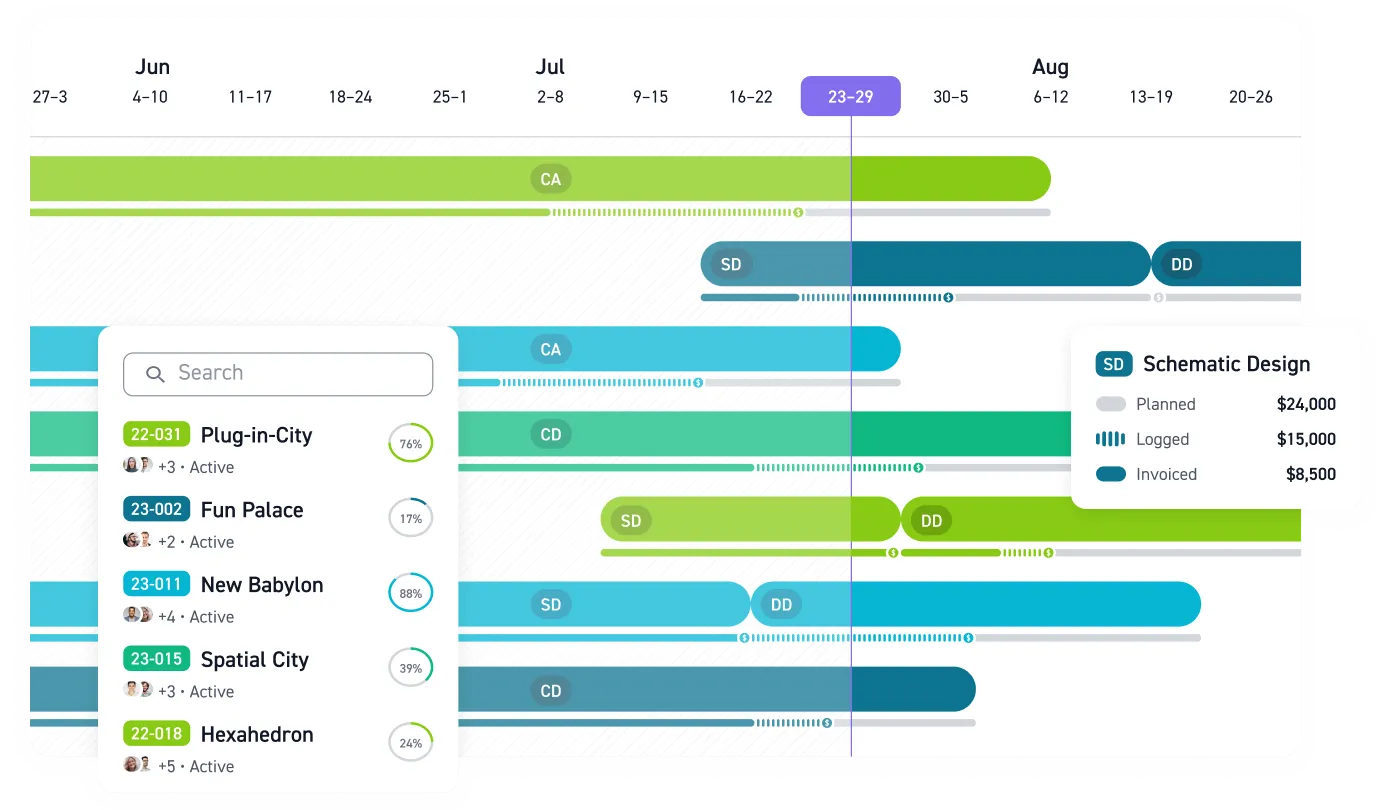
Monograph's signature MoneyGantt™ transforms traditional project timelines by combining them with budget-to-cash progression. See which projects are off-track in seconds with visual intelligence that shows planned hours, logged time, invoiced amounts, and payments received. No mathematical complexity required.
The reporting gives you one-click access to utilization rate, realization rate, profit and loss, project progress, and revenue forecasting, each designed in the language of A&E leaders. The majority of Monograph customers are US-based firms between 3 and 30 employees. This is exactly the size where spreadsheet tracking becomes unsustainable but enterprise software feels like overkill.
Stop Losing Projects to Spreadsheet Chaos
Free templates give you a starting point. But when you're juggling 10+ projects across different phases, chasing consultant updates, and piecing together budget performance from three different spreadsheets, you're not managing projects. You're drowning in administrative work.
That Monday morning panic when a client asks about project profitability and you need three hours to compile an answer? That's the real cost of disconnected systems. Your firm can't scale when every status update requires a spreadsheet archaeology expedition. Woodhull, a 25-person architecture firm in Maine, experienced this transition firsthand. After moving to integrated practice management, they saved 66% of their time on administrative tasks and cut their billing process time in half. This allowed them to focus on design work rather than spreadsheet maintenance.
Start with free templates if you're managing a few projects. But when tracking becomes more work than the actual project management, it's time to connect your goals with your daily work in one integrated system.
Purpose-built practice management eliminates the scramble. You get real-time visibility into phase budgets, consultant coordination, and project profitability without the spreadsheet maintenance.
Your competitors already stopped guessing. See how Monograph works.
Frequently Asked Questions
When should I move from free templates to dedicated practice management software?
Watch for three warning signs: you're managing 10+ concurrent projects, you spend more than 5 hours per week updating spreadsheets, or you've discovered budget overruns weeks after they began. Free templates work well for 1-3 projects but break down when administrative work consumes time you should spend on actual project management. If you're constantly reconciling conflicting versions or scrambling to answer basic profitability questions, you've outgrown templates.
How do I customize free templates for phase-based A&E workflows?
Add columns for AIA-standard phases (Schematic Design, Design Development, Construction Documents, Construction Administration), phase completion percentages, and fee allocation by phase. Include fields for consultant coordination status, drawing package progress, and specification section tracking. Update milestone nomenclature to match your firm's project structure. The customization work can take 4-8 hours per template, which is why purpose-built platforms like Monograph come pre-configured for A&E workflows.
What if my team won't consistently track goals and time?
Inconsistent tracking usually signals friction in the process, not lack of discipline. Make tracking as painless as possible: automated staffing plans that pre-populate timesheets, mobile apps for field time entry, and weekly reminders tied to actual project milestones. Show the team how their tracking directly impacts decisions they care about: staffing allocation, bonus calculations, and project selection. When people see tracking connected to outcomes that matter, consistency improves dramatically.
Can free templates integrate with QuickBooks and other tools I already use?
Free Excel and Google Sheets templates won't integrate automatically with QuickBooks, accounting systems, or project management tools. You'll manually export data and import it into other systems, which creates reconciliation headaches and version control problems. Real integration requires either custom development work (expensive and brittle) or purpose-built platforms with native connectors. Monograph's two-way QuickBooks sync eliminates double-entry and keeps project data synchronized automatically.
How do I know if goal tracking is actually improving profitability?
Track three metrics before and after implementing systematic goal tracking: average project profit margin, percentage of projects finishing on budget, and hours spent on administrative coordination. Firms implementing structured goal tracking typically see 15-25% margin improvements within the first quarter. You should also measure time savings. If you're spending less time hunting for data and more time on actual project management, the system is working. Weekly variance analysis will show whether you're catching budget issues earlier than before.