
Every architecture project moves through the same arc. A kickoff meeting sets the program, schematic design takes shape, drawings get refined and detailed, and eventually the contractor declares substantial completion and you walk the punch list. The work is predictable. What trips up most firms is everything happening alongside that arc: the fee burning faster than the deliverables, the timesheets nobody filled out, and the invoice that went out late.
Project delivery software keeps the business side of a project moving as cleanly as the design side. When time tracking, budgets, and billing live in one place tied to your project phases, you stop guessing whether you're making money and start seeing it in real time.
The Phases Your Software Has to Understand
Architecture work follows a defined structure, organized into five sequential phases: Schematic Design, Design Development, Construction Documents, Procurement, and Construction. Each phase ends with an owner approval gate before the next begins, and each carries its own slice of the fee.
Generic project management tools treat a project as one bucket of tasks and one budget. That's the wrong model for architecture. A firm allocates fees by phase, and software built for A&E firms lets you set separate budgets for each phase so you can see exactly where a project stands at every approval gate.
The phases your delivery software should mirror map directly to how you actually work:
- Schematic Design: site plans, floor plans, sections, elevations, and a construction cost estimate submitted for owner approval
- Design Development: dimensioned drawings, outline specifications, and a formal approval letter at phase completion
- Construction Documents: the full drawing set, tracked internally at 30/60/90 milestones
- Procurement: bidding and procurement support before construction begins
- Construction / Construction Administration: field reports, change orders, and the punch list that closes the project out
When your software speaks this language, project managers spend less time forcing A&E workflows into tools that weren't built for them. Phases that use the terminology architects already know also make it easier for the whole team to use the tool.
Tracking Two Numbers That Decide Profitability
The most important thing your software does during a project is show you the gap between percent complete and percent spent. These are separate metrics, and the difference between them is where profit lives or dies.
Percent complete measures physical progress against the deliverables. Percent spent measures how much of the budget you've burned. When percent spent runs ahead of percent complete, you're burning fee faster than you produce work. On a fixed-fee contract, that overrun comes straight out of your margin.
This matters more in architecture than most realize. Architecture firm profitability averaged 13.2% of net billings in 2023, so a modest cost overrun on a fixed-fee project can wipe out the entire margin. Monograph's 2026 Architecture & Engineering Business Benchmarks Report found baseline firms average 96% realization, losing 4 cents on every billable dollar to write-offs and scope creep, while top performers reach 100%. Once a project is far enough along, an overrun rarely fixes itself.
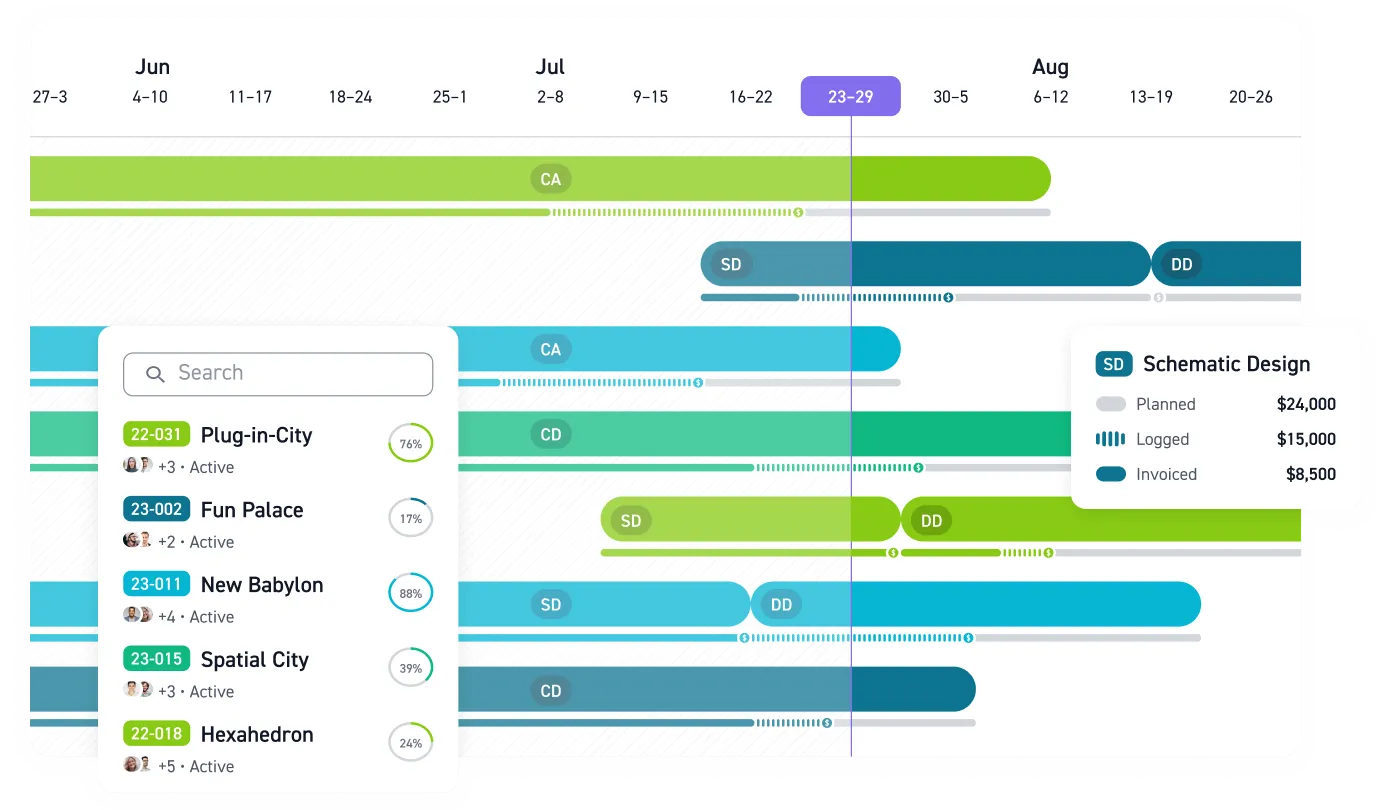
Phase-level tracking is what surfaces the signal. A project showing a high share of budget spent could be fine if the work is nearly complete, or in real trouble if the deliverables are still early. Monograph's MoneyGantt™ puts these two numbers side by side, showing budget and cash progression across each phase without making you run the math by hand.
Where Spreadsheets Break Down
Most firms start with spreadsheets because they're free and familiar. The problem is that project data ends up scattered across files that go stale the moment someone forgets to update them. When project information lives in disconnected tools, the breakdown follows a predictable chain:
- Time entries trickle in late, so percent spent is always wrong
- Inaccurate cost data means budgets get corrected after the damage, not before
- Billing slows because invoices require reconciling timesheets, budgets, and subconsultant bills across separate tools
- Slow billing strains cash flow, leaving you reacting instead of planning
These breakdowns cost real money and time. Architects routinely spend more than half their time on administrative tasks, and inefficient workflows drive burnout. When data lives in one connected system, that whole chain shortens and your team gets time back for actual design work.
The firms that escape this pattern put time, budget, and billing in one place so the numbers update themselves. For example, one Maine firm reported admin savings: 66% time saved on admin, a 50% faster billing process, and 66% less budget overage after moving from BQE Core to Monograph.
Real-Time Data Beats Outdated Reports
Spreadsheet errors carry real financial risk. A flawed workbook can change staffing, billing, or collection decisions, especially when project managers are working from copied formulas and stale exports. When you're deciding whether to re-staff a project or chase a client for payment, you need numbers you can trust.
Current numbers change what a project manager can do in a given week:
- Spot a phase running hot mid-week instead of waiting for the month-end report
- Rebalance staffing before an overrun compounds
- Flag a phase approaching its fee ceiling before the next approval gate
That kind of mid-stream correction is impossible when the only data you have is weeks old. The value of current data shows up at the portfolio level too. Firms in the top quartile of real-time responsiveness achieved more than 50% higher revenue growth and net margins than the bottom quartile, and that advantage compounds across every active project. It also shows up in the margin: firms using connected project management software reach 15.9% profitability compared with the broader industry average.
Connecting to QuickBooks Instead of Replacing It
Most firms need both business accounting and project accounting. For many small and mid-size architecture firms, QuickBooks already handles the business accounting layer well.
QuickBooks was built for financial management, though it now includes project phases for basic project tracking, billing, and budgeting. It doesn't model phase budgets, track utilization, or handle subconsultant pass-through billing. But accounting replacement risk is real. The smarter path connects your project platform directly to QuickBooks so project and accounting data stays in sync without manual reconciliation.
That connection turns billing into a rhythm. Syncing project and accounting data cuts time off the cycle from work performed to cash collected. Over 13,000 architects and engineers across 1,800+ firms use Monograph, and the platform was built by people who coordinated A&E projects firsthand.
Stop Finding Project Problems Too Late
By the time a spreadsheet tells you a phase is over budget, the fee is usually already gone. Architects need project delivery software that matches how projects actually move: kickoff, design phases, approvals, construction administration, billing, and close-out.
Monograph connects time tracking, phase budgets, staffing, invoicing, and QuickBooks Online in one system built for A&E firms. Monograph's MoneyGantt™ shows percent complete against percent spent by phase, so project managers, operations leaders, and principals can catch overruns while there is still time to fix them.
Fee burns fast. Catch it sooner. Start when you map fees by phase, then see how Monograph brings those numbers together. Book a demo.
Frequently Asked Questions
What should architects look for in project delivery software?
Look for software that matches how architecture projects are structured. At minimum, it should track budgets by phase, connect time entries to those phases, show percent complete against percent spent, support invoicing, and connect to your accounting system.
Do we need another tool if we already use spreadsheets?
Spreadsheets work until project data starts living in too many places. Once time tracking, budgets, billing, and consultant costs are separated, the numbers go stale and project managers react after the damage is done.
Do we need to replace QuickBooks to manage projects better?
No. For many small and mid-size firms, QuickBooks works well for business accounting. The gap is project accounting: phase budgets, utilization, subconsultant costs, and real-time project health.
How does phase-level tracking improve profitability?
Phase-level tracking shows where the fee is actually being used. When you compare percent complete to percent spent by phase, you can adjust staffing, review scope, or talk to the client before the overrun becomes permanent.
How do we get staff to track time accurately?
Make time tracking match the way the team already works. Use project phases and clear assignments, then review the data in project meetings so people see how timesheets prevent budget surprises and avoidable weekend work.
Data was collected as of April 2026.