



Firm management made easy

Simple Project Tracking Tools to Replace Spreadsheets
A client asks where their project stands, and you spend the next 20 minutes hunting through tabs, cross-referencing formulas, and hoping the numbers are current. Meanwhile, the spreadsheet your team updated last Thursday already has three conflicting versions floating around the office.
A&E firm leaders have historically invested in design tools while second-guessing the value of tools that improve financial management or resource planning. The result is a false economy: expensive professional time burned on administrative spreadsheet maintenance instead of billable project work or business development.
If you're a project manager or operations leader at a firm of 5 to 50 people, that trade-off hits you harder than anyone. You're the one reconciling budgets, chasing time entries, and compiling reports from disconnected sources. Simple project tracking software built for A&E workflows can give you those hours back.
Where Spreadsheets Break Down
The problems aren't subtle. Most firm leaders know their overall billings, but when asked exactly where a specific project stands right now, the answer involves a lot of spreadsheet hunting. By the time margin pressure shows up in reports, the opportunity to intervene has already passed.
Resource allocation suffers the same lag. A new project kicks off, a client accelerates their timeline, and suddenly you're scanning the office trying to figure out who's available. The staffing spreadsheet was updated weeks ago. According to workforce survey data, 45% of firms report project delays tied directly to labor shortages, making workforce availability the leading cause of schedule disruptions.
Scope creep compounds everything. Industry analysis of A&E project failures consistently links the root cause to scope and fee alignment problems, not day-to-day execution. Projects blow up when the firm agrees to do more than it was hired to do, and spreadsheets rarely flag that in real time. Without current visibility into budget burn rates, you can't price changes promptly or reset expectations before it's too late.
The financial stakes are real. The average A&E firm bills only 81% of its staff's time, and salary costs are the biggest expense at every firm. Every hour spent on manual tracking is doubly costly: you're paying for administrative labor and losing the billable work that hour could have produced.
Features That Actually Matter for A&E Firms
Generic project management tools miss the mark because they don't understand how architecture and engineering firms work. Your contracts are structured around phases. Your budgets need to track against those phases. Your billing methods vary from project to project. Prioritize the following capabilities:
- Phase-based project structure: Time and budget tracking aligned with SD, DD, CD, and CA phases, including milestone-to-payment connections.
- Integrated time capture: Simple daily time entry assigned directly to project phases, with automated reminders to prevent delayed entries that kill billing accuracy.
- Real-time budget monitoring: Budget versus actual comparisons at the phase level, with automated alerts when variance exceeds your thresholds. Best-practice benchmarks recommend tracking variance percentages, forecast accuracy, and time to resolve budget issues.
- Resource and utilization tracking: Visual capacity planning, workload balancing, and utilization rate monitoring. Industry KPI benchmarks rank utilization rate among the essential metrics managers at all levels need.
- Flexible billing and invoicing: Support for phase-based, hourly, fixed-fee, and consultant pass-through arrangements, because no two A&E contracts look the same.
Over one-third of AEC firms say they're unsure whether projects are completed on time or within budget. Purpose-built tracking with these capabilities eliminates that uncertainty in ways spreadsheets never will.
The Financial Case for Switching
The correlation between technology adoption and financial performance is hard to ignore. Industry benchmark data confirms 67% of tech-forward firms achieve project profit rates of at least 20% within 12 months, compared to 52% of tech-static firms. Tech-forward firms also report highly developed project management processes at 2.5 times the rate of their peers.
The wins compound across three areas:
- Administrative time recovery: Firms moving from spreadsheets to integrated tools save admin hours. One Maine-based architecture firm with 25 staff documented a 66% reduction in administrative tasks and a 50% faster billing process after switching from BQE Core, redirecting that time to proposals and client development.
- Faster billing cycles: Integrated time-to-invoice workflows cut billing time in half compared to spreadsheet-driven processes. When your billing cycle shrinks, cash arrives sooner. A&E industry benchmarks put high-performing firms around 34 days for Days Sales Outstanding, while some firms stretch past 73 days.
- Higher utilization rates: AIA survey data shows 49% of small firms don't track billable efficiency formally, while 91% of large practices do. Dedicated tracking makes utilization measurement automatic, and what gets measured gets managed.
Forecasting project costs, schedules, and resources is a challenge for 52% of AEC firms. That number drops significantly when time records flow automatically into billing, reports, and financial analyses rather than requiring manual reconciliation across disconnected spreadsheets.
Tools Worth Your Time
A&E project managers on peer forums consistently recommend a handful of platforms. Each serves a different need depending on your firm's size, budget, and priorities.
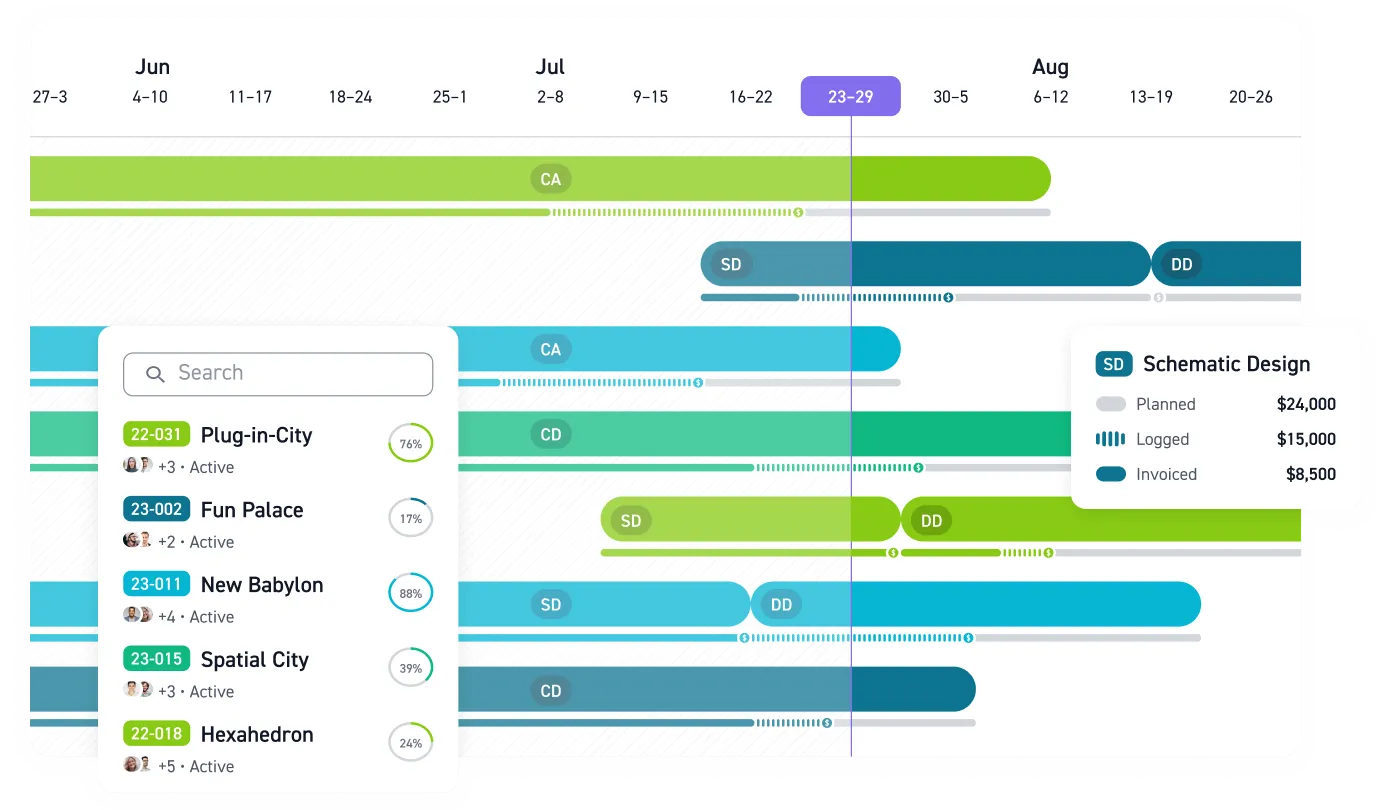
Monograph was built for A&E firms and serves 13,000+ architects and engineers across 1,800+ firms. Monograph's MoneyGantt™ feature layers planned fees across project schedules, showing budget progression from planned to paid in one visual bar. Phase-based billing, resource planning, and QuickBooks integration are built in rather than bolted on. Customer-reported results include up to 66% less admin time and 66% less budget overage.
BQE Core/ArchiOffice earned a published profile from Building Design + Construction, documenting how one San Francisco firm gained instant visibility into which projects were over budget or understaffed. Some practitioners on community forums note a steep learning curve.
Fresh Projects draws strong practitioner endorsements for user-friendliness. Multiple firm leaders on AIA's community forums have noted switching from BQE Core and Replicon to Fresh Projects, citing a simpler interface and lower cost than either predecessor.
The right choice depends on whether you need full A&E workflow coverage from day one or prefer to start with lighter functionality and grow into it.
Making the Transition Stick
Selecting software is the easy part. PM practice research across 100+ A&E firms shows that formal project manager training programs produce dramatically better budget performance and client satisfaction outcomes, yet only one-third of firms put most of their project managers through formal training. The same research recommends a larger training budget than the software line item itself.
AIA's adoption guidance starts with one foundational principle: explain the underlying purpose to all stakeholders before introducing the steps, workflows, and settings. An adoption-first mindset matters here, because design professionals are trained to question and critique systems. Simply mandating a switch creates resistance, especially from staff who've built sophisticated spreadsheet workflows over years.
A phased approach works best for firms under 50 people:
- Start with time tracking and project financials. These deliver the fastest visible wins.
- Pilot with a single project or team rather than rolling out firm-wide on day one.
- Document quick wins in terms your team cares about: hours saved, fewer billing errors, faster answers to client questions.
- Expand gradually as competency builds, keeping some spreadsheet processes during the transition.
Firms typically evolve their technology approach based on size and complexity. Only 38% of A&E firms currently rate themselves as digitally mature, even though 74% expect to reach that stage within three years. For firms under 20 employees, a single purpose-built tool covers most needs. Between 20 and 100, firms often connect tools through APIs. The key is choosing platforms with open integrations so you're not creating new data silos to replace the old ones.
When your systems handle the data entry, your team gets to focus on the design work that won the project in the first place.
Stop Managing Projects in the Dark
A version mismatch can bury a budget overage for weeks, and a staffing decision can get made off a tab that hasn't been touched since the last all-hands. By the time anyone catches it, the margin is already gone.
If you're running a 5–50 person firm, you don't have extra capacity to donate to admin work. Every hour a PM spends reconciling time, budgets, and invoices is an hour that doesn't go toward solving scope issues early, answering clients with confidence, or protecting the margin you already earned.
Your firm's profitability is hiding in those disconnected spreadsheets. Find it. Book a demo and see what phase-based project tracking looks like when the numbers update as your team works, not weeks after the fact.
Frequently Asked Questions
Is it worth switching if our current spreadsheets work fine?
If "work fine" means you can get an answer eventually, spreadsheets usually feel acceptable. The problem is timing. When you only find out a phase is over budget after you've already burned the hours, you've lost the chance to course-correct, document scope, and bill changes while the work is still current.
Firms switch when they need shared, real-time visibility without constant babysitting.
How long does it take to migrate our data from spreadsheets?
You don't need a perfect historical backfill to get value. Many firms keep old spreadsheets as an archive and start by setting up active projects with clean phase budgets, current staffing expectations, and the billing method that matches the contract.
The win comes from what happens next: consistent time capture, budget-to-actual visibility, and billing that's tied to real project progress instead of month-end reconciliation.
How do we get our team to adopt a new tool after years of using Excel?
Treat adoption like a design problem. Reduce friction, make the workflow match how A&E projects are actually structured with phases and fees, and show the team the data helps prevent fire drills and supports day-to-day delivery.
Start with a pilot team or a single project, then share concrete outcomes: fewer late timesheets, faster invoices, and quicker answers when a principal or client asks, "Where are we on this phase?"
What's the best place to start if we can't change everything at once?
Start where the spreadsheet pain shows up every week: time tracking tied to phases and budgets. Once time is coming in cleanly, budget variance and utilization stop being detective work.
From there, add billing and resource planning. You'll feel the compounding effect when the same set of time entries supports project health, staffing decisions, and invoices without re-keying the data in three places.