
A new project kicks off, a client accelerates their timeline, and suddenly you're scanning the office trying to figure out who's available. You check a spreadsheet that was last updated two weeks ago. You ask a principal who thinks someone might be wrapping up a deliverable soon. You make a call based on memory, proximity, and hope.
That's gut instinct staffing. And it's how most A&E firms still operate, even when the data to make better decisions already exists inside their project workflows.
The Real Cost of Guessing
The gap between firms that staff well and firms that guess isn't abstract. Benchmark data from 337 firms shows top-quartile performers hit 95.2% utilization rates while median firms land at 82.4%. That 12.8-point spread translates directly to revenue. For a 50-person firm with $5 million in labor costs, closing that gap could unlock roughly $640,000 in additional billable capacity every year.
And that's just the efficiency side. Nearly 40% of firms in architecture report project delays tied to staffing constraints. Meanwhile, the Architecture Billings Index dropped to 43.2, with design contracts declining for 14 consecutive months. When firms are holding onto staff through a downturn, deploying those people on the right projects at the right time becomes even more critical.
Add the administrative burden, and the picture gets worse. Traditional project management requires hours each week pulling together budget variance calculations and utilization reports manually. Integrated resource planning cuts reporting time by 25%, hours that go straight back into billable work or leadership capacity.
Why Spreadsheets Hit a Wall
Most A&E project managers aren't short on intelligence or effort. They're short on infrastructure. You wouldn't design a structural system without load calculations, yet most firms staff projects without equivalent data rigor. The staffing spreadsheet you built three years ago was fine when the firm had eight people and four active projects. At fifteen people juggling a dozen projects, with a quarter of them paused at any time, that spreadsheet becomes a liability.
A survey of nearly 400 A&E firms found that resource management maturity hinges on how effectively firms leverage data and technology to support their planning practices. The same research found that most firms still struggle with manual tracking, reactive deployment, and limited forecasting.
The broader AEC industry faces a similar gap. A global survey of 1,000+ AEC professionals found that while 84% of firms plan to increase technology investment, many still rely on hybrid workflows mixing paper and digital tools. Only 27% use AI in any capacity, which is exactly why early adopters at any size gain a measurable edge.
What AI Resource Planning Actually Does
In practical terms, AI resource planning does something simple: it replaces the guesswork in staffing decisions with pattern recognition drawn from your firm's actual project history. Instead of asking "Who do I think is available?" you're looking at real-time data showing who is available, what their utilization looks like this month, and how similar projects burned through hours in the past.
The practical capabilities emerging for A&E workforce management include:
- Predictive capacity planning: Analyzing historical project data to forecast staffing needs weeks or months ahead, rather than reacting when someone's already overloaded.
- Real-time utilization: Tracking who's billing, who's underutilized, and who's approaching burnout, without waiting for end-of-month reports.
- Skills-based matching: Connecting project requirements with staff capabilities, certifications, and experience by building type or delivery method.
- Scenario modeling: Testing different allocation strategies before committing, so you can see the downstream impact of pulling someone off one project to staff another.
These aren't theoretical. A 10-person Florida engineering firm called Dynamic Engineering achieved 25% growth and 2x efficiency gains after implementing AI-powered practice management that automated budget tracking and proposal workflows. The point: you don't need a massive team to see results.
The Metrics That Make It Work
AI resource planning is only as good as the data feeding it. Before evaluating any tool, your firm needs consistent tracking across a handful of core metrics. Here's what matters most for staffing decisions:
- Utilization rate (billable hours ÷ total hours × 100): The primary indicator of whether your people are deployed effectively. The industry target for sustainable performance sits between 80–85% firm-wide, with 10–15% buffer for scope changes.
- Realization rate (invoiced revenue ÷ value of billable hours): High utilization without strong realization signals scope creep, pricing issues, or collection problems that no amount of good staffing can fix.
- Net multiplier (actual revenue ÷ total direct labor): A&E benchmarking research consistently identifies this as the single most reliable indicator of an A&E firm's operating performance.
- Revenue backlog (contract value minus billed and unbilled): Industry KPI analysis identifies this as essential for forward-looking capacity planning, typically projecting resource needs three to six months ahead.
Most PMs track utilization religiously but overlook realization rate, which is where the real story hides. A team billing 90% of their hours sounds great until you discover the firm only collects on 70% of that work. These metrics work as a system, not in isolation.
Track these consistently, and you've built the dataset AI tools need to generate meaningful recommendations. Skip this foundation, and even the best software will produce unreliable outputs. AI estimating accuracy hinges entirely on your historical data quality, so clean inputs are the prerequisite for useful outputs.
From Gut Instinct to Data-Driven: A Phased Approach
You can't flip a switch. Teams need time to build trust in new processes, and data needs time to accumulate. A realistic transition looks something like this:
- Months 1–4: Consolidation. Audit your current data practices, identify gaps in historical project records, and move active project tracking into a centralized system built for A&E workflows.
- Months 5–9: Standardization. Train PMs on consistent time-tracking protocols and start generating reports on utilization patterns and capacity trends.
- Months 10–12: AI-powered recommendations. With clean data flowing through an integrated system, predictive analytics become reliable. Budget alerts trigger automatically, and staffing scenarios model themselves based on actual firm history.
The key throughout is starting with task automation before attempting complex predictive analytics. Firms that follow this sequence tend to see fewer budget surprises and faster billing cycles because the underlying data becomes consistent and timely.
Building the Foundation With the Right Tools
Generic project management platforms miss the nuances of A&E work: contract phases, fee caps, and the reality of paused projects eating capacity. That's where practice management built for A&E firms matters.
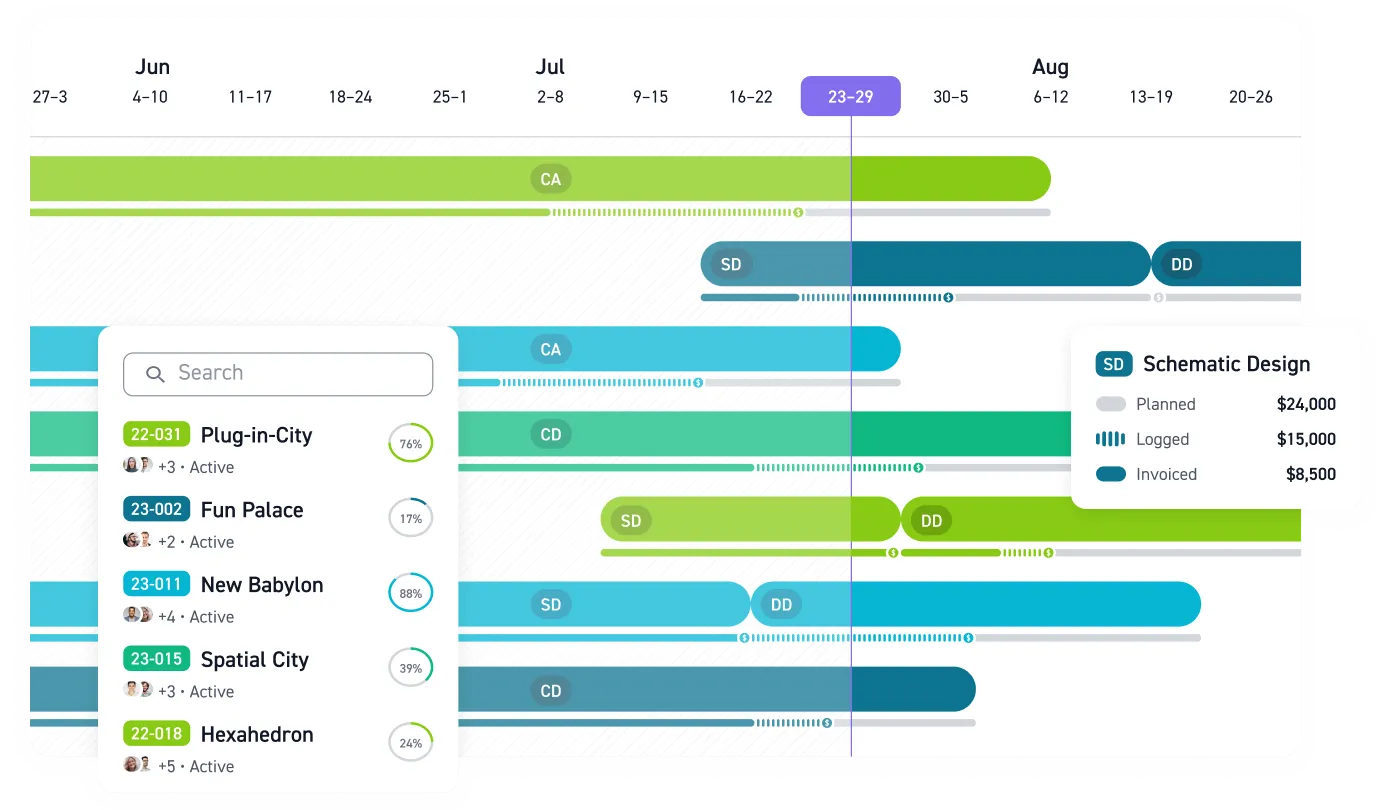
Monograph's resource dashboard gives PMs a Monday view of team allocations, letting you build schedules and distribute weekly hours while seeing the real-time impact on budgets. Monograph's MoneyGantt™ layers planned fees across project timelines, then tracks how dollars move from planned through logged, invoiced, and paid, turning financial data into something you can actually read at a glance. Two-way sync between time entries, budgets, and invoices eliminates the double-entry that eats hours every week.
Firms using this integrated approach report meaningful gains. Woodhull, for example, reported results including 66% time saved on admin, a 50% faster billing process, and 66% less budget overage. Those aren't marginal improvements. They represent the difference between a PM who spends Monday mornings firefighting and one who spends them leading.
The talent market makes this urgent. Engineering graduates have increased since 2019, at least in the United States, and 91% of professionals with under five years' experience are demanding better work-life balance. You can't simply hire your way out of a capacity problem. Deploying the people you have with precision is how your firm stays competitive while the industry figures out what comes next.
Stop Staffing by Gut Instinct. Start Using Data.
You can't build a profitable, sustainable firm when your most critical asset, your team, is allocated based on who's standing closest to your desk. Every hour spent guessing who's available is an hour not spent on billable work or strategic leadership.
Monograph's resource planning tools replace the guesswork with real-time data. See who's overutilized, who's on the bench, and how project timelines impact future capacity, all in one dashboard built for the way A&E firms actually work.
The data to staff your projects with precision already exists in your firm. It's time to use it. See Monograph.
Frequently Asked Questions
Do we need a data scientist to use AI for resource planning?
No. Modern practice management platforms like Monograph are designed for A&E professionals, not data scientists. The AI works in the background, analyzing your existing project data, timesheets, budgets, and schedules, to provide clear recommendations. If you can manage a project, you can use these tools.
Will AI resource planning replace our project managers?
No, it empowers them. AI automates the tedious part of resource planning, like sifting through spreadsheets and calculating utilization, so your PMs can focus on high-value work: mentoring staff, managing client expectations, and solving complex project challenges. It replaces administrative drag, not strategic judgment.
Our project data is inconsistent. Can we still benefit from AI planning?
Yes. The first step is often consolidating your data into a single system. A platform like Monograph helps you standardize time tracking and project setup. Even with just a few months of consistent data, the system can start identifying patterns and providing valuable insights. You don't need perfect historical data to start making better decisions today.


.png)