



Firm management made easy

You're toggling between three spreadsheets, trying to figure out who's overloaded and who has bandwidth for a new project kicking off next month. By the time you've pieced the picture together, it's already wrong. Someone got pulled onto a different phase, a project paused, and the numbers you spent an hour compiling are stale.
This is the daily reality for project managers and operations leaders in A&E firms. Utilization tracking software exists to replace that guesswork with real-time visibility, but not all tools are built for how architecture and engineering firms actually work. Choosing the right one means understanding what to measure, why raw utilization rates don't tell the full story, and how the right data prevents burnout before it becomes a retention problem.
The Benchmarks You Should Actually Be Tracking
Before picking a tool, you need to know what good looks like. A large-scale firm study found that architecture firms average 82.4% utilization for technical staff, while a separate analysis of 450 A&E firms shows professionals typically log 1,600 to 1,900 billable hours annually. That translates to roughly 77 to 91% utilization.
But those numbers mean nothing without role-specific context. Your firm should set different expectations depending on who's doing the work:
- Principals and directors: commonly reported average utilization is around 67 to 74%, with the remaining time available for business development, firm management, and strategic planning
- Associates and senior project managers: 70 to 75%, balancing project oversight with billable technical work
- Technical staff (architects, engineers, designers): 80 to 85%, focused primarily on billable project delivery
- Firm-wide average: 59% median across all positions, per industry benchmark data, reflecting the inclusion of non-technical roles
If you're comparing your firm's overall number to an 82.4% benchmark meant for technical staff, you're measuring against the wrong target. Match your calculation methodology to the right benchmark, or you'll make decisions based on misleading data.
Why Utilization Rate Alone Is the Wrong Metric
Here's the part most spreadsheet-based tracking misses entirely. Firms focused on utilization percentages are debating the wrong number. What actually drives profitability is revenue factor, which is utilization multiplied by labor multiplier.
Consider two team members side by side:
- Employee A: 70% utilization × 4.2 labor multiplier = 2.94 revenue factor
- Employee B: 85% utilization × 3.0 labor multiplier = 2.55 revenue factor
Employee A generates more revenue despite being "less utilized." If your tracking system can't show both components, you're making resource allocation decisions with incomplete information.
Practice management research supports this conclusion, finding that utilization is not as significant a contributor to overall firm success as conventional wisdom suggests. And the financial stakes are real. Firm-level financial data shows the revenue impact of utilization improvements is significant, even at small scale. For a 100-person firm with an average billing rate of $150 per hour, increasing total billable time by just 2% generates roughly $420,000 in additional revenue, since payroll and overhead costs are essentially fixed. For a 20-person firm, that same 2% improvement could translate to approximately $84,000 in additional annual revenue, most of which flows straight to the bottom line.
Burnout: The Cost You Can't See in a Spreadsheet
Pushing utilization numbers higher without tracking workload balance creates a different kind of problem, one that shows up in resignation letters. The data paints a clear picture of an industry-wide problem:
- 32% of A&E professionals experience frequent or persistent burnout, per a 2024 workforce survey
- 87.1% of architects reported increased burnout during the pandemic, per an industry publication survey
- More than 2 in 3 A&E professionals view long hours as an expected part of the profession, normalizing the very conditions that drive people out
- 13% median turnover across A&E firms, with under 3% being involuntary, meaning most departures are preventable
Meanwhile, cross-industry burnout research found that many employers respond with individual wellness programs instead of fixing the workload management systems causing the problem, prioritizing symptoms over root causes. Firms implementing proper workload management achieved 50 to 70% reductions in new hire turnover. Utilization tracking software isn't just a financial tool. It's a retention and burnout prevention tool.
What A&E Firms Need From Utilization Tracking Software
Generic project management tools don't understand phase-based billing, role-specific labor multipliers, or consultant and subconsultant tracking. When evaluating utilization tracking software, your shortlist should include these A&E-specific capabilities:
- Phase-level project tracking: A&E projects move through schematic design, design development, construction documents, and construction administration, each with different staffing needs, budgets, and billing structures. Phases must be first-class objects in your software, not just tags or labels.
- Revenue factor calculation: The software must track labor multipliers alongside utilization to surface revenue factor, the metric that actually predicts profitability, as detailed above. Without both components visible, resource allocation decisions rely on incomplete data.
- Real-time alerts and forecasting: Historical reports tell you a project went over budget last quarter. Real-time dashboards tell you it's trending over budget now, when you can still adjust staffing, scope, or client expectations.
- Built-in accounting sync: Two-way sync with your accounting platform eliminates the double-entry that wastes time and introduces errors between time tracking, budgets, and invoices. Sync quality is a critical differentiator determining whether your team adopts the system and gains the visibility needed for effective capacity management.
The technology investment pays off. Technology adoption research on tech-forward firms shows that 67% project a profit rate of at least 20%, compared to 52% of tech-static firms. That 15-point gap comes from the real-time visibility and process maturity that purpose-built software makes possible.
From Reactive Spreadsheets to Proactive Management
The shift from spreadsheets to dedicated utilization tracking software changes more than your data accuracy. It changes how you manage.
Instead of compiling weekly reports from disconnected sources, you see who's above the 80 to 85% utilization target and at risk of burnout. Instead of discovering a project burned through its budget after the phase is complete, you get alerts at critical thresholds. Instead of guessing whether you can take on new work, you model scenarios against actual team capacity. Maine-based Woodhull, a 25-person architecture firm that previously relied on BQE Core, reduced administrative time by 66% and cut budget overages by 66% after implementing purpose-built utilization tracking, freeing their team to focus on design work instead of data compilation.
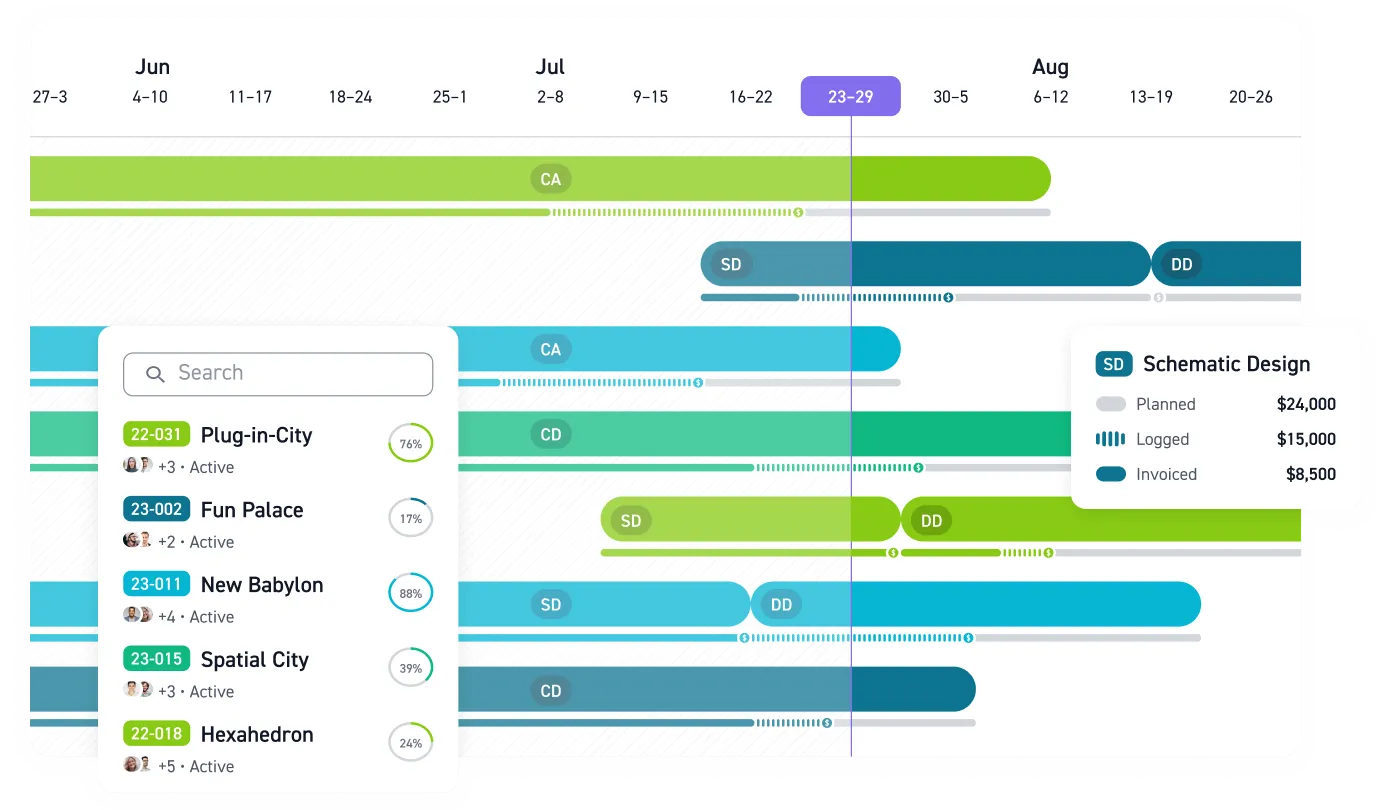
Monograph was built for exactly this kind of work. Designed specifically for A&E firms, it connects time tracking to project profitability to team utilization in a single workflow. Its signature MoneyGantt™ feature gives project managers instant visual insight into budget-to-cash progression across phases, without the three-spreadsheet shuffle. With a native QuickBooks Online sync, invoices, bills, expenses, and certain project costs can be exchanged between Monograph and QuickBooks Online, with imported costs from QBO automatically updating in Monograph for project profitability reporting. Monograph time entries do not sync directly into QuickBooks budgets or invoices, and the sync is not designed for real-time capacity planning.
The goal isn't maximizing every billable hour. It's knowing when an extra billable hour starts costing more in burnout than it earns in profit. According to utilization guidance, this clarity requires tracking four interconnected metrics simultaneously: utilization rate, realization rate, project gross margin, and client satisfaction. This prevents blind spots from focusing on a single metric and is what separates firms that grow sustainably from firms that grind through turnover cycles wondering where their best people went.
Stop Managing Capacity in the Dark
While you're toggling between spreadsheets trying to piece together who's overloaded and who has bandwidth, your competitors have real-time visibility into team utilization, project profitability, and burnout risk. They're taking on the right projects, staffing them appropriately, and keeping their best people.
The firms that retain talent and grow sustainably don't have better luck. They have better data. Purpose-built utilization tracking gives you the clarity to spot problems before they become resignations and make staffing decisions based on actual capacity, not outdated spreadsheets.
Your next staffing decision shouldn't require three hours of spreadsheet archaeology. Book a demo with Monograph.
Frequently Asked Questions
What's a healthy utilization rate for technical staff versus principals?
Technical staff (architects, engineers, designers) should target 80 to 85% utilization, with the rest going to professional development, internal meetings, and administrative tasks. Principals and directors typically run 67 to 74% because business development, firm management, and strategic planning aren't billable. The mistake most firms make is comparing everyone to a single benchmark instead of setting role-appropriate targets.
How do I prevent utilization tracking from feeling like micromanagement?
The key is transparency about why you're tracking and what you're measuring. Share the data with your team. Let them see their own utilization trends and understand the connection to project profitability and workload balance. When people understand that tracking protects them from burnout and helps allocate work fairly, resistance drops. Tracking becomes a tool for the team, not surveillance by management.
Can utilization software actually prevent burnout, or does it just measure the problem?
It depends on how you use it. Software that only shows you historical utilization data tells you someone burned out last quarter, which isn't helpful. Real-time tracking with alerts lets you intervene when someone's consistently running above 85% before they hit the wall. The firms seeing 50 to 70% reductions in turnover aren't just measuring utilization; they're acting on the data to rebalance workloads proactively.
What's the difference between utilization rate and revenue factor, and which matters more?
Utilization rate measures how much of someone's time is billable. Revenue factor multiplies utilization by labor multiplier (how much you bill for their time versus what you pay them). Someone at 70% utilization with a 4.2x multiplier generates more revenue than someone at 85% utilization with a 3.0x multiplier. Track both, but revenue factor is the metric that actually predicts profitability.
How quickly can we expect results after implementing utilization tracking software?
Most firms see immediate visibility improvements. Within the first week, you'll know who's overloaded and which projects are trending over budget. Meaningful operational changes typically take 4 to 8 weeks as teams adjust workflows and start acting on the data. The financial impact (improved margins, reduced budget overruns) usually becomes measurable within the first quarter. Firms like Woodhull reported 66% reductions in administrative time and budget overages after implementation.