
The Architecture Billings Index was stagnant in the latest billing index update in November 2025, with billings still under pressure. When revenue is shrinking, every unbilled hour hits harder.
Recent industry reporting indicates firms are still missing their own billing targets. For smaller engineering firms, hours worked beyond contracted scope are simply unrecoverable under lump-sum contract guide. The right time tracking software helps close that gap. A generic tool, or no system at all, usually makes it worse.
What A&E Timesheet Software Actually Needs to Do
Generic time tracking tools treat every hour the same. Anyone who's billed a Schematic Design phase at one rate and a CA phase at another knows that's not how A&E works. Your contracts are structured around phases. Your billing methods vary from project to project. Your staff bill at different rates depending on the client, the contract, or the role. Timesheet software that ignores those realities creates more reconciliation work than it removes.
Project managers, operations leaders, and finance managers each need specific capabilities from a timesheet system. Here are the ones that matter most for A&E firms:
- Phase-based time coding ties hours to Schematic Design, Design Development, Construction Documents, and CA, so you can see when a phase is burning through budget before it blows.
- Multiple billing method support handles your T&M environmental study and your fixed-fee residential project in the same system without manual workarounds.
- Real-time utilization reporting shows billable hours as they're logged, not compiled at month-end when the damage is already done.
- Budget controls with alerts notify PMs when a phase is nearing its fee, leaving time to course-correct or start a scope conversation.
Finance teams usually need two more things: QuickBooks Online connection and role-based billing rate tables. Accurate rate management is directly tied to revenue capture. Industry guidance on global practice management discusses system workflows when evaluating these systems. Those basics matter because firms need clean time data before any reporting becomes useful.
The Best Timesheet Software for A&E Firms in 2026
Most options A&E firms consider fall into three camps. There are enterprise ERPs for larger organizations. There are A&E ERP systems with built-in accounting, including BQE Core and Deltek Ajera. Then there are PM-first systems built around project visibility and paired with QuickBooks, including Monograph, Factor AE, and BigTime.
For smaller firms, the real decision is usually where you want the accounting complexity to live.
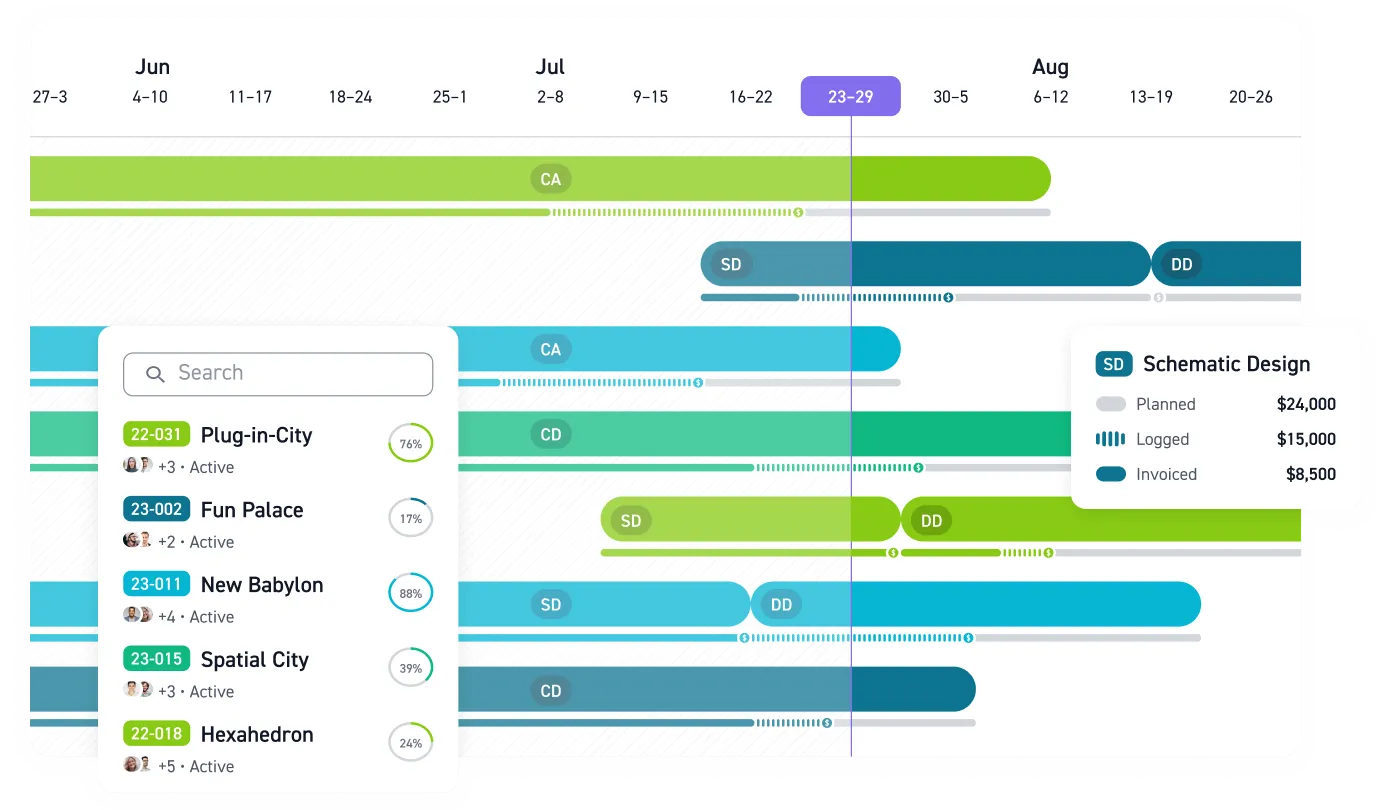
Monograph is built exclusively for architecture and engineering firms. Time tracking connects directly to project phases and fee budgets. Its signature feature, Monograph's MoneyGantt™, gives you a visual read on budget health across every project without digging through spreadsheets. It helps replace the Monday morning scramble to figure out where things stand. Brunton Architects & Engineers, a Minnesota firm, reports less time spent on admin, a faster billing process, and less budget overage after switching to Monograph in this firm results summary.
Plans start at annual plan pricing based on annual billing, with unlimited projects and unlimited reports included. AI tools help with AI budget planning and project staffing, and a project pipeline view is part of the platform. Monograph connects with QuickBooks Online but does not include native general ledger accounting, so bookkeeping stays in QuickBooks. It is founder-led and venture-backed, built by architects who lived these problems firsthand. Over 13,000 architects and engineers across 1,800+ firms use Monograph.
BQE Core has Core pricing plans aimed at a wide range of mid-market A&E needs, including built-in accounting that removes the need for a separate GL. Pricing requires a quote. Users rate it in this user review summary, though Resource Allocation scores lowest among individual features in that same review source.
Deltek Ajera brings accounting depth to A&E project management, with built-in general ledger, accounts payable, and accounts receivable functionality. It is positioned for small firms in the A&E ERP category. The interface has received product review notes, and the evidence here supports a mix of strong accounting and adoption challenges for project teams.
Factor AE offers a more straightforward pricing model, with monthly pricing also listed publicly. It is purpose-built for A&E with phase-based project structures and QuickBooks connection. Its review coverage here supports a positive read from at least one reviewer, but not a broader conclusion.
BigTime has some feature essentials at the basic level, but project budgeting is reserved for a higher tier. Firms that need phase-based budget tracking will need to look closely at the upper-tier offering. It serves professional services broadly rather than A&E specifically.
Harvest offers clean, simple time tracking but is not positioned as A&E-specific. Its official features emphasize project management, budgeting, profitability reporting, invoicing, and productivity dashboards.It might fit solo firm needs before they outgrow it.
The Single-System vs. Paired-System Decision
Every A&E firm evaluating timesheet software runs into the same decision: keep project accounting tools in one place, or pair two systems that each do their job well?
Integrated platforms like BQE Core and Deltek Ajera give finance teams one financial record to work from. The trade-off is higher complexity and, in some cases, project-team interfaces that create adoption resistance. PM-first systems paired with QuickBooks Online, like Monograph or Factor AE, usually give project teams a cleaner day-to-day workflow, but they do require managing two systems. Firms have to weigh those approaches against their own priorities and internal habits.
For firms already running QuickBooks Online, a purpose-built A&E system like Monograph gives project visibility tools and operations teams the phase-level visibility they need without forcing the accounting team onto an unfamiliar system.
Getting Your Team to Actually Fill Out Timesheets
The best software still fails if your team doesn't use it. One timesheet training course for AIA CES credit treats timesheet completion as a financial literacy competency, not an administrative requirement. Staff who understand why billing rates exceed their salaries and what can and cannot be charged to a project code fill out timesheets more consistently.
Three principles make the difference between a timesheet system that works and one that collects dust:
- Track utilization, billability, and realization separately. Utilization measures how busy people are. Billability measures what's client-facing. Realization measures what actually gets collected. Conflating them hides where revenue is lost.
- Connect time entry directly to budgets and invoicing. When logged hours automatically update burn rates and feed invoice generation, the data stays clean and the reconciliation overhead disappears.
- Start with consistent basics before using advanced reporting tools. Firms implementing time tracking systems can improve performance within the first year because visibility drives better decisions.
That discipline matters because firms with slow collections after invoicing cannot afford incomplete timesheet data upstream, as reflected in collections benchmark data. Firms hitting stronger profit benchmark data usually have tighter visibility into project performance data and the discipline to act on it.
Stop Letting Unbilled Hours Decide Your Margin
If your current system cannot track time by phase, show utilization as hours are logged, and connect cleanly to your billing workflow, you've already found the problem. Generic tools create extra reconciliation work precisely when fee pressure is highest and missed scope is least recoverable.
Monograph connects timesheets directly to project phases, budgets, utilization, and invoicing in a workflow built for architecture and engineering firms. For teams already using QuickBooks Online, that paired-system approach gives project managers, operations leaders, and principals the visibility they need without replacing the accounting system that already works.
If you're comparing systems now, start with the workflow your team will actually use every day, then look at how cleanly it connects to billing and accounting. See the platform.
Frequently Asked Questions
What timesheet software is best for a small A&E firm?
For most small A&E firms, the best fit is usually a system that matches how A&E projects are actually billed: by phase, fee, and utilization target. In this group, the most relevant options are mid-market A&E ERPs and PM-first systems paired with QuickBooks. If your team already runs on QuickBooks Online, a purpose-built A&E system can be easier for project teams to use day to day.
Do we need a full ERP, or can we pair project software with QuickBooks?
That depends on where you want complexity to live. Tools like BQE Core and Deltek Ajera keep accounting and project management in one system, which can give finance teams a single source of truth. Paired systems like Monograph or Factor AE usually give project teams better usability, but you do need to manage two connected systems.
Is phase-based time tracking really necessary for smaller architecture or engineering firms?
Yes. Smaller firms have less room to absorb hidden overruns, especially on fixed-fee or lump-sum work. Phase-based coding helps you see when Schematic Design, Design Development, Construction Documents, CA, or other deliverables are burning through budget before the fee is gone.
How do we get staff to fill out timesheets consistently?
Start by treating timesheets as part of project and financial literacy, not as admin for admin's sake. Staff are more consistent when they understand what can be charged, why billing rates matter, and how clean time data affects budgets, invoicing, and collections. Then keep the workflow simple: connect time entry directly to project phases, budgets, and invoices so the data gets used instead of disappearing into a report no one reads.