

A&E firms lose money twice on the same project: through underutilization, when available hours never become billable work, and through poor realization, when billable time never reaches an invoice. Time tracking software addresses the second problem: getting every hour you actually work onto a bill your client pays.
That leak is bigger than most firms realize. A&E practices watch 3–5% of revenue vanish annually from preventable billing errors. In a market where new design contracts declined for 18 consecutive months, every unbilled hour hits harder.
Why Phase-Level Tracking Is the Foundation
A&E projects don't run as one continuous effort. They move through sequential design phases: schematic design, design development, construction documents, bidding, and construction administration. Each phase carries its own slice of the total fee, usually 35–50% for construction documents and 15–20% for schematic design.
Generic time trackers fail A&E firms here. Progress payments under standard owner-architect agreements are calculated by phase, so invoice accuracy depends on knowing how much work happened in each one. Phase budgets create profitability checkpoints, revealing where work is bleeding early enough to fix it.
Multi-rate billing sits on top of that phase structure. A principal, project manager, and intern working the same phase bill at different rates, and consultants pass through with markups. The software has to store role-based rate tables, apply the right rate to each person's hours automatically, and keep consultant fees separate from direct labor so nothing gets miscoded when it's time to invoice.
Without this granularity, you're guessing. Dorman Associates, an 18-person California firm, moved from Harvest to a purpose-built A&E platform and cut their billing time in half while reducing budget overages by 25%.
What to Look for in A&E Time Tracking Software
Not every time tracker handles A&E work. Generic tools treat time as a single flat category, which breaks the moment you need to bill by phase or reconcile hours against a fixed fee. Before you commit to a platform, confirm it covers the fundamentals of practice management.
The features that separate A&E-ready software from generic timers:
- Fixed fee, hourly, and not-to-exceed phases handled in a single project, since real contracts mix types
- Role-based rate tables that apply the right rate to each person automatically
- Consultant tracking with markups and pass-through billing kept separate from direct labor
- Real-time WIP and burn-rate reports at the phase level, not just the project level
- Native accounting sync so hours reach invoices without re-keying
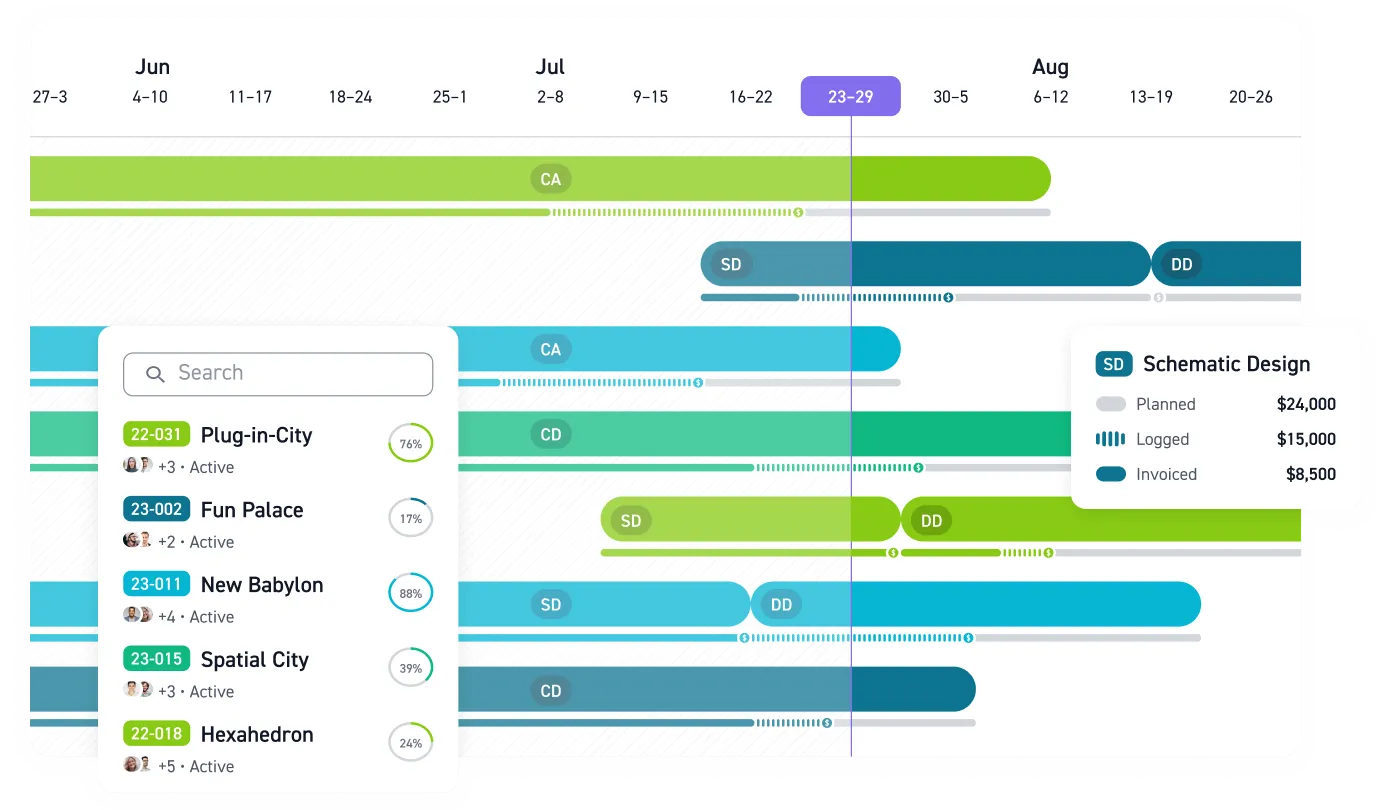
- Monograph's MoneyGantt™ or an equivalent visual view of budget consumption across phases
Pressure-test each item against your actual workflow before signing anything. The wrong tool costs more in workarounds than it saves in subscription fees.
Percent Complete vs. Percent Spent: Where Fixed-Fee Margin Disappears
Dollars spent tells you nothing about work done. A project can burn 80% of its budget while completing 50% of deliverables, and if you're only watching timesheets, you won't know until it's too late. Percent spent measures actual cost against budget. Percent complete measures earned value against budget.
This gap matters most on fixed-fee work. Hourly projects let you bill for overruns. Fixed-fee projects don't, so real-time visibility matters more when you can't recover lost margin through additional billing. 29% of A&E projects run over budget and 36% miss deadlines, so the stakes are real.
Real-time data works as an early warning system. Catch the overrun early and you can adjust scope, re-staff, or renegotiate. Firms logging by phase rather than by project alone gain the granularity to spot trouble early, which is why practices using real-time WIP tracking report 44% fewer budget overruns.
The Cost of Late and Inaccurate Time Entry
End-of-week timesheets are a work of fiction. Memory drops short interactions and compresses effort, so rebuilding a full week from scratch becomes guesswork. By Friday, Tuesday's quick client call and Wednesday's redlines blur into a round number that undersells the real effort.
Delayed entry compounds into cash flow trouble. Late timesheets stretch billing cycles, and firms lean on credit lines to cover the gap. The capture workflow has to fit the daily routine, or the team skips it.
Daily capture only sticks when the software gets out of the way. A few features move the needle:
- Mobile entry so a site visit or client call gets logged before the day ends
- Timers alongside manual entry, since some people work in blocks and others reconstruct after meetings
- Pre-populated phases and activities pulled from the project so nobody hunts through a dropdown
- Lightweight approval workflows that flag missing days without turning entry into a compliance exercise
Tighter time capture pays off in measurable ways. Moving from spreadsheets to automated tracking can reclaim 20–30% more billable hours, and shortening the billing cycle from monthly to weekly can improve cash flow by 15–20%.
Realization: Where Billable Hours Turn Into Revenue
Realization measures how much of your billable time actually turns into revenue. A firm can post strong utilization and still bleed cash if its realization rate sags. Time tracking has to connect directly to invoicing, not sit in a separate system waiting for someone to translate it.
Utilization and realization work as a pair. Utilization tells you how much of your team's capacity went to billable work. Realization tells you how much of that billable work reached a paid invoice. Phase-level tracking feeds both numbers accurately, which is why the two leaks introduced at the top of this article get closed by the same data.
Monograph's 2026 Architecture & Engineering Business Benchmarks Report sets a clear standard. Firms using AI-assisted tracking average 100% realization against a 96% baseline, which means baseline firms lose roughly four cents on every billable dollar. Top performers push past 100%, hitting 115% by capturing every reimbursable and change order that lower performers write off or absorb as overhead.
Software closes the gap in concrete ways:
- Logged hours reach invoices with the right phase breakdown, so nothing gets dropped in translation
- Reimbursables get captured instead of being absorbed as overhead
- Change orders land on the bill as separate line items you can invoice
Each is a line item lower performers routinely forfeit, and recovering them is where realization gains come from.
Why Your Time Data Has to Reach Your Books
The last mile is accounting. Without a connection between your time tracking and your books, your accountant generally can't generate a draft invoice without hunting down where time was spent. When time data lives in one system and the books live in another, someone spends month-end reconciling the two by hand.
A native QuickBooks Online connection removes most of that friction. Several data types move between systems automatically:
- Invoices export to QuickBooks Online with automatic payment marking
- Client contacts and consultant vendors sync across platforms
- Real costs import from QuickBooks for profit forecasting
Confirm the exact sync scope with any vendor before you buy. The goal is consistent: your team stops re-keying the same numbers, chasing the current version of a file, and reconciling spreadsheets at the end of the month.
Monograph's MoneyGantt™ maps fee consumption against each phase on a single timeline, so budget burn is visible before it becomes an overrun. Built by architects and engineers who lived the phase-billing headache, Monograph tracks the value of time across phases, budgets, team members, and clients in real time. After switching to Monograph, Garrison Architects, a nine-person New York firm, cut admin costs by 50%, sped up billing by 1.5x, and reached payment 2.5x faster.
Capture Every Billable Hour Before It Disappears
Unbilled time slips away through late timesheets, phase miscoding, missed reimbursables, change orders that never reach the invoice, and data trapped outside your books.
Monograph connects time tracking, phase budgets, invoicing, and QuickBooks Online so your team can see where hours are going before margin disappears. Start capturing every unbilled hour. Book a demo.
Frequently Asked Questions
Why does phase-level time tracking matter for fixed-fee A&E projects?
Fixed-fee projects only protect margin when you know where the fee is being spent. Tracking by phase shows whether work completed matches budget consumed before a phase is underwater.
How do we get staff to enter time daily without turning it into policing?
Make time entry part of project management, not just accounting. Set up timesheets around real project phases and activities, then use the data in project check-ins to adjust staffing, scope, or schedules.
Can better time tracking improve realization on fixed-fee work?
Yes. Realization improves when billable work, reimbursables, and change orders make it onto invoices instead of getting absorbed as overhead.
Do we need to replace QuickBooks to connect time tracking and invoicing?
No. Many A&E firms keep QuickBooks Online as their accounting system and connect it to a practice management platform built for project work.
What separates A&E time tracking software from generic time trackers?
Generic tools treat time as one flat category. A&E-ready software handles phases, multi-rate billing, consultant markups, fixed-fee vs. hourly contracts within a single project, and native accounting sync so hours reach invoices without manual re-keying.
How long does it take to switch time tracking systems?
Most firms move over between projects or at a fiscal boundary, then run the new system in parallel with the old one for a billing cycle to catch anything that didn't map cleanly. Expect a few weeks of setup for rate tables, phase templates, and accounting sync before the team is fully on the new tool.