



Firm management made easy

Most A&E project managers plan staffing in a spreadsheet, with names down one column and a mental model of who's actually free. That works until a project goes on hold, a client adds scope, or deadlines collide. Resource management lands second on the list of the biggest project-management challenges at A&E firms, right behind forecasting, in a survey of close to 400 firms. And with the industry in a more cautious phase defined by cost management and careful expansion, getting more out of your current team matters more than adding headcount.
Capacity planning software answers whether you have the right people, with the right skills, available at the right time for the work coming in. The answer arrives while there is still time to hire, borrow, or decline.
What Capacity Planning Software Actually Does
Capacity planning terms answer different questions. Capacity planning looks ahead: do we have enough of the right people for upcoming work, and should we hire, borrow, or decline the next project? Resource planning tracks who's doing what, on which project, this week. Utilization tracking looks backward at work already done and shows what the last quarter cost.
Utilization is direct labor divided by total labor, or how many payroll dollars ended up on billable client work. Good software closes the loop between all three, so last quarter's utilization data feeds next quarter's staffing forecast. Across project-driven organizations broadly, resource management ranks as the top challenge, driven by inadequate forecasting and poor visibility into who is available.
Features That Matter for A&E Firms
Generic capacity tools treat staffing like a calendar problem. A&E staffing turns on project delivery: fee budgets burn by phase, and a paused project scrambles everyone's week.
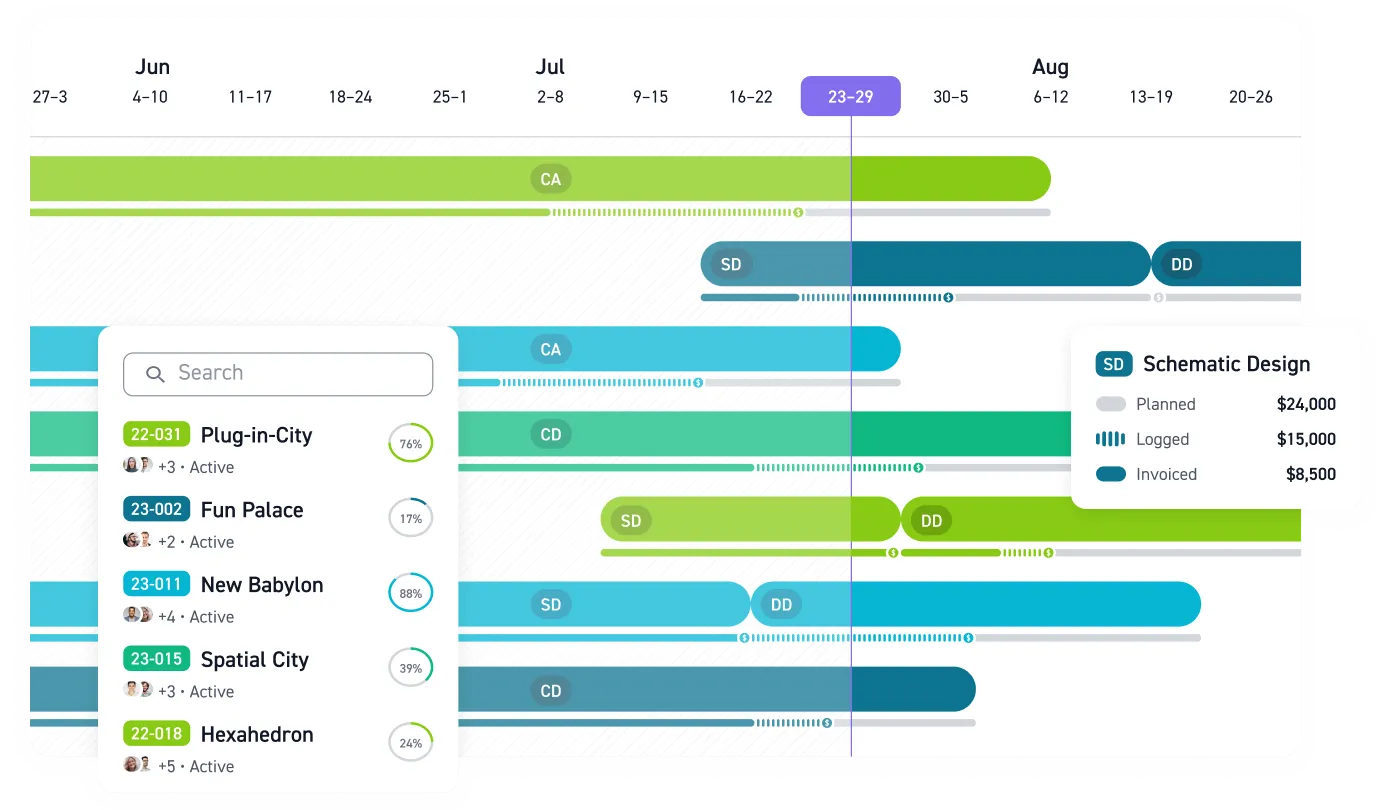
- Phase-based budgeting. Projects structured around SD, DD, CD, bidding, and CA, with fee and hours allocated per phase.
- Forward availability views. Staff availability weeks and months out, accounting for PTO, backlogs, and committed hours.
- Pipeline-connected forecasting. See how a probable win affects workload before you sign the contract.
- Connected time tracking. Phase-level entries that flow into profitability, billing, and staffing views instead of living in a separate app.
- Accounting connection. A QuickBooks Online connection helps keep billing-related records, such as invoices, expenses, consultant bills, and clients, in one place.
- Consistent utilization math. One firm-wide denominator, enforced by the system, so different managers can't calculate different rates from identical hours.
Internal comparisons fall apart unless everyone uses the same method.
The Benchmarks to Plan Against
Monograph shows the 75-90% utilization sweet spot high enough to stay profitable while leaving room for non-billable work. Sustained rates above 90% utilization risk burnout and underinvestment, while below 60% utilization signals significant unfilled capacity.
The 2026 Architecture & Engineering Business Benchmarks Report found operations staff run at 84% AI-adopting utilization, versus 81% baseline utilization. Beyond AI spending, tech-forward firms rate their resource-management processes as very mature at roughly double the rate of tech-static peers.
Where your firm sits inside that range changes what you do next. If you're below the floor, chase the pipeline and rebalance people onto the work you already have before you talk about layoffs. If you're brushing up against the ceiling, treat it as a warning. The comfortable middle gives you room to absorb a scope change without a crisis.
Planning Around Paused Projects and Seasonal Swings
A project going on hold reshuffles the week for everyone assigned to it. A capacity plan that assumes a flat year drifts out of date because workload rises and falls with the seasons.
Use a few practices to absorb that uncertainty:
- Categorize on-hold projects explicitly. Track why each one is paused and when it's expected to resume, so forecasts weight them by likelihood.
- Start with month-by-month scheduling. Schedule the quarter ahead, compare scheduled hours to actuals, and refine next quarter.
- Rebalance across projects. A common fix is to borrow staff from another project, or even a partner firm, when schedules slip.
- Build in buffer. Plan to a target below your ceiling so an unexpected RFI or scope change doesn't blow up the week.
Software makes these habits sustainable. When hold status, a resume date, and a reassignment live in one system, updating the plan takes minutes instead of an afternoon of spreadsheet archaeology.
Software Options for Small and Mid-Size Firms
Firms typically make the shift from spreadsheets between 20 and 100 employees, though the trigger is usually pain rather than headcount. The current field for small-to-mid-size A&E firms:
- Monograph. Built for small and mid-size A&E firms with QuickBooks Online integration. Monograph's MoneyGantt™ shows budget-to-cash progression alongside the schedule. Pipeline forecasting maps future work to staffing, timing, revenue signals, and firm constraints. Workbench, a 30-person California firm that moved from BQE Core, reported 8x faster staffing, a 4x faster billing process, and 75% fewer unbilled fees after adopting Monograph.
- Factor AE. Includes QuickBooks sync and tools to push the plan forward when a project goes on hold.
- BQE CORE. Built-in accounting and CRM; a fit for firms that want financial control without a third-party accounting dependency.
- Deltek Ajera and Vantagepoint. Ajera offers native project accounting for small-to-mid A&E firms. Vantagepoint targets larger firms with federal compliance needs.
- BigTime. Mid-market professional services tool.
- Runn. Visual forecasting and scenario planning.
The right choice depends on where your pain sits. When project-level fee burn by phase is the problem, a purpose-built A&E platform like Monograph fits. When you need multi-entity rollups and federal compliance, you're shopping in ERP territory.
Getting Started
First, establish a baseline. Calculate utilization as billable hours divided by total available hours, using a consistent full-time-equivalent standard, and include your full staff mix. Excluding principals or part-time staff overstates the number.
Then map demand. Chart hard and soft backlog, confirmed contracts plus high-probability pursuits, against available hours by phase and month. Treat rising backlog as an early hiring signal so recruiting starts before the workload arrives.
Finally, set a review cadence. Markets change too fast for annual planning cycles, so compare planned hours to actuals monthly and adjust early.
Plan Capacity Before the Fire Drill
Capacity problems rarely arrive with a clean warning label. They show up as a paused project restarting the same week a deadline moves, a principal guessing who is available, or a project manager learning too late that the team is already overcommitted.
Monograph gives A&E firms one place to see project budgets, staffing plans, time tracking, pipeline demand, and utilization. Instead of rebuilding the forecast in a spreadsheet every month, your team can see where workload is heading and decide while there is still time to rebalance, hire, or adjust the pipeline.
Your next staffing crunch is already taking shape. See it before it hits. Book a demo.
Frequently Asked Questions
When should an A&E firm move capacity planning out of spreadsheets?
Move when the spreadsheet stops matching reality. If project managers are staffing from memory or rebuilding the plan every month, the firm needs a live system.
What utilization target should we use for planning?
Pick one method and use it everywhere. The exact target matters less than using the same denominator across the firm and leaving room for business development, mentoring, quality control, and administration.
How should we plan capacity when projects go on hold?
Treat paused projects as their own status, not as active work or dead work. Track the expected restart date, likelihood of restart, and staff tied to the project.