



Firm management made easy

Every project manager at an A&E firm knows the feeling: ten projects open, three different design phases happening simultaneously, and no clear picture of where resources are actually going. You're juggling client requests, coordinating with consultants, and trying to figure out which deliverables need attention before something falls through the cracks.
How Kanban Translates to A&E Workflows
Your A&E projects aren't software sprints. They come with building code compliance requirements, professional licensing and seal obligations, and municipal permitting cycles with fixed submittal windows. Many A&E firms implement quality management practices as part of their documented review processes. But these constraints don't disqualify Kanban. They simply require adaptation, particularly through explicit quality control and professional review stages within your workflows.
If you've worked through SD to CA phases, you already understand the flow Kanban follows. The approach aligns with standard AIA phases: Schematic Design, Design Development, Construction Documents, Procurement, and Construction Administration. Rather than forcing continuous flow through arbitrary stages, you can visualize deliverables moving through familiar phase structures while adding explicit review and coordination checkpoints.
Core Components for A&E Implementation
Work-in-Progress Limits
Research from PMI shows that limiting WIP maintains smooth, uninterrupted production flow and allows project teams to unclog resource pipelines.
The benchmark that emerges from industry implementation is three concurrent projects per team or individual. This forces teams to complete active work before starting new projects.
Phase-Aligned Column Structures
Structure board columns to align with standard AIA design phases rather than generic software workflow stages. As KanbanZone's AEC guidance notes, include columns showing: Backlog, To Do, In Progress, Ready to Review (QA/QC), and Done.
A recommended structure integrating AIA phases with quality control:
- Project Backlog - All pending deliverables across projects
- Schematic Design (SD) - In Progress - Active conceptual design work
- SD - Coordination Review - Interdisciplinary coordination checkpoint
- Design Development (DD) - In Progress - Detailed design refinement
- DD - Coordination Review - Structural/MEP/architectural coordination
- Construction Documents (CD) - In Progress - Final technical documentation
- CD - QA/QC Review - Code compliance and professional stamp verification
- Ready for Submittal - Completed deliverables awaiting submission
- Complete - Submitted and approved deliverables
According to AIA's SD guidance, quality checkpoints should verify that documents are coordinated with structural and MEP before advancing. This is why dedicated coordination review columns matter.
Visual Workflow Transparency
Each Kanban card should include: drawing number and discipline identifier (A-101, S-201), project phase and responsible team member, due date aligned with submittal schedule, review requirements and interdisciplinary dependencies, and professional stamp verification requirements. With this information visible at a glance, bottlenecks surface before they derail submittal deadlines.
Connect these visual elements to your existing QA/QC processes. When everyone can see what's stuck in review versus what's actively being designed, coordination meetings become shorter and more productive.
Addressing A&E-Specific Challenges
Managing Project Pauses
Projects pause constantly. Client funding stalls, permits get delayed, scope changes require renegotiation. You know how this goes.
Create an "On Hold" column to keep paused work visible without cluttering active lanes. Categorizing pauses by type helps you track without losing project context. This includes waiting on client decisions, pending permit approvals, or budget holds.
Your team stops asking "whatever happened to the Smith project?" because the answer is right there on the board. The visual clarity eliminates the scramble when someone finally asks for a status update on a dormant project.
Equally important is establishing clear triggers for moving projects back to active status. When client funding comes through or permits clear, the project moves from "On Hold" back into the appropriate phase column. This prevents "surprise" reactivations that suddenly demand resources your team has already committed elsewhere.
Resource Allocation Visibility
Your senior engineers and project architects are probably juggling five projects at once with different levels of demand. Portfolio-level Kanban boards provide centralized visibility into resource allocation. Individual tasks connect to portfolio-level objectives, helping you see firm-wide capacity across disciplines.
This visibility directly connects to preventing burnout and overcommitment. When principals can see that a structural engineer is allocated across six active projects while another has capacity, rebalancing happens before deadlines slip or quality suffers. Woodhull, a 25-person Maine architecture firm, saved 66% of administrative time and reduced budget overages by 50% after implementing portfolio-wide visibility across their projects. This demonstrates how resource transparency translates directly to financial performance.
The practical application shows up in weekly staffing decisions. Rather than relying on memory or scattered spreadsheets, project managers can pull up the portfolio view and make informed choices about who takes on the next RFI response or which projects need temporary reinforcement.
Multi-Project Coordination
A two-tier approach works well: portfolio-level boards showing all active projects with stage-gate milestones, and project-level boards for detailed task management within individual engagements. Workshop/APD, a 50+ person New York firm, demonstrates this approach effectively. They use portfolio views for leadership meetings while project managers work in detailed boards daily, achieving 50% efficiency gains across their operations. This structure keeps strategic decisions separate from tactical execution without losing the connection between them.
This separation prevents leadership from wading through individual task cards when they need to understand firm-wide capacity. They see project-level status at a glance instead.
The two-tier structure also helps when priorities shift mid-week. If a client accelerates a deadline, leadership can assess impact at the portfolio level while project managers adjust task sequencing in the detailed view. This same structure simplifies client communication. You can quickly reference where their project sits relative to milestones without exposing internal task-level complexity.
Implementation Strategy for A&E Firms
According to PMI change management guidance, around 70% of change initiatives fail without proper change management. Making Kanban work in your firm requires a phased approach.
Start by mapping your current workflow states and documenting existing phase structures. This foundation work typically takes 1-4 weeks and helps you understand where bottlenecks actually occur versus where you think they happen.
Next comes the pilot phase. Select a representative project with engaged team members for initial testing. Run this pilot for 8-12 weeks while gathering feedback from everyone involved. The firms that succeed with Kanban use pilot learnings to refine their column structure before expanding.
Team adoption follows the successful pilot. Expand to additional teams while continuing to gather feedback. This gradual rollout prevents the firm-wide chaos that kills 70% of change initiatives.
Integration with existing systems happens next. Connect your Kanban approach to existing project management systems and fee tracking over months 6-9. This ensures the visual board reflects actual business operations rather than becoming another disconnected tool.
Finally, commit to continuous improvement. Refine workflows based on metrics after full implementation and continuing indefinitely. Moya Design Partners, a 34-person DC firm transitioning from Monday.com, reported 50% efficiency gains during their phased Kanban adoption. This proves that even firms switching from existing project management platforms can achieve significant improvements through systematic implementation.
Frame Kanban as workflow visibility rather than productivity surveillance. The AIA emphasizes that successful implementation requires coaching high-performance teams while respecting creative autonomy. Position Kanban as providing clarity rather than limiting creative processes.
Implement Kanban with the Right Foundation
You understand how Kanban adapts to A&E workflows. Phase-aligned columns, WIP limits that respect design complexity, and portfolio visibility that connects individual tasks to firm-wide capacity. The concepts make sense. Case studies prove it works.
The challenge isn't understanding Kanban principles. It's implementing them without disrupting active projects while your team is already stretched thin across multiple deadlines. You need workflow visibility and resource tracking working together, not another disconnected system adding to the chaos.
Monograph provides the practice management foundation that makes Kanban work for A&E firms. Our platform handles the project tracking, resource visibility, and phase-based organization that Kanban requires without forcing you to rebuild your entire workflow from scratch.
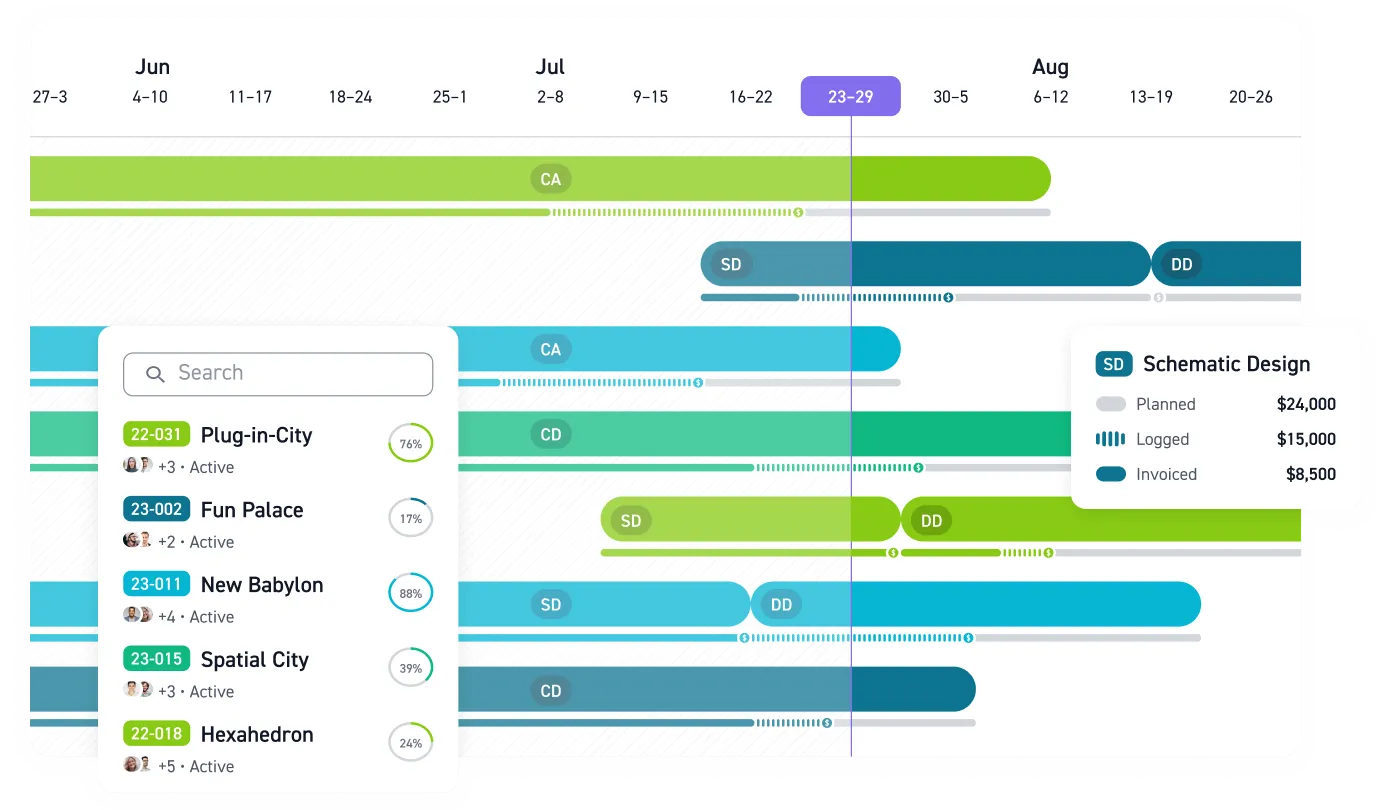
See real-time utilization across projects with our Staffing Table. Track budget progression alongside workflow status with Monograph's MoneyGantt™, our signature feature that combines traditional timelines with budget-to-cash progression (planned, logged, invoiced, paid). Connect project phases to actual financial performance so your board reflects business reality, not just task completion. Monitor which projects are burning budget faster than planned, identify which team members are overallocated, and forecast capacity for the next three months in one unified view.
Over 13,000+ architects and engineers across 1,800+ firms use Monograph to gain the operational clarity that makes workflow systems like Kanban actually effective. Our platform provides the data infrastructure that turns Kanban from a visual board into a decision-making tool that improves both project delivery and firm profitability.
Stop juggling spreadsheets and disconnected systems. See how Monograph supports better project management.
Frequently Asked Questions
Can Kanban really work with the unpredictable nature of A&E projects?
Yes, if you structure it correctly. The key is treating client pauses and permit delays as visible workflow states rather than exceptions that break your system. Create an "On Hold" column and categorize pauses by type: waiting on client decisions, pending permits, or budget holds. This keeps paused work visible without cluttering your active workflow. When conditions change, projects move back to the appropriate phase column without surprising your already-committed team. The 25-30% of projects that are typically paused at any moment become manageable instead of invisible chaos.
How do WIP limits work when every project feels urgent?
WIP limits force the conversation you need to have anyway: which three projects actually deserve focus right now? The benchmark of three concurrent projects per team member comes from firms that tried higher limits and watched quality suffer. When a principal wants to start a fourth project, the question becomes: which of the current three can pause or hand off? That clarity prevents the "everything is urgent" chaos that kills both project quality and team morale. You're not limiting work. You're protecting the focus required to deliver complex technical work properly.
What if our firm is too small to justify dedicated project management software?
Kanban works at any scale. Some of the most effective implementations happen at 5-10 person firms where everyone can see the entire board in one glance. Start with a physical board or free tool to test the workflow. The question isn't whether you need software, it's whether you need the visibility and structure that Kanban provides. Software like Monograph adds value when you want budget tracking and resource planning connected to your visual workflow, not just task management. Even small firms benefit from seeing which projects are profitable alongside which deliverables are complete.
How do we handle projects that span multiple years with Kanban?
Break long-duration projects into phase-based deliverables that move through your Kanban columns. A hospital project might have separate cards for SD, DD, and CD phases, each progressing through its own workflow while the overall project timeline stays visible in your portfolio view. This approach prevents massive projects from becoming invisible blockers that monopolize resources without showing progress. Phase-based cards surface coordination issues before they delay entire phases and give your team the satisfaction of moving work to "Done" regularly instead of staring at a single card for eighteen months.
Should we adopt Kanban firm-wide or can we pilot it first?
Start with one project team or project type where you have an engaged project manager and relatively clean data. Run that pilot for 8-12 weeks, gather feedback, and refine your column structure before expanding. The firms that succeed with Kanban take 12-18 months for full adoption. Rushing firm-wide implementation without learning from a pilot is how 70% of change initiatives fail. Use your pilot to identify what works for your specific workflows, then expand systematically to additional teams. Frame it as a visibility tool rather than productivity surveillance, and let early success stories sell the approach to skeptical team members.