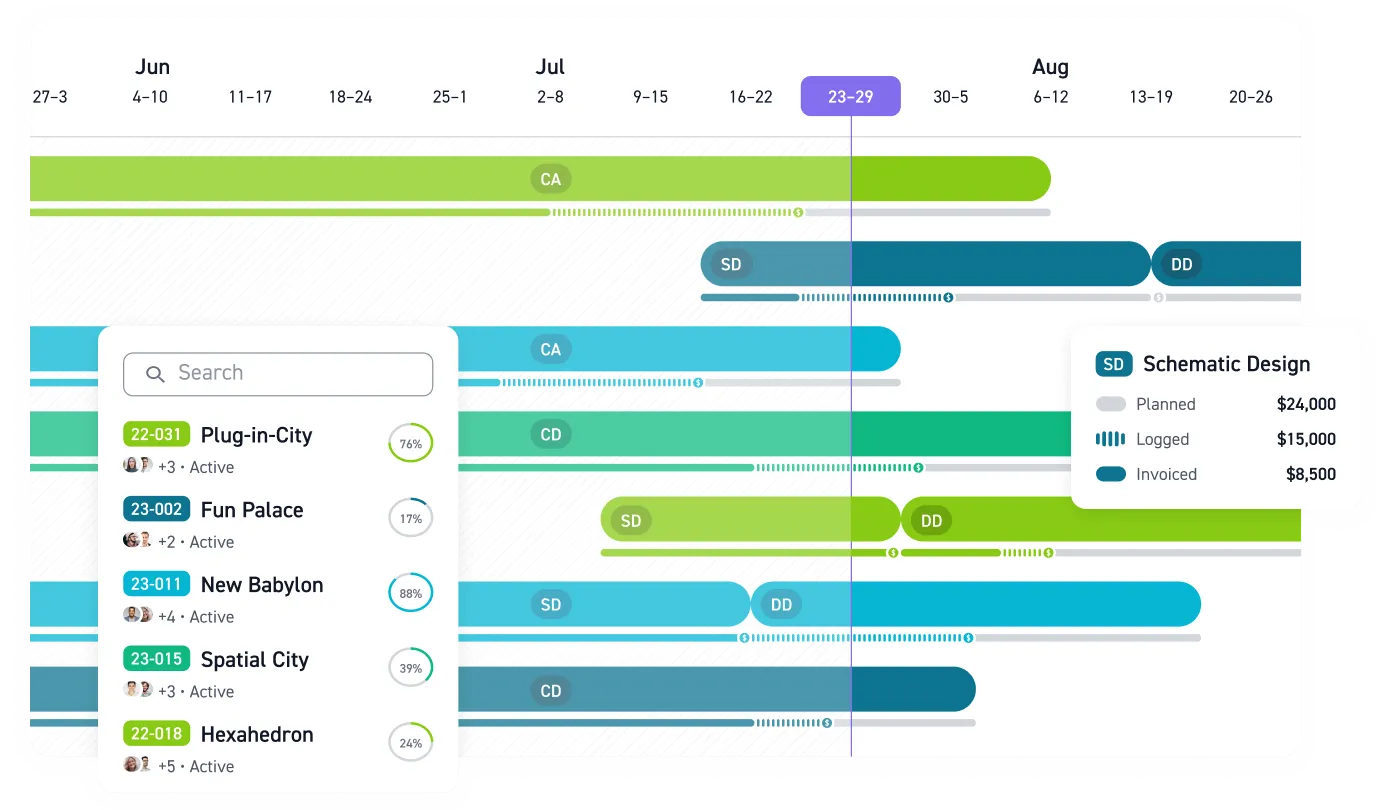

You're juggling a dozen projects, and project status lives in scattered spreadsheets. Principals and project managers can't see resource allocation across concurrent projects, identify which teams are overallocated, or spot schedule issues before they become costly delays.
The financial stakes are real. Average A&E utilization rates hover around 59%, and even small gains in that number translate directly to revenue. Yet fewer than 40% of A&E firms formally train most or all of their project managers, and roughly a third have no formal PM training program at all. Multiply that resource visibility problem across every project in the firm, and no amount of color-coded tabs will fix it.
Kanban for architects addresses this problem directly, offering a practical way to see your entire workload without digging through files and inboxes.
Generic Boards Don't Work for Design Workflows
Kanban methodology originated in manufacturing and gained traction in software development. The basic setup ("To Do," "In Progress," "Done") is simple enough. But A&E projects don't move in clean, linear paths. Design iterations loop back. Client reviews stall. Coordination between structural, MEP, and architectural teams creates dependencies that a three-column board can't represent.
A&E-focused kanban implementations need board structures that reflect how design work actually flows through a firm. The optimal setup uses workflow-stage columns (Backlog, To Do, In Progress, Review/QA/QC, Done) organized with discipline-based cards linked to actual design phases: Schematic Design, Design Development, Construction Documents, Construction Administration.
The AIA's quality management checklists for Schematic Design and Design Development phases spell out what teams must track: performance criteria for principal building systems, code compliance verification, cost estimate alignment, client approval milestones, and coordination between disciplines. Effective Kanban boards mirror these phase-specific requirements, ensuring visual workflow management reinforces the firm's quality management obligations rather than conflicting with them.
A Board Structure That Reflects Real Practice
Clark & Enersen developed a five-column board structure for their multidisciplinary A&E firm that manages over 30 active projects:
- Backlog: Future work queued but not yet started, where paused projects live without consuming team attention
- To Do: Work ready to be pulled into active progress based on team capacity
- In Progress: Active design work underway
- Review (QA/QC): Internal check sets before phase completion, a critical quality gate that generic boards overlook entirely
- Done: Completed and issued work
That dedicated QA/QC column matters. It addresses quality control requirements that generic project management boards skip, turning internal checks from an informal activity into a visible stage every deliverable passes through.
Clark & Enersen takes this further with discipline-specific cards linked to master project cards. Each card represents tasks for one discipline in one phase (architectural tasks in DD, structural coordination in CD) with estimated time effort tied to the deliverable schedule. The master project card includes the Principal-in-Charge, team members, scope summary, project size, phase schedule, budget, priority indicators, and icon-based tokens for visual navigation. This structure gives project managers consolidated visibility across disciplines without losing the granular detail each team needs, while allowing template-based replication across multiple projects.
The Hybrid Approach: Kanban Plus Critical Path
You can't abandon your existing project scheduling framework. Regulatory submittals, permit deadlines, and phase-based fee structures require milestone tracking that Critical Path Method (CPM) scheduling provides. Successful firms use CPM for overall project scheduling and critical path analysis, particularly for regulatory milestones, while applying Kanban principles for day-to-day workflow management within design phases. The two approaches layer together well.
Design doesn't follow a straight line. Client revisions send tasks backward. Coordination cycles create feedback loops. A visual board accommodates that iterative reality by letting cards move between columns without breaking the tracking system, while your CPM schedule keeps big-picture milestones intact.
This hybrid model is the consistent pattern across firms that make visual management work, from Clark & Enersen's multidisciplinary practice to SSOE Group's global project delivery operation.
Seeing Capacity and Getting Team Buy-In
Spreadsheets tell you what happened last week. Visual boards show you what's happening now. Clark & Enersen built two portfolio-level boards to address firm-wide visibility:
- Portfolio Board #1: All projects organized by project phase, providing firm-wide visibility into current staffing workloads
- Portfolio Board #2: Each project in its respective market sector, including columns for internal operational projects and pre-project business development efforts
These portfolio views go to management and marketing leadership, making it possible to project workloads, justify hiring requests, or redistribute capacity before someone burns out.
But the best board structure in the world fails if nobody uses it. A&E project management performance research shows that roughly a third of firms have no formal PM training program, and only 37% formally train most or all of their project managers. When your PMs lack formal methodology training, the tools they use need to be immediately intuitive and aligned with mental models they already have, like design phases. A realistic implementation timeline:
- Weeks 1–2: Design board structure around your firm's actual workflow, select a pilot project, and train the team
- Weeks 3–4: Launch the pilot, gather feedback, and refine columns and card structures based on real usage
- Months 1–3: Gradually expand to additional projects with policy refinement informed by pilot experience
- Month 4+: Cultural embedding, where teams naturally use the system without prompting
The biggest adoption risk isn't resistance to change. The risk is building something nobody references during their daily work. Measure whether architects actually look at the board during their day, not just whether the board exists.
Connecting Visibility to Profitability
Visual workflow management tells you where work stands. But architecture firms running on tight margins need workflow visibility connected to phase budgets, team utilization, and project profitability.
Recent firm survey data put average A&E firm profitability at 13.2% of net billings. At those margins, the difference between knowing a project is "in progress" versus knowing it's 80% through its DD budget with 40% of work remaining can determine whether a project stays profitable.
That gap between task tracking and financial awareness is where standalone boards hit their ceiling and purpose-built A&E practice management systems pick up. One 25-person Maine firm achieved 66% less budget overage and 50% faster billing after connecting workflow visibility to integrated practice management, demonstrating the impact when visual boards link directly to project financials. Firms seeing measurable results connect Kanban principles with integrated practice management, linking workflow visualization to actual project data, phase budgets, and team utilization. When your board shows a card stuck in "Client Review" for two weeks, you want to know immediately how that delay affects your phase budget, not three weeks later when timesheets get reconciled.
Your Competitors Are Already Seeing Their Projects Clearly
While you're hunting through spreadsheets and inboxes for project status, firms across the street are using visual boards connected to real-time financial data. They're spotting budget overruns before they happen, reallocating resources before teams burn out, and making decisions based on current conditions rather than last week's data.
Kanban gives you visibility. Monograph connects that visibility to the project financials that determine whether your firm stays profitable. Visual project management for architects means making the work your team already does visible enough to manage proactively.
The gap is widening. Close it. Book a demo with Monograph.
Frequently Asked Questions
Do I need to abandon my existing project scheduling software to use kanban?
No. The most successful firms use kanban alongside Critical Path Method scheduling. Use CPM for regulatory milestones, permit deadlines, and phase-based fee structures. Use kanban for day-to-day workflow visibility within design phases. They complement each other, and many firms prove the hybrid model works.
How do I get my team to actually use a kanban board?
Structure your board around design phases they already understand: SD, DD, CD, CA. When columns match their mental model, adoption follows. Start with one pilot project, gather feedback after two weeks, and refine before expanding. The biggest risk is building something nobody references during their daily work, not resistance to change itself.
Can kanban work for large, multi-discipline A&E projects?
Yes. Firms like Clark & Enersen use discipline-specific cards linked to master project cards, each representing tasks for one discipline in one phase. Portfolio-level boards provide firm-wide visibility into staffing workloads across 30+ active projects without losing the granular detail each team needs. The key is building a structure that scales through templates, not added complexity.
How do I connect visual project tracking to actual project profitability?
Standalone kanban boards show where work stands but not what it costs. Purpose-built practice management systems like Monograph connect workflow visualization to phase budgets, team utilization, and real-time profitability data. When a card stalls in "Client Review" for two weeks, you immediately see the budget impact rather than discovering it three weeks later when timesheets get reconciled.


.png)