



Firm management made easy

Your P&L tells you whether the firm made money last quarter. It can't tell you which projects made it, which phases lost it, or which client invoices are drifting toward write-offs. Project accounting software closes that gap by treating each project as its own P&L, tracking fees, hours, consultant costs, and profit at the phase level.
For finance managers at small and mid-size A&E firms, this decides whether you close the month from connected project data or reconcile scattered spreadsheets and a general ledger that only sees the firm as a whole.
What Project Accounting Tracks That Your General Ledger Can't
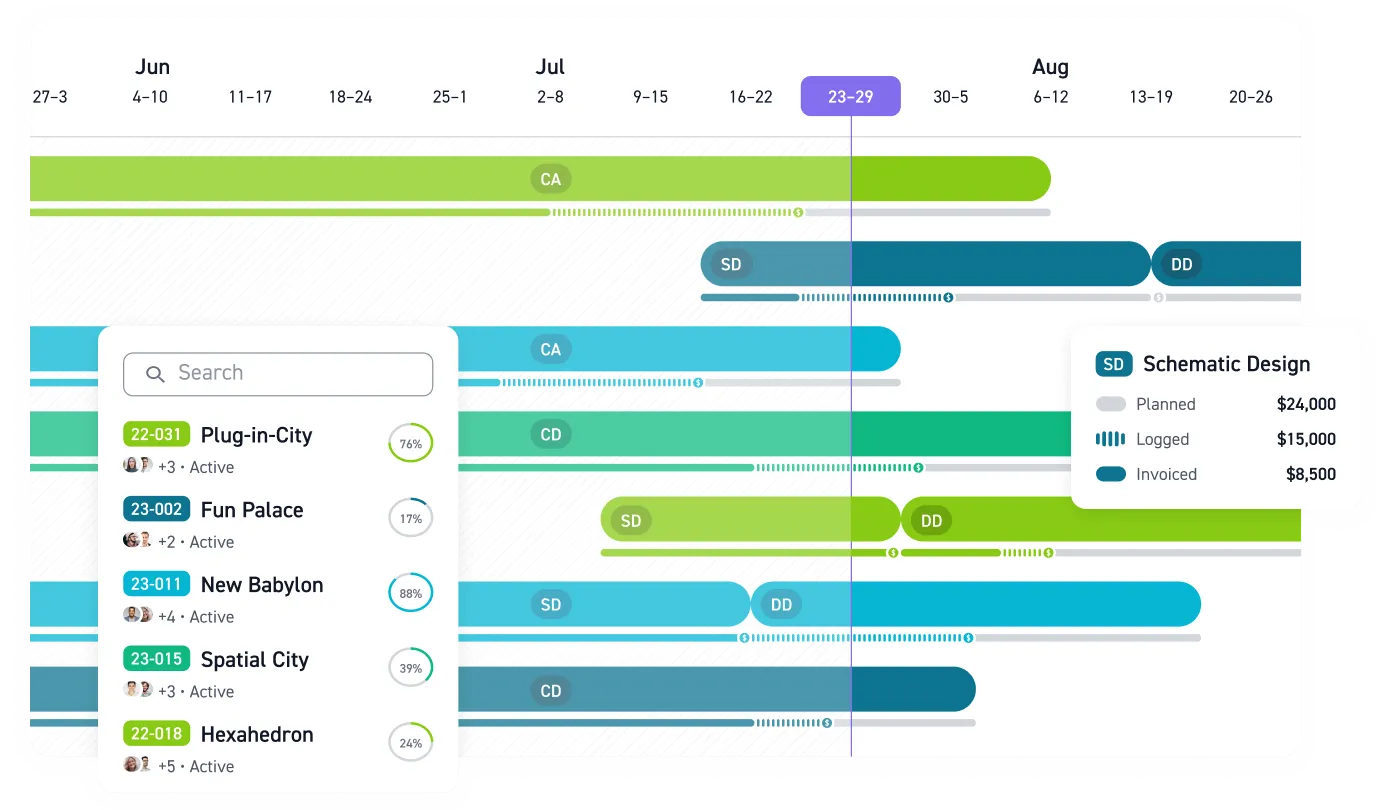
Project accounting shows why a firm made or lost money, phase by phase, which firm-level books never break out. An architecture fee typically splits 15% to schematic design, 20% to design development, 40% to construction documents, and 20% to construction administration, and each phase needs its own budget, burn tracking, and billing. If the team burns through too much of the project-hour budget before design development begins, every later phase starts underwater, and a firm-wide income statement will never flag it.
The net multiplier follows the same phase-level logic: net revenue divided by direct labor can be calculated per phase and per billing period, which generic bookkeeping tools can't do at the project level.
Then there's work in progress: fees you've earned but haven't invoiced. Earned revenue equals total contract fee times percent complete. On a fixed-fee project, earned revenue follows percent complete; if the team has earned more than it has invoiced, that gap becomes unbilled WIP. Paused work sharpens the problem: 28% of firms reported an increased share of projects on hold at the end of 2025, and every paused project freezes unbilled WIP on the books.
Features Finance Teams Should Require
Most of what separates A&E project accounting software from generic accounting tools shows up in a handful of capabilities. Evaluate candidates against these:
- Phase-based budgets that operate as live constraints the team checks during the project, updated as hours post
- Flexible invoicing across hourly, fixed fee, milestone, percentage of construction cost, and retainer billing models
- Consultant fee tracking that connects what you owe consultants to what clients owe you: planned costs, actual fees, markup, billed, and collected in a shared view
- Burn rate visibility, so finance can see spend against what remains to be delivered against the fees still on the table
- WIP and AR aging reports that flag where work is getting done but bills aren't going out
Use this list as a demo script, not a procurement checklist. Ask each vendor to walk through one real fixed-fee project with phases, consultants, time entries, an invoice, and a payment so the workflow matches how your team actually works.
Those reports matter because they give finance, PMs, and principals the same view of project risk before billing or margin problems reach month-end.
What Disconnected Systems Cost
When project data lives in spreadsheets, month-end numbers are already out of date. Inputs arrive inconsistently, formulas break, and finance runs on lagging indicators. When hours get rounded, delayed, or logged to the wrong phase, cost history stops being trustworthy, so the next fee proposal gets built on bad data. Workbench's billing results show how a 30-person California firm previously on BQE Core reported 4x faster billing and 75% fewer unbilled fees after moving to Monograph.
Data from Monograph's 2026 Architecture & Engineering Business Benchmarks Report, built from real platform usage across 13,000+ architects and engineers across 1,800+ firms, breaks project economics down to the phase level that firm-wide books never surface.
Collection speed varies just as sharply. The report shows top firms get paid in about 22 days while low performers wait about 42, a 91% longer wait on every invoice cycle. For a firm where labor costs run regardless of invoice timing, that gap comes straight out of working capital.
Pair QuickBooks Online With a Project Layer
A common setup at small and mid-size A&E firms keeps QuickBooks Online as the accounting system of record for the general ledger, tax prep, and your CPA's workflow, while a purpose-built platform handles the project-level workflows QuickBooks can't: phase budgets, time tracked against fees, consultant coordination, and project reporting.
A two-way sync between the systems replaces manual re-entry. In a typical integration:
- Invoices and reimbursable expenses flow from the project platform into QuickBooks
- Payment information flows back, so project dashboards reflect what's actually collected
- The chart of accounts maps to project-level items, keeping the GL clean
Without that sync, hours get exported, reformatted, and keyed into the accounting system days later. Full ERP replacement is another route, but for smaller firms, enterprise ERPs usually bring heavier setup, IT support, and training overhead that purpose-built platforms avoid.
What to Test Before You Buy
Define requirements before any vendor demo. Then test candidates against criteria specific to A&E practice:
- Does it organize time, budgets, and invoices around design phases rather than generic tasks?
- Is pricing published? Most A&E platforms require a sales quote; Monograph publishes plans at $25–$60 per user per month.
- How heavy is rollout for the people who will use it every week?
- Can non-finance staff actually use it? Run trials with PMs and designers, not just the controller.
- Does data flow automatically between modules? Manual synchronization between a vendor's own modules is a red flag.
The software only pays for itself when the whole team enters time and PMs check budgets. Monograph's A&E benchmark comparison, built for small and mid-size A&E firms, lets you compare your firm against industry benchmarks.
Close the Gap Between Projects and Profit
Month-end should not require a scavenger hunt through spreadsheets, consultant invoices, timesheets, and QuickBooks. If project accounting lives outside daily workflows, finance will always be working from old numbers.
Start by tracing one recent project from proposal to final payment. If the fee, phase budget, consultant bills, time entries, invoice, and payment status live in different places, finance is carrying risk the system should be carrying.
Monograph connects phase budgets, time tracking, invoicing, consultant costs, and QuickBooks Online in a platform built for A&E firms. Principals get a clearer view of profitability, operations leaders can tighten billing cycles, and project managers can see where fees are going before a phase runs out of room.
Review where your project accounting breaks down, connect your project workflows with QuickBooks Online, and see phase-level profitability before the next close. Book a project accounting demo.
Frequently Asked Questions
Do A&E firms still need project accounting software if they already use QuickBooks Online?
Yes. QuickBooks Online should stay your accounting system of record. A project accounting layer tracks budgets, hours, consultant costs, WIP, invoices, and payments against project phases.
What is the first project accounting problem a small firm should fix?
Start with time and budget tracking by phase. Misplaced hours weaken WIP, invoices, profitability, and future fee proposals.
How does project accounting help with fixed-fee projects?
Fixed-fee work stays profitable when you know how much fee remains compared with the work left to deliver. Project accounting software shows burn rate, percent complete, earned revenue, and unbilled WIP.
Should finance managers replace their ERP or add a project layer?
For many small and mid-size A&E firms, adding a project layer on top of QuickBooks Online is cleaner. You keep the general ledger and CPA workflow intact while giving PMs and finance phase-level visibility.
What should we test before choosing project accounting software?
Test weekly workflows: time entry, phase budgets, consultant bills, invoicing, payment tracking, and QuickBooks sync. Include PMs and designers, not just finance.