



Firm management made easy

Your staffing spreadsheet was accurate the day you built it. Then a permit stalled, a client requested a redesign, and booked engineers waited on a consultant deliverable. This is normal A&E operations: resource management ranks second among the biggest project-management challenges at A&E firms, right behind forecasting, and 57% of decision-makers call forecasting their hardest problem.
Workload management software closes that gap by connecting who is working on what to phase budgets, utilization targets, and the project pipeline. Staffing decisions come from live data instead of a stale sheet.
Why Generic PM Tools Miss How A&E Firms Work
Task platforms like Asana and Trello organize around tasks and milestones. A&E work organizes around design phases: Schematic Design, Design Development, Construction Documents, and Construction Administration for architects, with comparable deliverable stages for engineering teams.
- Phase-based staffing intensity. SD, DD, CD, and CA carry different staffing loads, fee allocations, and risk profiles.
- Role-differentiated billable targets. Principals, project managers, and staff carry different billable expectations.
- Pipeline-driven staffing. Staffing decisions often happen before a project is signed, which requires accurate backlog data.
- Person-centric cross-project load. Most A&E staff work on several projects, so a project-by-project view hides each person's real total load.
Utilization, direct labor divided by total labor, is one of the most widely used financial KPIs. Generic tools usually lack billing-linked utilization views for role-specific targets.
What to Look For in the Software
Ask whether a tool connects staffing to money. Purpose-built workload management software adds capabilities a task board lacks.
- Role-based utilization tracking that recognizes different billable targets for principals, PMs, and production staff
- Capacity forecasting tied to the pipeline, so you can see hiring needs before backlog turns into overload
- Phase-based budgets, where assigned hours update fee burn and capacity views across projects
- Person-centric workload views that aggregate each person's load across every active project
- Real-time financial visibility that surfaces an over-budget phase before month-end closeout
For a 100-person A&E firm, a 1% increase in utilization is worth about $225,000 in additional revenue per year.
Role-based utilization shows whether principals, PMs, and project architects are carrying the right load. Phase-based budgets tie assigned hours to fee burn, so moving staff onto Construction Documents shows both capacity drawn down and budget consumed.
Utilization Benchmarks Worth Managing To
The healthy utilization sweet spot runs 75-90%, leaving room for business development, training, and long-term investment. Monograph's 2026 Architecture & Engineering Business Benchmarks Report found that operations staff at firms adopting AI tooling run 84% utilization, versus an 81% baseline at firms that haven't adopted it. Above 90% for weeks means non-billable work is getting cut and burnout risk climbs.
Firms that manage utilization well tend to plan more realistically. The gap between projected and actual staff chargeability widened to 4.0% in 2026 from 2.9% the prior year, so firms are planning higher utilization than they achieve.
Realization tracks how much logged time turns into revenue on fixed-fee work. Firms that never measure it can't tell which project types earn more than their logged hours suggest.
Balancing Work Across Concurrent Projects
A few allocation habits keep multi-project workloads from tipping over.
- Limit each manager's active project load to resource capacity
- Stagger project lifecycles so multiple projects sit in different phases
- Maintain a priority list with a capacity line. Projects above the line get staffed, projects below it wait
- Use a shared resource pool, so an assignment made on one project is visible to every other project drawing on the same people
Rebalance before month-end when permits stall and clients change scope. Resist shuffling staff to chase utilization: high-performance firms prioritize team stability over squeezing out every billable hour. Zweig Group also recommends treating backlog as an early hiring signal: firms with six to nine months of backlog should start recruiting when backlog climbs past target coverage.
When the Spreadsheet Becomes the Bottleneck
More than 90% of spreadsheets contain errors, and those errors stay hidden until staffing or fee decisions expose them. One firm co-founder described disconnected spreadsheets and duplicate data entry costing his practice hundreds of billable hours a year. Firms that implement proper tracking systems consistently improve performance 15-20% within the first year.
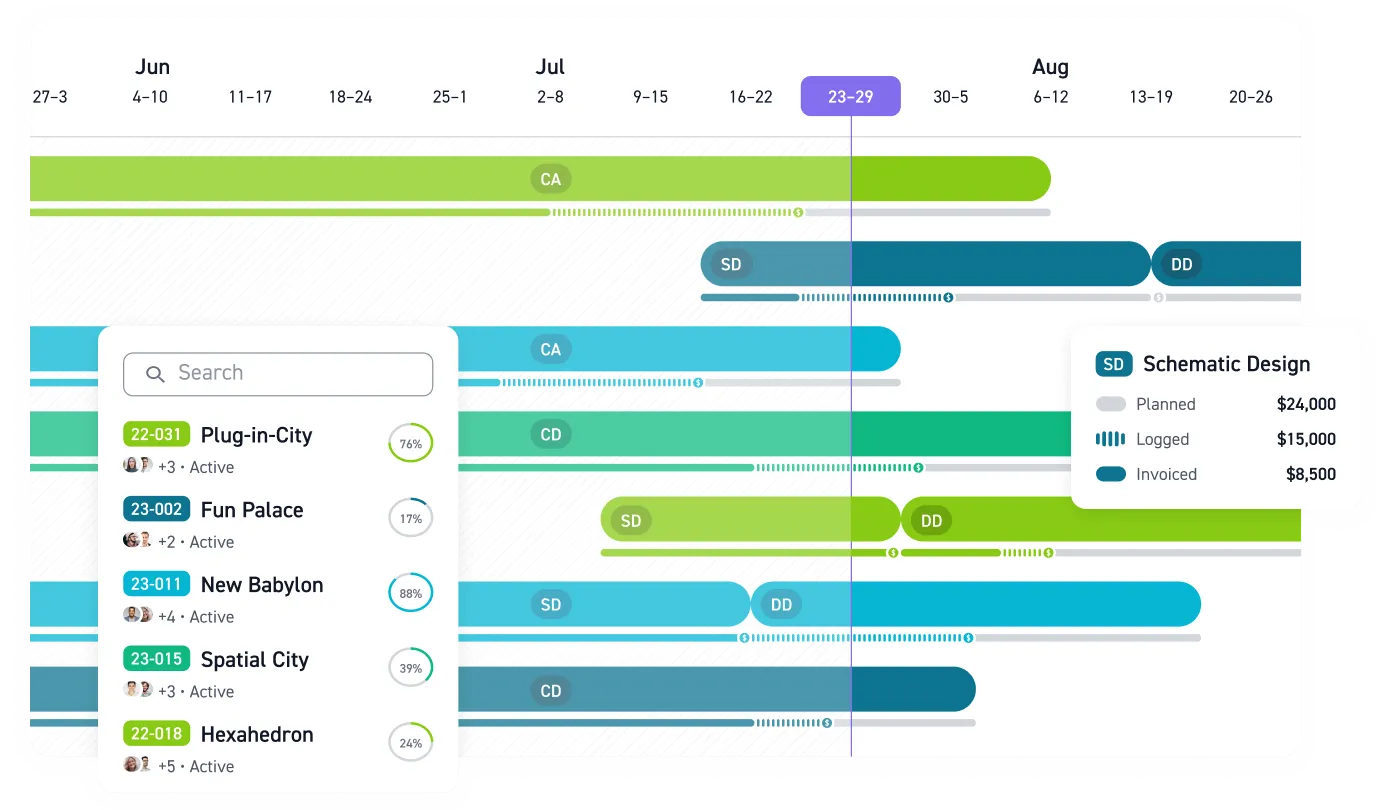
Monograph was built for A&E firms. Monograph's MoneyGantt™ shows project timelines alongside budget-to-cash progression: planned, logged, invoiced, and paid amounts in one visual view. A phase trending over budget shows up while there is still fee left to protect. The staffing view aggregates each person's allocation across projects and phases so teams can see upcoming capacity risks.
Workbench, a 30-person California firm that moved from BQE Core and reported 8x faster staffing, 4x faster billing, and 75% fewer unbilled fees after adopting Monograph.
Time tracking flows into draft invoices, with invoice export to QuickBooks Online, client and vendor contact syncs, and real-cost imports for profit forecasting. 13,000+ architects and engineers across 1,800+ firms use Monograph to manage their work.
Stop Staffing from a Stale Spreadsheet
PMs need a current view of who is overloaded, who has capacity, and which phase is about to burn through its fee. Operations leaders need utilization and realization numbers tied to real project work. Principals need backlog and hiring signals early enough to act before the team is underwater.
Monograph brings staffing, phase budgets, timesheets, invoices, and pipeline visibility into one A&E-specific system. It gives architects and engineers the same practical view of workload that they expect from a good drawing set: clear, current, and detailed enough to make decisions.
Stale staffing data costs real money. See how Monograph helps A&E firms plan capacity. Book a demo.
Frequently Asked Questions
When is a spreadsheet no longer enough for workload management?
A spreadsheet becomes the bottleneck when staffing decisions depend on outdated data. If you keep rebuilding availability, checking budgets elsewhere, and asking PMs for side-channel updates before making assignments, the spreadsheet is no longer giving you control.
Do small A&E firms really need workload management software?
Small firms often need it sooner because an overloaded PM or overrun phase can affect the whole practice. You do not need a heavy enterprise system, but you do need a shared view of assignments, remaining fee, and upcoming work.
How should utilization targets vary by role?
Treat utilization like a role-based planning tool. Principals need time for business development and leadership, PMs need room for coordination and client management, and production staff usually carry higher billable targets.
How do we keep workload tracking from feeling like surveillance?
Make the purpose clear from the start: workload tracking protects people from surprise overload and projects from late budget warnings. Review the data in team planning conversations, not only when someone misses a target.
Does workload management software replace QuickBooks or accounting tools?
No. Workload management software should connect project staffing, time, budgets, and invoicing to the financial picture; accounting software remains the system for accounting records. In Monograph, time tracking flows into draft invoices and selected data syncs with QuickBooks Online.