



Firm management made easy

If you're copying project data from your practice management system into QuickBooks every billing cycle, you already know the problem. You're spending hours on data entry that should take minutes, and by the time your financials are current, the numbers are already stale. For A&E firms managing dozens of active projects, each with unique phases, consultant costs, and billing structures, this disconnect between project data and accounting is more than annoying. It's expensive.
A QuickBooks CRM connection built for architecture and engineering workflows closes that gap. It connects your project reality to your financial records in real time, so your finance team stops reconciling spreadsheets and starts making decisions with accurate data.
Why Generic Accounting Software Misses the Mark
QuickBooks Online handles general ledger, tax preparation, and standard invoicing well. But it doesn't think in terms of schematic design phases, consultant pass-throughs, or percentage-of-completion billing. That's understandable given its general-purpose design.
A&E firms need project-level financial tracking that generic accounting software can't provide. You're billing by phase, allocating costs across consultants and disciplines, and tracking metrics like net multiplier and realization rate. AEC technology benchmarks show that nearly 80% of firms have at least partially integrated their technology systems, with forecasting and system integration now ranking as top priorities for finance teams.
The real value here is pairing QuickBooks with a platform that handles the A&E-specific work, including time tracking, phase-based budgets, and consultant coordination, and then syncing the financial totals automatically. One system for project operations, one for accounting, and a clean connection between them.
The Financial Reality of Disconnected Systems
The numbers paint a clear picture. Recent industry benchmark data shows that 52% of firms report at least one in four projects going over budget. That's a visibility problem, not a design or staffing problem. When your project data lives in one system and your accounting data lives in another, budget overruns become surprises instead of early warnings.
The same benchmark report found that every firm using project management software reported efficiency improvements, a 100% response rate that underscores where the friction lives for firms still stitching systems together manually.
A&E financial benchmarking data highlights four metrics every firm should watch continuously:
- Net multiplier: Net operating revenue divided by total direct labor, a key indicator of how much revenue an A&E firm generates for each dollar of direct labor, typically used alongside other metrics such as overhead rate, utilization, and project profitability to assess operating performance
- Overhead rate: Non-chargeable costs expressed as a percentage of total direct labor
- Utilization rate: Billable (direct) labor hours to projects divided by total available labor hours (typically expressed as a percentage)
- Profit rate: How effectively you complete projects profitably
Calculating these metrics manually from disconnected systems is slow and error-prone. By the time you have the answer, the project may already be off track. A connected system computes them automatically, giving your finance team current data instead of last month's best guess.
What a QuickBooks CRM Connection Should Include
Not every connection is equal. A&E firms need capabilities that go far beyond syncing invoices. Most generic connectors flatten your project structure into simple line items, which strips out the phase-level detail that actually drives your billing and profitability decisions. That's why so many firms invest in a connector only to find it doesn't speak their language.
When evaluating platforms, look for these essentials:
- Bidirectional sync: Project changes should update financial records automatically, and financial approvals should flow back to project status with no manual transfer in either direction
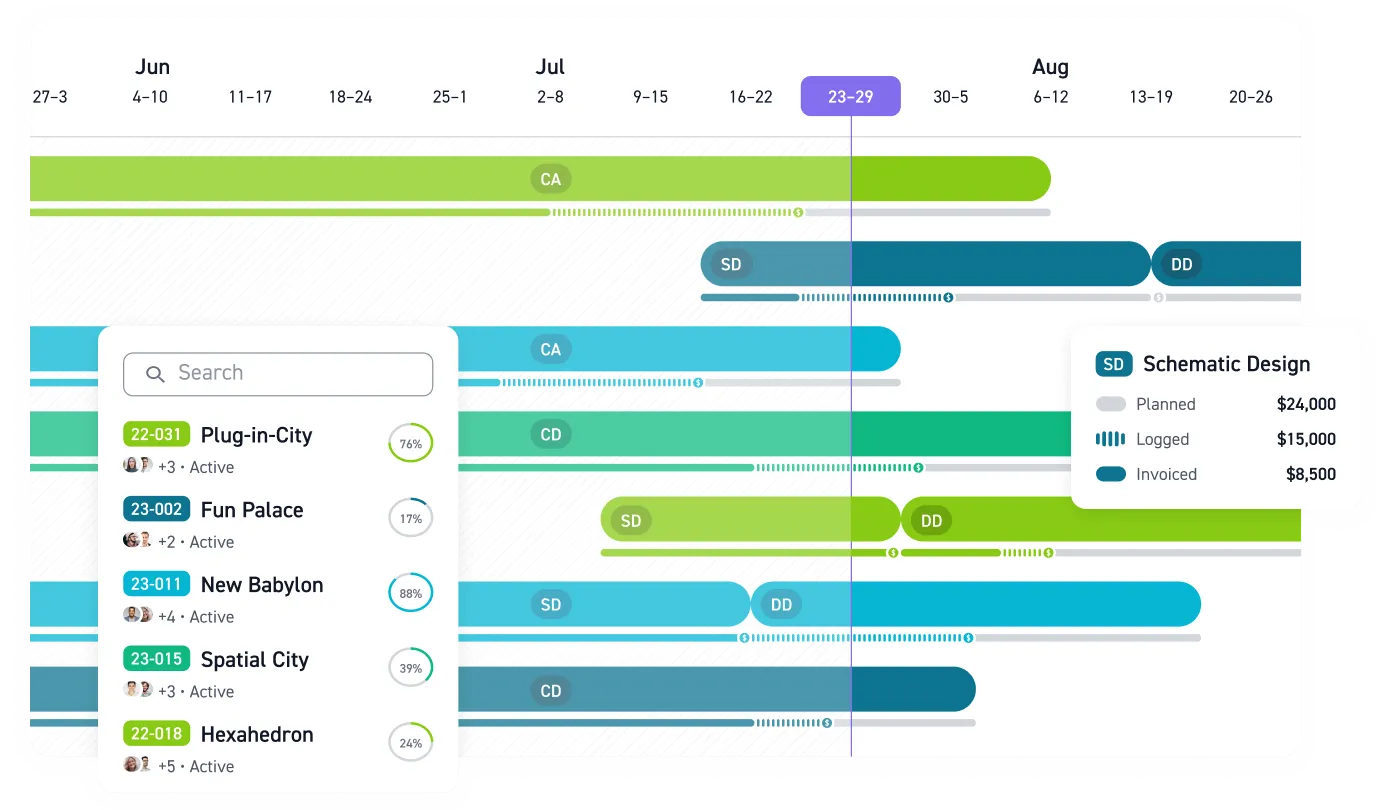
- Phase-based budget tracking: Your connection must maintain schematic design, design development, construction documents, and construction administration as distinct budget categories, not flatten them into generic line items
- Consultant cost allocation: Structural engineers, MEP consultants, and landscape architects each need separate cost tracking tied to the right project phases, with support for both markup and pass-through billing
- Time-to-invoice automation: Approved timesheets should generate draft invoices that flow directly to QuickBooks, cutting billing cycles from weeks to days
These features are the difference between a system that works for professional services in general and one that works for how A&E firms actually operate.
How Monograph Connects Project Data and QuickBooks
This is the workflow we built Monograph around. It manages the A&E-specific work, including project management, time tracking, phase-based budgeting, and consultant coordination, while QuickBooks handles core accounting. The connection keeps both systems current without manual data entry.
The bidirectional sync connects the two systems across several critical workflows:
- Invoices generated in Monograph can be sent to QuickBooks Online via a user-initiated sync
- Consultant bills created in Monograph can be sent to QuickBooks Online, while clients and consultants are kept in sync between both systems
- Client data exports from Monograph to QBO without re-entry
- Expense sync keeps both systems aligned on project costs
On the billing side, Monograph generates draft invoices from approved timesheets, flows phase percentages and consultant costs into those invoices without manual entry, and syncs completed invoices to QuickBooks automatically. The platform maintains phase structures on the project management side while syncing the financial totals to QuickBooks, which is critical when you're tracking five project phases across twenty active projects.
The results speak for themselves. Woodhull Architecture, a 25-staff Maine firm, cut administrative task time by 66% and accelerated billing processes by 50% after adopting connected workflows. Firm data also shows that practices using connected billing systems captured 21% additional revenue on average in their first year by eliminating billing delays.
Getting the Connection Right the First Time
Successfully connecting systems takes planning. Rushing the process creates the same data quality problems you're trying to solve. Firms that get this right tend to focus on a few priorities in sequence rather than trying to flip a switch overnight.
Start by understanding where your current workflows break down. If your finance team can't tell you real-time project profitability without opening three applications, that's your baseline. Define what success looks like before you connect anything. Faster month-end close, fewer manual entries, and real-time project profitability are all reasonable targets.
Getting your chart of accounts right for project-based accounting is one of the highest-leverage decisions you'll make. This is where professional support pays for itself. Migration failures like incorrect balances, broken reports, or inability to track profitability by project are expensive to fix after the fact. If you have historical data to preserve or complex project structures, don't treat configuration as a DIY task.
Before rolling out broadly, pilot the connection on a couple of active projects. Run them through the full workflow end to end, from time entry through invoice generation through QuickBooks sync. Validate the numbers in both systems and gather feedback from the people who'll use it daily.
The biggest risk at this stage is adoption, not technology. Teams that still rely on spreadsheets after implementation represent wasted investment. Train finance staff and project managers separately, focusing on how connected workflows replace their existing manual processes. Then expand in waves, not all at once.
The goal is building a financial foundation where your project data and accounting records tell the same story in real time, without anyone copying numbers between applications. That's how you move from reacting to overruns to preventing them. It's also how your finance team stops closing the books and starts driving the business forward.
Connect Your Projects to Your Profits
If your project data and financial records live in separate systems, you're making decisions based on outdated information. Budget overruns become surprises, billing cycles stretch for weeks, and profitability remains a guess until month-end. This directly threatens your firm's financial stability.
Stop reconciling spreadsheets and start making real-time financial decisions. Connect your firm's operations from project planning to payment with a connection built for A&E workflows. See how Monograph connects to QuickBooks.
Frequently Asked Questions
We already use QuickBooks Online. Why can't we just manage projects there?
QuickBooks is excellent for general accounting but wasn't built for the complexities of A&E project management. It doesn't understand phase-based billing, consultant cost pass-throughs, or metrics like net multiplier. A connection pairs QuickBooks' accounting power with a platform like Monograph that handles the A&E-specific work, giving you the best of both worlds without compromise.
Our data is a mess. How difficult is it to connect systems without making things worse?
This is a common and valid concern. A successful connection requires more than flipping a switch overnight. The key is a phased approach, starting with cleaning up your chart of accounts for project-based accounting and piloting the connection on a few projects. This protects data integrity and allows your team to adapt to the new, more efficient workflow without disrupting the entire firm.
What specific information syncs between Monograph and QuickBooks?
The connection creates a two-way street for your most critical financial data. Invoices and consultant bills generated in Monograph sync directly to QuickBooks. Client and vendor information is kept consistent across both platforms. This eliminates double-entry, ensures your project costs are aligned with your general ledger, and cuts your billing cycle down significantly.