
At A&E firms, some invoices can take 90 to 120 days to be paid. Payroll, rent, and consultant invoices still come due, so the firm covers those costs from reserves until clients pay. Accounts receivable automation shortens that gap: invoices go out when work is billable, and follow-up runs on schedule without a principal spending Friday afternoon chasing balances.
What Slow Collections Actually Cost
Slow collections hit payroll first. Payroll accounts for 60-70% of expenses at most A&E firms, so a receivables gap becomes a payroll-funding problem. A documented case shows a 12-person firm needed a $200,000 payroll float before its first client payment arrived.
When labor is most of your spend and clients pay months after work is done, the firm becomes a bridge lender for its clients. Monograph's 2026 A&E Business Benchmarks Report found that top firms get paid in 22 days, average firms in 34 days, and low performers in 42 days.
The collection side is deteriorating even where billing improves. A&E firms now bill faster but collect more slowly, which forces leaders to lean on lines of credit and delay other investments while cash sits in receivables.
What Accounts Receivable Automation Does
AR automation pulls from timesheets, phase budgets, and QuickBooks records to generate and send digital invoices, match payments, and keep reminders moving without anyone drafting emails.
For a project-based firm, the workflow usually includes:
- Invoice generation built from approved time entries, phase budgets, and expenses instead of manual assembly
- Scheduled payment reminders that escalate in tone as an invoice ages
- Online payment links embedded in the invoice email, covering ACH and card
- Automatic reconciliation that matches payments to invoices and marks them paid in your accounting system
- Real-time aging reports that flag invoices approaching or past due
The billing cycle becomes a review step. Finance checks draft invoices built from live project data rather than piecing them together from timesheets, spreadsheets, and email threads.
Why Generic AR Tools Miss A&E Billing
Most AR software was built for companies that ship a product and send a simple invoice. A&E billing follows contract structures those tools rarely handle. Under standard AIA agreements, invoicing runs on percentage of completion of active phases, typically monthly, and that is only the start of the complexity:
- Phase-based fees billed on percent complete against each phase's allocation
- Consultant invoices passed through to clients with a contractual markup
- Fixed fees, hourly work, retainers, and reimbursables mixed on a single invoice
- Unbilled work in process that quietly loses value as it ages
That last item is easy to miss. Most A&E firms track AR but few track WIP, even though WIP is unbilled receivables. A billing discipline problem gets misdiagnosed as a collections problem. Project managers hesitate to send a large invoice for work done months ago because they know the client will push back, and every write-off cuts net revenue without cutting the labor cost already spent.
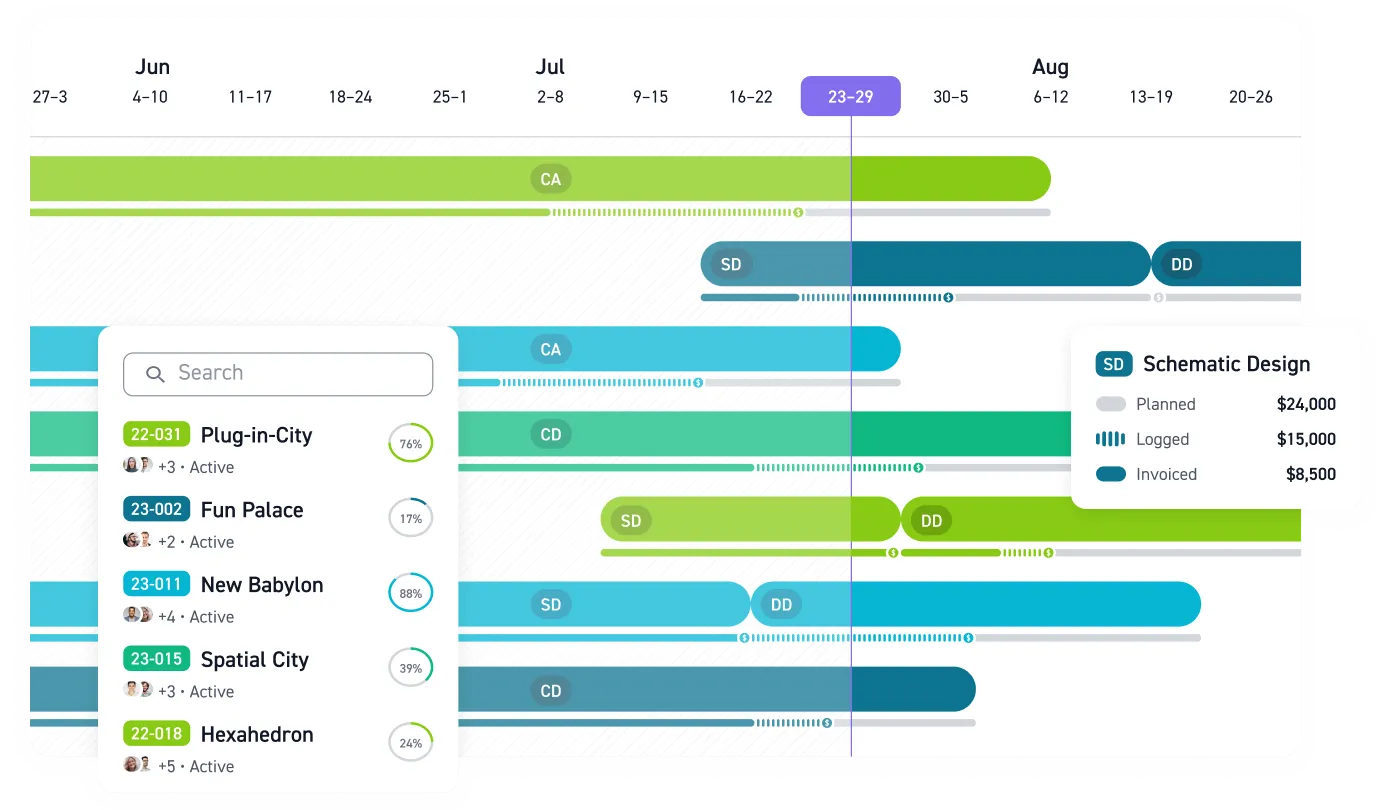
Discipline-specific software closes this gap. Monograph generates draft invoices from approved timesheets and phase budgets, with clear breakdowns of fixed fees, hourly work, consultants, and expenses, and firms using Monograph finish billing 2x faster. Garrison Architects, a New York firm that moved from ArchiOffice, reported a 1.5x faster billing process and 2.5x faster time-to-payment after adopting Monograph. Monograph's MoneyGantt™ pulls project fees and logged hours into a color-coded timeline, so billing progress across phases is visible before you draft an invoice.
Faster Close, Cleaner Books
The same connections that speed invoicing compress month-end. When Monograph pairs with QuickBooks Online, the workflow is clear:
- QuickBooks handles the general ledger and chart of accounts
- Monograph tracks budgets, staffing, and profitability by project
- Invoices, payments, consultant bills, and client data sync between the two without re-entry
Payments through integrated Stripe mark the QuickBooks invoice paid automatically.
Unbilled work is the close risk this catches early. One project-based firm showed $400K profit through November, then watched $150K vanish after the year-end WIP adjustment corrected untracked overbilling.
Regular WIP review inside the same system that generates invoices prevents that kind of December surprise. For government work, many state DOTs require FAR-compliant overhead audits, making timely cost documentation and classification a contract condition.
Where to Start
Automation amplifies whatever process you feed it, so set the process before switching it on. The same playbook separates fast-collecting firms from slow ones across the collections guidance:
- Standardize payment terms, rate tables, and a late fee policy across every contract
- Put the client's internal project number and formatting requirements on invoices from day one; sometimes that alone gets you paid faster
- Set a reminder cadence and stick to it, from receipt confirmation to leadership escalation
- Turn on online payments so clients can pay directly from the invoice email
- Review AR and WIP aging on a regular cadence, and treat stale balances as a leadership conversation
Getting paid faster starts with a process the firm follows every time. Automation is how a small firm without a dedicated AR clerk follows through. Connect your time tracking, phase budgets, and QuickBooks, set the billing cadence, and send an automated invoice this cycle.
Get Paid Before Cash Gets Tight
Manual billing breaks down in the same places every month: missing time, unclear phase progress, late consultant costs, and follow-up that waits for a free afternoon. A&E firms do not need more pressure on principals or project managers. They need billing work to move with trusted project data.
Monograph connects timesheets, phase budgets, invoices, payments, QuickBooks, and WIP visibility for A&E billing. Your team can review invoices instead of assembling them, send payment links without extra steps, and see overdue balances before they become payroll pressure.
Build a receivables process your team can follow every month. Book a demo.
Frequently Asked Questions
What should an A&E firm automate first in accounts receivable?
Start with invoice generation and reminders. Build draft invoices from approved time, phase budgets, expenses, and consultant bills instead of rebuilding them by hand. Then reminders and online payment links keep collections moving.
Will AR automation work with percentage-of-completion billing?
Yes, if the system understands phase-based A&E billing. Generic AR tools struggle when one invoice includes percent-complete fees, hourly work, retainers, reimbursables, and consultant markups.
How do automated reminders avoid damaging client relationships?
The cadence matters more than the automation itself. Confirm receipt, follow up professionally as invoices age, and escalate only when the balance needs leadership attention. Clients usually respond better to predictable follow-up than to silence followed by a tense email months later.
Do we still need QuickBooks if we use AR automation?
Yes. QuickBooks should remain the accounting system for the general ledger, chart of accounts, and financial reporting. AR automation handles the project-side work and syncs payments back so the books stay clean without duplicate entry.
How does WIP review connect to accounts receivable?
WIP is work you have earned but have not billed yet, so it is the earliest version of receivables. A regular WIP review helps you bill while the work is fresh, protect revenue already spent as labor, and catch close problems before year-end.