


Does a tracked hour in Toggl Track land against a phase budget and reach an invoice without re-entry? The five tools below are judged on that question, for a team that tracks hours in Toggl Track and rebuilds phase budgets, fees and invoices in a spreadsheet or QuickBooks Online. The time tracking roundup covers a broader list. Monograph is firm management software built for A&E firms and trusted by 16,000+ architects and engineers across 2,000+ firms.
A&E Firms Outgrow Toggl When Hours Stop Reaching the Fee
Toggl Track records time well, but A&E firms still have to connect those hours to phase fees and rebuild billing elsewhere. Its help center defines billable rates and estimates at the project level and fixed fees for the whole project, leaving phase math outside the tool for a firm running a fixed fee from Schematic Design through Construction Administration. Plan details below are current as of October 20, 2026.
Hours that don't connect to phase budgets or fees
Toggl has no phase object. Tasks work as sub-projects with hour estimates, and rates and estimates sit at the project level. A fixed fee is one flat amount for the whole project, on Premium and Enterprise only. You fee a multifamily project at $180,000 and allocate 15% of it to Schematic Design. Toggl can tell you the project has burned 40% of its estimated hours. It can't tell you Schematic Design is 90% spent with the client review still a week out, because the fee and the hours were never split by phase. The phase math then has to happen outside Toggl.
Time and billing in separate systems
Toggl creates invoices from a Summary or Detailed report through Export, as the guide to creating invoices explains. Toggl's invoicing documentation describes no progress invoice. The closest feature is the project dashboard, which charts progress against a fixed fee on Premium and Enterprise plans. Toggl's QuickBooks Online article describes a connection between Track invoices and QuickBooks Online, but its integrations page calls the same connection an older one that Toggl currently doesn't support. Toggl has no phase-progress invoice to send either way, so your bookkeeper still rebuilds each phase-progress invoice by hand.
No forward-looking firm view
Toggl shows each person's capacity for this week and month on paid plans and sells a Capacity Management add-on to extend it. Forecasting and the Profitability report sit on Premium and Enterprise. Toggl's product and help pages describe no pipeline with win probability and no revenue-per-employee report. You need to know in March whether you can absorb the two proposals likely to land in May, and whether to hire before or after. Toggl leaves that question outside the tool, since it holds tracked hours but not phase budgets or proposed fees.
Five Toggl Track Alternatives Compared on Capture, Budgets and Billing
Each row follows a tracked hour after it's logged. Every tool here has a timer, so the phase-budget and invoicing columns decide the switch.
Vendor pricing and help pages are current as of October 20, 2026.
Each Alternative Solves a Different Part of the Toggl Gap
BQE Core and Deltek Ajera close the gap with accounting depth, BigTime closes it at its higher tier, Harvest closes only the invoicing half, and Monograph closes it at the phase, where the hour is logged. Choose by which half hurts your firm most.
Monograph
Monograph is firm management for A&E firms, with the phase as the primary structural unit. Smart Time Tracking spans four capture surfaces: the web timesheet, the desktop timer, the mobile app and the Smart Inbox.
You review candidate entries from your Google or Outlook Calendar activity through Smart Time Suggestions in the web timesheet. You confirm or adjust each one before it counts. Each becomes a phase-level entry only after that review. Mobile descriptions get the same review.
On mobile, you describe the time in your own words ("two hours on the Ridgeline DD structural coordination"), and the app converts it into a structured entry you review. The desktop timer records only after you start it and name the work, and the Mac studio guide covers how firms run it.
When you confirm a suggestion, you record an hour against that project's Design Development budget. You can include that record in the monthly draft invoice.
Standalone trackers let you draft calendar entries but still leave you connecting them to phase budgets elsewhere. Monograph logs the hour against the phase budget when you confirm it. Confirming an entry also updates that phase's burn.
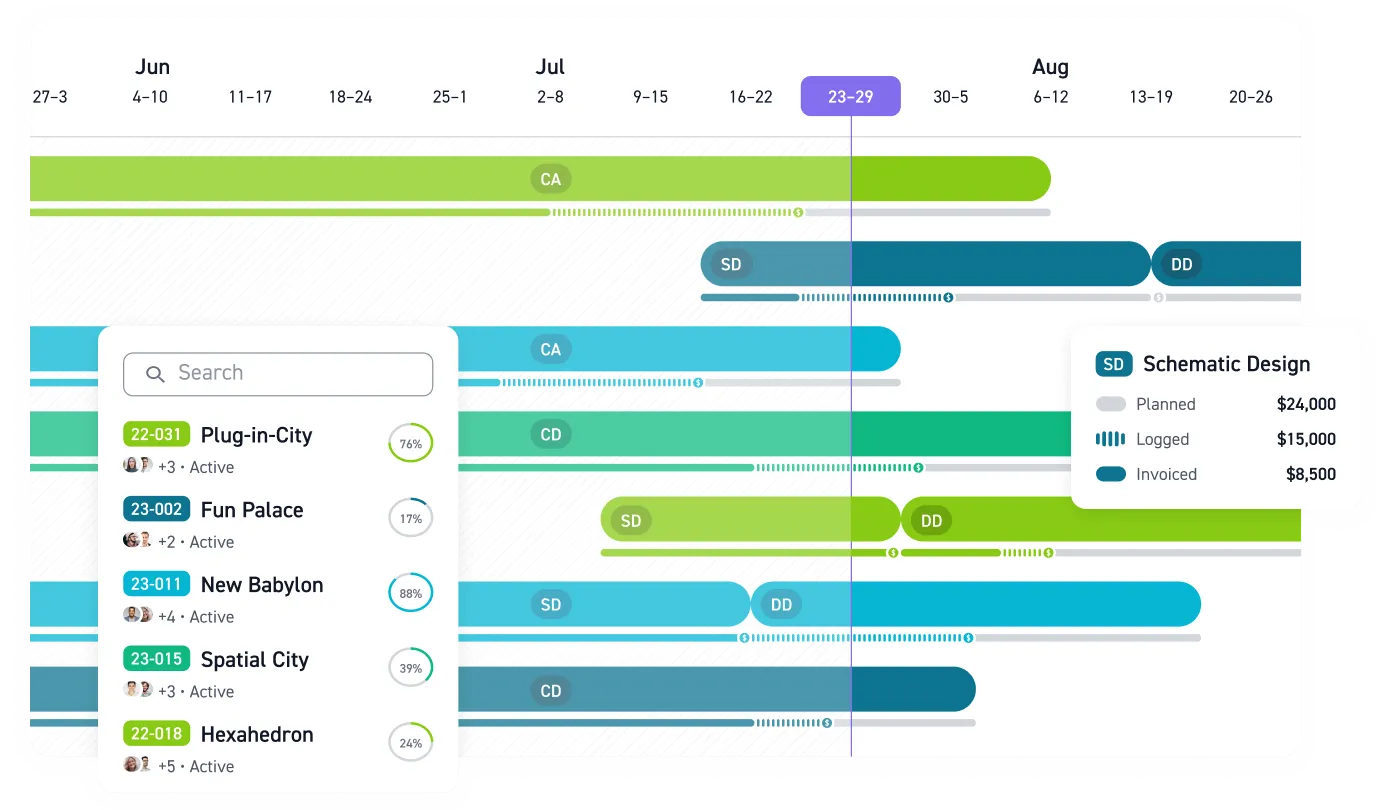
MoneyGantt™, Monograph's signature view, puts the project timeline and the budget-to-cash progression on one screen. You read each phase's burn against its schedule bar. Phase burn changes the moment you confirm a suggestion, and you can review updated profitability without re-keying.
Check these before a demo:
- Firm size: 5 to 100 users.
- Ratings: 4.5/5 on G2 and Capterra, captured September 17, 2026.
- Accounting connection: Connects to QuickBooks Online so project and accounting records stay consistent without re-keying; time entries and payroll do not sync.
- Pricing: Annual subscription with a 5-seat minimum; current plans are linked in the table above.
Monograph vs Toggl Track
The four rows that decide a switch:
Two conditions apply. Smart Time Suggestions need access to Google Calendar or Outlook Calendar, so a firm that keeps project meetings off shared calendars gets fewer suggestions. The desktop timer app asks for system permissions at install. A firm that bills hourly from a single rate, carries no phase budgets and never invoices progress is well served by Toggl's timer and can stay on it.
- Pros: Your team records hours against phase budgets at capture and bills from the same record. You can use the pipeline and capacity forecast to weigh proposed work by win probability and decide when to hire before the backlog arrives.
- Cons: Monograph requires an annual commitment with a 5-seat minimum. Monograph has no general ledger, so you keep QuickBooks Online for accounting.
BQE Core
BQE Core is the most direct A&E competitor and the deepest on invoicing. Its help center documents phases and sub-phases that each carry their own budget, plus nine billing methods including percent complete by phase, so you can bill each phase on its own progress. BQE Core tracks consultants by phase or purchase order, with budgets as another option, and supports pay-when-paid. A firm wanting its ledger in the same system should weigh the general ledger add-on module, which brings payables and receivables. BQE Core converts calendar events to entries, and BQE states that automated artificial intelligence (AI) data entry is not available yet.
- Pros: QuickBooks Online syncs in both directions, and you can track consultant costs by phase. The optional ledger can replace QuickBooks later.
- Cons: Pricing is quote-only, and subscriptions can't be cancelled before expiry. BQE also quotes a migration fee for historical data.
BQE Core fills Toggl's phase and billing gaps:
Deltek Ajera
Deltek Ajera is the choice for a firm leaving QuickBooks entirely. It combines project management with project accounting: the ledger, payables, receivables and bank reconciliation live inside it, and payroll is an add-on. Deltek publishes its QuickBooks Online connection for Deltek Vantagepoint, not Deltek Ajera. Project managers enter percent complete at the lowest phase and review the rolled-up total. Deltek Ajera creates a draft invoice when you save a project, and the invoice updates as staff post time and expenses and enter vendor invoices. A firm under 100 people can find it over-built.
- Pros: Accounting and payroll share one database with phase budgets, and six phase levels suit multi-discipline structures.
- Cons: Implementation runs through a consultant, and the timer doesn't run on mobile. Deltek publishes no pricing.
Ajera replaces Toggl and the ledger together:
BigTime
BigTime provides time tracking and billing for professional services firms. It also tracks projects, with architecture and engineering as one vertical among several. Tasks can be renamed phases, but Project Budgeting appears under Premier on the pricing page, and Premier's price isn't published. Approvals of up to three levels are on Premier too. BigTime includes a QuickBooks Online connection, so your accounting records receive invoices, timesheets and expenses. A Defense Contract Audit Agency (DCAA) compliance add-on exists for firms doing government work.
- Pros: BigTime publishes an entry price and includes QuickBooks Online from the base tier. It also offers milestone and percent-complete invoicing.
- Cons: Phase budgets require Premier, and phases are renamed tasks rather than a phase model. Payments are non-cancelable and nonrefundable.
BigTime closes the budget gap only at Premier:
Harvest
Harvest closes the invoicing half of the Toggl gap for a firm billing a fixed fee. It bills tracked time and expenses alongside fixed fees, and clients pay through Stripe or PayPal. Retainer and recurring invoices are available as well.
Harvest states that phases within one project aren't possible, so you create one project per phase and combine them on one invoice per client. You can choose from five budget types covering hours and fees at project or task level, with hour budgets also available per person.
To bill part of a fixed fee, you edit the unit price. On Enterprise, you can review profitability reports and approve timesheets. The Monograph vs Harvest page and the Harvest alternatives guide cover the Harvest-specific switch.
- Pros: Setup is self-serve, pricing is published, QuickBooks Online and Xero connect natively, and calendar events populate the day view.
- Cons: Harvest has no phase budgets, no consultant tracking and no percent-complete control, with onboarding limited to a 20-minute webinar unless you're on Enterprise Plus or expect 50+ seats.
Harvest lets you invoice tracked time and use one project per phase for budgeting:
Match the Alternative to How Your Firm Bills
Choose by billing model first and firm size second. Check the budget and migration requirements below before switching:
- Fixed-fee studio: A 12-person studio invoicing percent complete by phase needs phase budgets and progress billing at minimum, which rules out Harvest and Toggl.
- Multi-discipline firm with a controller: A 60-person structural firm billing hourly not-to-exceed across three disciplines, with a controller who wants the ledger in the same system, is choosing between BQE Core and Ajera.
- Firm keeping QuickBooks Online: A firm in the 5 to 100 range that wants phase budgets, billing and the forecast in one place while keeping QuickBooks Online for accounting sits in Monograph's core.
Zweig Group's 2026 guide places a shift in software setup somewhere between 20 and 100 employees.
Budget considerations
- Monograph: Annual subscription with a 5-seat minimum, so a four-person studio pays for five seats.
- BQE Core: Quote only, with a Quick Start package aimed at go-live in as little as one day.
- Deltek Ajera: Quote only, with implementation through a consultant.
- BigTime: Only Essentials has a listed price, and the phase-budget tier has none; BigTime's site cites 47 days on average from contract to go-live.
- Harvest: Per-seat prices are published, but on the Flex plan usage charges begin at the second paid renewal, and Harvest's own example rises from $44 to $404.
Price the full first year, onboarding included, at the headcount you expect in month twelve.
Migration considerations
Toggl history leaves as comma-separated values (CSV) on paid plans only. The Free plan exports PDF only, and reports have a one-year maximum. Toggl's application programming interface (API) doesn't require a paid plan. BQE Core, Harvest, Deltek Ajera and BigTime have no documented Toggl-specific importer:
- BQE Core: accepts up to 1,000 time entries per CSV.
- Harvest: imports time by CSV, with people created first.
- Deltek Ajera: expects a Phase ID column in its time import.
- BigTime: ties import capability to the file's structure.
The real work is mapping Toggl tasks and tags to phases, a one-time decision about what each tag meant. Monograph's guided onboarding supports firms moving from spreadsheets and standalone trackers.
See Smart Time Tracking Tie Your Hours to Phase Budgets
Spreadsheets and disconnected time trackers hide the relationship between project work and firm finances. Monograph connects pipeline, phase budgets, staffing, timesheets and billing in one record, so a confirmed calendar suggestion reaches the phase budget, the invoice and the forecast without re-entry. Book a demo of Smart Time Tracking and phase-level budgeting.
Frequently Asked Questions
What are the best Toggl alternatives for architecture firms?
Five tools replace Toggl for architecture firms: Monograph, BQE Core, Deltek Ajera, BigTime and Harvest, listed by how far a tracked hour travels toward the fee. Monograph is the direct replacement for a fixed-fee studio of 5 to 100 people, with phase budgets and percent-complete billing by phase. It also offers calendar suggestions you confirm. BQE Core suits firms wanting accounting modules, and Ajera suits firms leaving QuickBooks. BigTime requires Premier for phase budgets, and Harvest has no phase budgets at all.
What are the best Toggl alternatives for engineering firms?
The same five tools apply once you filter for multi-discipline coordination. Mechanical, electrical and plumbing (MEP), structural and civil firms with subconsultants should weigh BQE Core for consultant tracking by phase with pay-when-paid, Ajera for six phase levels, and BigTime for three-level approvals and its DCAA add-on. Monograph covers the same ground at the phase level with consultant pass-through billing and capacity forecasting weighted by win probability. The engineering time tracking roundup goes deeper.
Which Toggl alternative connects tracked time to invoicing?
All five connect tracked time to invoicing, and the difference is whether the invoice knows about phases. Monograph bills phase progress from the record the hour was logged to, collects client payment through Stripe and connects to QuickBooks Online. BQE Core bills percent complete by phase and syncs with QuickBooks Online, while Ajera drafts invoices inside its own ledger and has no native QuickBooks Online connection. BigTime bills approved time by milestone or percent complete, and Harvest invoices from timesheets. Choose the tool whose invoice follows the phases your firm bills by.
Can I migrate my historical time entries from Toggl?
Yes, you can migrate by CSV from a paid Toggl plan. The Free plan exports PDF only. BQE Core and Harvest document CSV time imports, as does Deltek Ajera. BigTime ties import capability to the file's structure. Monograph's guided onboarding supports teams coming off spreadsheets and standalone trackers.
Do any alternatives capture time without a manual timer?
Yes, Monograph drafts entries as suggestions you confirm. It surfaces candidate entries from Google or Outlook Calendar activity in the web timesheet. Each becomes a phase-level entry only after you confirm or adjust it, and mobile descriptions get the same review. BQE Core converts calendar events to entries, Harvest adds them to the day view, Ajera's Timesheet Assist pre-fills from recent projects, and BigTime lists a Time Agent as coming soon. None is passive app logging, a category Monograph doesn't build. The comparison of automatic trackers, timers and smart suggestions explains the distinction.