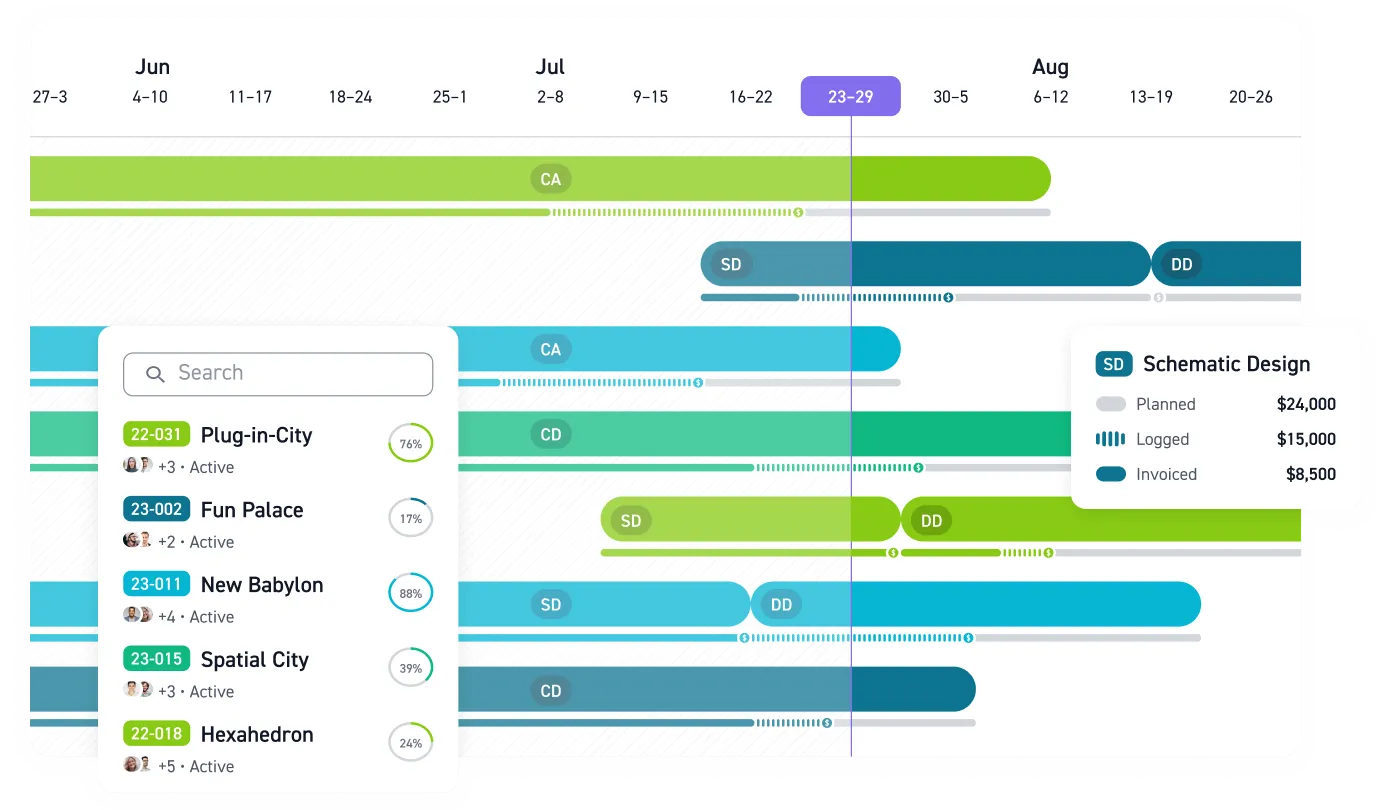


A fixed-fee project can look healthy through Schematic Design and be underwater by Design Development. If your budget report arrives monthly, you learn after the damage is done. Budgeting software for A&E firms exists to close that reporting lag. Fees are allocated by phase, labor drives most cost, and every hour past the estimate comes straight out of margin. Generic tools treat a project as one cost pool, but your budget tracking has to work at the phase level.
Where Spreadsheets Break Down
Field audits found that 94% of operational spreadsheets contain errors, with an average cell error rate of 5.2%. In an A&E firm, those errors live inside the file that decides whether a phase gets more hours or a fee proposal gets underpriced.
The problem runs deeper than typos. As firms grow, proposals, contracts, and invoices end up in someone's memory or a manually updated Excel file, and firms lack real-time visibility into how individual projects are performing. Many can't answer what their margin was on a specific project.
What the Software Must Actually Do
A&E contracts split the fee across sequential phases, and labor drives most phase cost. When burn shows up against the phase a designer is actually working in, and consultant costs land where they were budgeted, PMs have a reason to open the software instead of rebuilding a side spreadsheet.
A generic project tool asks a PM to reverse-engineer phase health from a lump cost figure. A&E budgeting software has to show what that lump figure hides:
- Phase-based fee allocation. Basic services are organized into five sequential phases, with compensation percentages that sum to 100%. That AIA B101-2017 structure means the software has to budget, track, and bill at that level.
- Real-time budget versus actual. When a designer logs time in SD, that burn should hit the SD budget immediately, not appear weeks later.
- Consultant cost tracking. Subconsultant pass-throughs are variable costs in A&E accounting. If the system doesn't track them, someone ends up tracking them manually in a spreadsheet.
- Earned value and burn rate. Dividing fee spent by physical percent complete shows how fast the budget is burning and how much remains.
- PM-accessible dashboards. Project managers need project financials directly, without waiting for accounting to export data.
- Progress billing. Percent-complete invoicing, retainers, and phase-level billing logic that generic invoicing tools can't reproduce.
When those pieces live in the same system, PMs can see phase risk before accounting closes the month.
The Metrics That Catch Overruns Early
Percent spent and percent complete are separate numbers, and the gap between them is the earliest honest signal you get. When percent spent runs ahead of percent complete, the project is burning fee faster than it produces deliverables. On fixed fee, the difference is pure lost profit. Percent complete should come from the PM's judgment of physical progress toward phase deliverables, not from hours logged.
Read the gap on a live phase. If Design Development has used more of its phase fee than the deliverables justify, the phase is burning fee ahead of the work it produces.
Earned value management formalizes that comparison. Warning signals from earned value have proven reliable early, as little as 15% into a project. If you don't like the number at that mark, act then.
Turn Visibility Into a Weekly Habit
Software only pays off when someone acts on what it shows. Firms that put proper tracking systems in place, even simple ones, consistently improve performance 15-20% within the first year.
A workable review rhythm for a small firm looks like this:
- Weekly: scan active projects for red items and accelerating costs
- Biweekly: catch overruns early and verify invoices align with phase milestones
- Monthly: review budget-versus-actual with all project managers, plus utilization and multiplier
- Post-close: dig into variances, scope creep, and allocation issues
Cash flow follows the same discipline. PSMJ's Circle of Excellence firms collect payment in about 52 days versus roughly 62 days for the median firm. Faster collection starts with budget data that is current when the invoice draft gets built.
How Monograph Structures Phase Budgets
Monograph starts from the A&E phase structure. The Project Planner builds detailed phase budgets from the start of a project, with staff and consultant assignments that sync automatically to weekly timesheets. Logged hours flow into phase burn, draft invoices, and profitability reports without re-entry.
Monograph's MoneyGantt™ overlays phase budgets against actual logged hours and invoiced fees, combining budgets, schedules, and fee consumption in a single view. A project manager scanning that view catches a phase drifting over before the next invoice goes out, not after, while there is still time to adjust staffing plans, scope, or billing.
The platform handles the workflow around that view:
- Automated budget notifications when phases approach budget limits
- Draft invoices generated from approved timesheets, with phase percentages and consultant costs flowing in without manual entry
- QuickBooks Online integration that exports invoices, syncs client and vendor contacts, and brings real costs into Monograph for clearer project profit forecasting, with Monograph as the project management and invoicing layer and QuickBooks keeping the general ledger and tax prep
- Live dashboards showing utilization, burn rate, and margin for every active project
After adopting Monograph, Woodhull reported measurable gains: the firm saved 66% of admin time, made billing 50% faster, and reduced budget overages by 66%. If you want to see how your own phase budgets and burn rates look in one view, a short walkthrough of Monograph shows where your firm stands.
Catch Budget Problems Before the Fee Is Gone
Fixed-fee projects do not give you much room to learn late. If your PMs only see phase burn after month-end, every correction starts after the damage is already done.
Your next overrun is already forming somewhere. Find it early. Book a demo.
Frequently Asked Questions
Why do A&E firms need phase-based budgeting instead of one project budget?
Because fixed-fee projects usually fail at the phase level first. A project can look fine overall while DD is consuming the fee faster than deliverables are moving.
How often should project managers review budget versus actuals?
Weekly for active fixed-fee work. A quick scan spots phases moving too fast, and the monthly review can handle deeper variance analysis and utilization.
Can a small A&E firm move off spreadsheets without rebuilding every process?
Yes. Start with active projects that carry the most margin risk, then standardize phase budgets, time tracking, and consultant cost coding.
How should budgeting software handle consultant costs?
Consultant costs need to be tied to the project phase where they were budgeted, then reviewed with labor burn during weekly checks.
Does project budgeting software replace QuickBooks?
No. QuickBooks should keep the general ledger, tax prep, and accounting record. The project system should give PMs live phase health, then connect cleanly to QuickBooks Online.