

Balancing workload against staff is the hardest daily problem for A&E operations leaders, and most firms still use tools that can't see past Friday.
56% of principals can't see their staffing needs more than a week out, triggering reactive hiring, blown budgets, and exhausted teams.
Resource scheduling software built for A&E firms replaces that guesswork with utilization data, phase-based staffing plans, and capacity forecasts tied to the actual pipeline.
Why Spreadsheets Keep Failing
Small firms buy CAD and BIM tools, then second-guess spending on resource planning software while teams burn hours in custom-built spreadsheets.
Scattered spreadsheets create work for PMs, slow proposals, and push managers to rely on gut instinct instead of data. The numbers are often wrong; field audits found errors in 94% of spreadsheets. Timesheet integrity compounds the problem: when staff charge billable time to overhead to protect a budget, every scheduling decision runs on corrupted data.
What Makes A&E Scheduling Different
Generic project management tools handle task lists. Construction schedulers track critical-path sequences and float.
Neither maps to how a design firm staffs work, because A&E resource scheduling has four structural characteristics that most software ignores:
- SD, DD, CD, and CA phases carry different staffing intensities, so flat project timelines miss phase-specific demand spikes
- Principals, PMs, and staff carry different billable targets and can't be treated interchangeably
- Staffing decisions must happen before projects ramp up, which requires accurate backlog data
- Most A&E staff work across several projects at once, so a project-by-project view hides each person's true total load
In most firms, the picture stays split: the PM knows workload, the owner knows pipeline, the admin sees billing impact, and nobody holds the full picture. Scheduling software earns its keep by assembling that picture in one place.
Features Worth Evaluating
Forecasting is where firms hurt most; 57% of decision-makers name it their toughest project management challenge.
Evaluate each tool by how well it answers the core questions: who is actually available, and what happens to capacity if this proposal lands? Look for:
- Utilization dashboards that combine targets, actuals, and workload trends per person, so overloaded and underused staff surface before delivery slips
- Capacity forecasting that includes tentative pipeline projects and lets you compare staffing scenarios
- Phase-native planning built on SD, DD, CD, and CA rather than generic milestones
- Time tracking tied to phase budgets, split billable versus non-billable, with real-time budget-burn alerts
- Flexibility to reshuffle when change orders, reprioritizations, or a departure hit mid-quarter
The payoff scales with headcount. A 1% utilization improvement is worth roughly $225,000 a year at a 100-person firm, and firms implementing tracking systems improve performance 15-20% within a year.
What Good Utilization Looks Like
Data from Monograph's 2026 Architecture & Engineering Business Benchmarks Report, built from 13,000+ architects and engineers across 1,800+ firms, puts the utilization sweet spot at 75-90%: enough billable work to stay profitable, with a buffer for unexpected RFIs or design changes.
Sustained utilization above 90% risks burnout. Below 60% utilization indicates significant unfilled capacity.
At firms investing in AI tools, operations staff run 84% utilization against an 81% baseline. For a PM or ops lead, that gap is the difference between building the staffing plan and reconciling spreadsheets.
Scheduling Around Paused and Delayed Projects
Pauses are a structural feature of A&E work. In December 2025, 28% of firms reported their share of on-hold projects had increased over the prior six months, and 27% reported more significantly delayed projects reported their share of on-hold projects had increased over the prior six months, and 27% reported more significantly delayed projects. The most common stall driver was a construction budget insufficient for the project, cited by 29.7% of respondents.
A staffing plan that assumes projects proceed on schedule breaks within weeks. A workable cadence:
- Commit people to projects on a regular rhythm, then revisit when phases shift or permits stall
- Review delay and scope-creep patterns before staffing breaks
- Use leadership reviews for hiring decisions, since candidates take time to find and onboard
- Model probable projects as what-if scenarios, then decide whether to hire, bring in consultants, or adjust timelines
A rolling near-term forecast prevents crisis hiring after the team is already overloaded. Re-staffing speed matters too: 35% of leaders projecting 2026 revenue growth cite restarting stalled projects as a major factor, second only to current backlog.
Where Monograph Fits
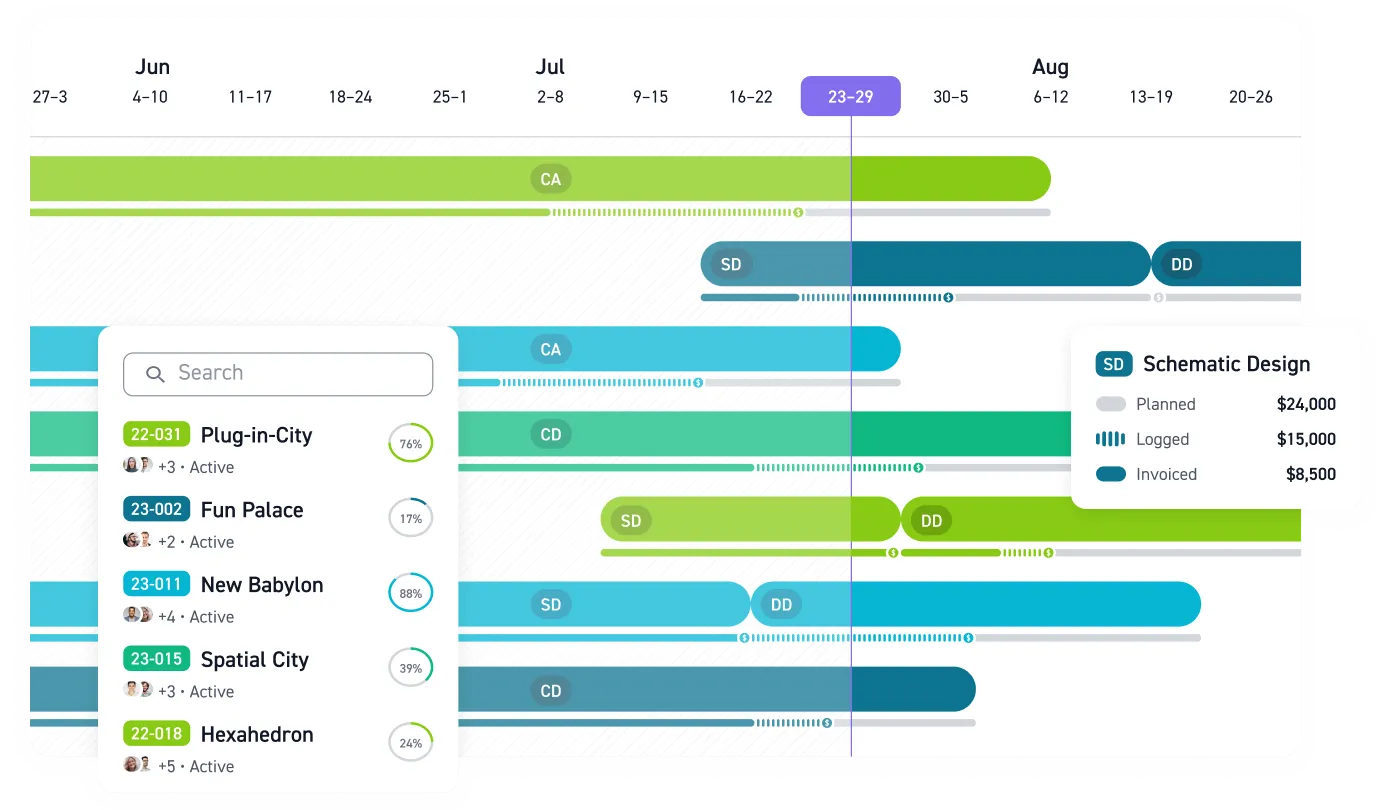
Monograph is a firm management platform built for A&E firms, for studios of roughly 5-50 staff. It connects pipeline, project budgeting, time tracking, and invoicing with QuickBooks Online. Its resource planner lays out team hours, auto-assigns scheduled hours to timesheets, and compares billable hours and utilization against target rates. Capacity dashboards expose over-allocated team members, and pipeline forecasting shows capacity impact by role and month, with SD, DD, CD, and CA phases native throughout.
MoneyGantt™ ties this together by combining the project timeline with fee burn in a single view. Unlike traditional Gantt charts, MoneyGantt™ shows budget-to-cash progression, so a PM can see that the CD phase is burning fee faster than planned while there's still time to rebalance the team.
Results show up quickly in practice. Workbench, a 30-person firm that moved off BQE Core, staffed projects 8x faster after switching. You can compare your firm's utilization and revenue per employee against the 2026 Benchmarks Report cohort to see where you stand.
Make Monday's Staffing Meeting Easier
Your staffing plan changes before the week is half over. A proposal lands, a permit stalls, and the spreadsheet that looked current on Friday starts telling the wrong story.
Monograph gives principals, operations leaders, and PMs one place to see capacity, utilization, pipeline work, and phase budgets together. You can spot overloaded staff before burnout, keep paused projects visible without overcommitting the team, and make hiring or consultant decisions with the near-term pipeline in view.
Your next staffing decision should come from real capacity data. Book a demo.
Frequently Asked Questions
When should an A&E firm move from spreadsheets to resource scheduling software?
Move when the spreadsheet becomes the meeting: principals can't see staffing needs beyond a week, PMs rebuild schedules by hand, or one delay scrambles the team.
How far ahead should we forecast staffing capacity?
Use a rolling near-term forecast. Commit people on a consistent rhythm, revisit the plan when phases shift, and review hiring needs before the team is over capacity.
What should we do with paused or delayed projects in a staffing plan?
Keep them visible, but don't treat them as confirmed work until timing is real. Model probable restarts as what-if scenarios, then compare the capacity impact by role and month.
How do we get staff to keep schedules and time data accurate?
Make the schedule useful to the people entering time. When scheduled hours flow into timesheets and rebalance workloads, staff see the point: fewer weekend fire drills, cleaner phase budgets, and earlier overload warnings.
Do small firms need resource scheduling software?
Small firms need it when people split their week across several projects and the owner can no longer hold the workload in their head. One proposal, resignation, or stalled permit can change the entire staffing picture.