

Design firms wait 65 to 70 days on average to collect payment, with collection periods stretching to 120 or even 180 days in many cases, effectively extending clients a long interest-free loan. Behind those delays sits a mostly manual process: many firms still lean heavily on spreadsheets for accounting and invoicing. If your finance team spends every month rebuilding invoices from timesheets, email threads, and consultant PDFs, you already know how those facts connect.
Manual billing drains cash before you see the problem
Fixed-fee work creates a structural mismatch. Payroll, rent, and insurance hit every month, but invoices wait for a phase to reach percent complete. Firms typically collect only 23% by end of schematic design and 25% by the end of design development. More than half the fee arrives later, when project risk is highest and the early work has long been delivered.
Monthly invoicing adds systematic delay to every billing cycle, and earned-but-unbilled work piles up as WIP the firm cannot spend. The cost shows up at year-end. One firm appeared to have $400K in profit through November. Year-end WIP adjustments then corrected twelve months of overbilling, and $150K vanished in December.
Structural causes drive slow collection: billing is not treated as a first priority, and many firms lack an effective billing system or hesitate to enforce payment terms. Both are process problems, which is where billing automation software starts.
What billing automation software actually does
Billing automation software pulls approved time and expense entries directly into invoices and applies the correct fee logic for each phase, whether the contract is fixed fee, hourly by role, or percentage complete. For an A&E firm, the core capabilities look like this:
- Phase-based invoicing that generates bills from fixed fees, hourly rates, percent complete, retainer balances, or a blend, matching each contract's terms
- Consultant pass-through billing that tracks structural, MEP, and other consultant costs and rolls them into client invoices with markup, instead of reconciling PDFs from email threads
- Automated payment reminders and online payment links, so clients can pay by card or ACH directly from the invoice
- Two-way QuickBooks Online sync that pushes invoices and pulls payment status automatically, with no double entry
Each capability removes a manual handoff, where hours get lost and invoices stall.
Firms that automate billing and follow up on receivables promptly have shortened collection cycles by 8 to 9 days year over year. Median WIP turnover has improved from 22 days to 18 across surveyed firms.
The complexity generic invoicing tools miss
Percent spent and percent complete are separate metrics: one tracks dollars consumed, the other tracks deliverables transferred. On fixed-fee contracts, the gap between them comes straight out of margin, because the firm keeps working without additional compensation once the fee is spent. Old WIP gets harder to recover the longer work sits unbilled too long. A billing system that cannot hold both numbers side by side hides the problem until the phase closes.
A billing system needs these fields together:
- Phase budget
- Percent complete
- Consultant costs
- Change orders
- WIP status
Separate fields turn billing into reconstruction.
Revenue recognition adds another layer. A&E firms run multiple simultaneous contracts with multiple performance obligations over months and years, and each contract needs a consistent measure of progress. Manual workflows fail when change orders, cost allocation, or WIP reporting live outside the billing system.
Generic invoicing tools stop at the invoice. They bill hours, not revenue recognition across phased contracts. Project-based billing structures the firm's financial workflow around how projects accrue work, expenses, and revenue, and the invoice comes out of that structure.
How to evaluate billing automation software
Bring your accounting team in before selection, not after. Decisions made without the bookkeeper or controller frequently surface integration failures only after launch. When you compare platforms, test against the requirements that break generic tools:
- Native contract support for fixed-fee phases, hourly, retainers, not-to-exceed limits, and reimbursables
- Time entry tied to project and phase, with low enough daily friction that staff actually use it
- True two-way QuickBooks Online sync, because one-way exports reintroduce the errors you are trying to eliminate
- Phase-level budget visibility that lets finance and project managers compare planned versus actual hours without exporting spreadsheets
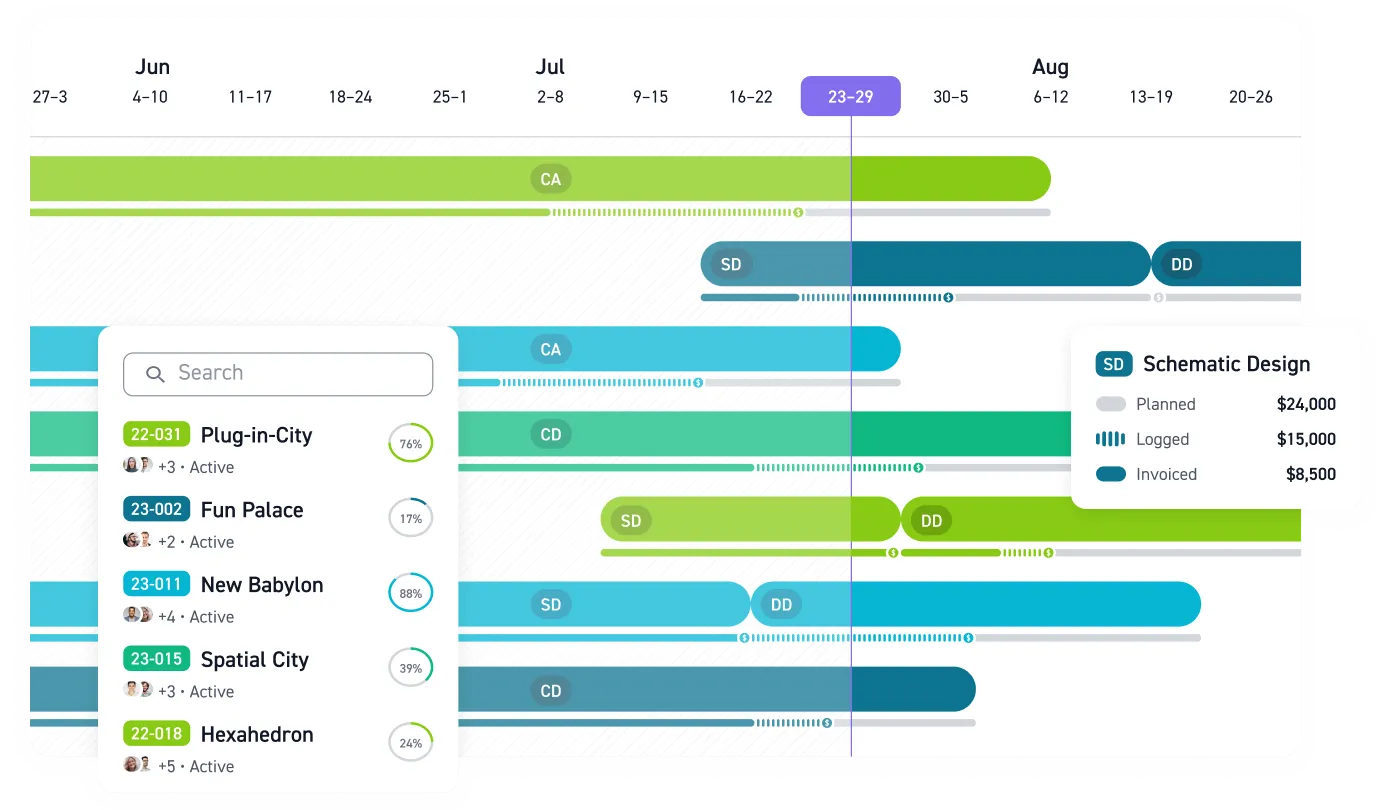
Monograph was built for exactly this evaluation. Monograph's MoneyGantt™ displays scope, schedule, and cash in a single visual, so you can see whether a phase is burning hours too fast or drifting past its fee before the invoice goes out. Approved time flows into draft invoices that sync to QuickBooks Online, and payment status updates on both sides automatically. Workbench, a 30-person California firm, reported a 4x faster billing process and 75% less unbilled fees after moving from BQE Core to Monograph.
Then pilot with one recent project, not a demo dataset. Run it through phased budgets, consultant coordination, and your daily timesheet routine. If a platform cannot handle how that project was staffed, billed, paused, and restarted, it will not hold up across your firm.
Stop Letting Billing Delay Your Cash Flow
Manual billing turns earned work into WIP your firm cannot spend. Every spreadsheet handoff between time tracking, consultant bills, phase budgets, invoices, and QuickBooks Online gives cash flow another place to stall.
Monograph connects approved time, phase-based invoicing, consultant bills, payment status, and QuickBooks Online in one workflow built for A&E firms. Principals, project managers, and finance teams can see what has been earned, billed, and unpaid before month-end turns into a surprise.
Cash flow does not wait for month-end. Use one current project to test whether your billing process can keep up with the work your team has already earned. Book a demo.
Frequently Asked Questions
Can billing automation handle fixed-fee and hourly work in the same firm?
Yes. A&E firms rarely bill every project the same way, so the system needs to support fixed-fee phases, hourly rates, percentage complete, retainers, reimbursables, and blended contracts. Phase-level billing logic keeps each invoice tied to the contract instead of forcing your team to rebuild the math in a spreadsheet.
Is QuickBooks Online enough for A&E billing?
QuickBooks Online is the accounting system of record, but it does not replace the phase-level project logic A&E firms need before an invoice reaches accounting. Your project system should know the budget, phase, percent complete, approved time, consultant costs, and reimbursables first. Then QuickBooks Online can handle the accounting without double entry.
How does billing automation help with consultant invoices?
Consultant bills create delays when they live in email threads and PDFs until someone manually reconciles them. Billing automation ties consultant costs to the right project and phase, then rolls approved costs into the client invoice with the correct markup.
Will automation make our invoices less flexible?
No, as long as the platform is built for A&E contracts. Good billing automation should let you adjust draft invoices before they go out, handle different contract types, and reflect the way your firm actually bills clients. The goal is to remove repetitive reconstruction, not take judgment away from the people responsible for the invoice.