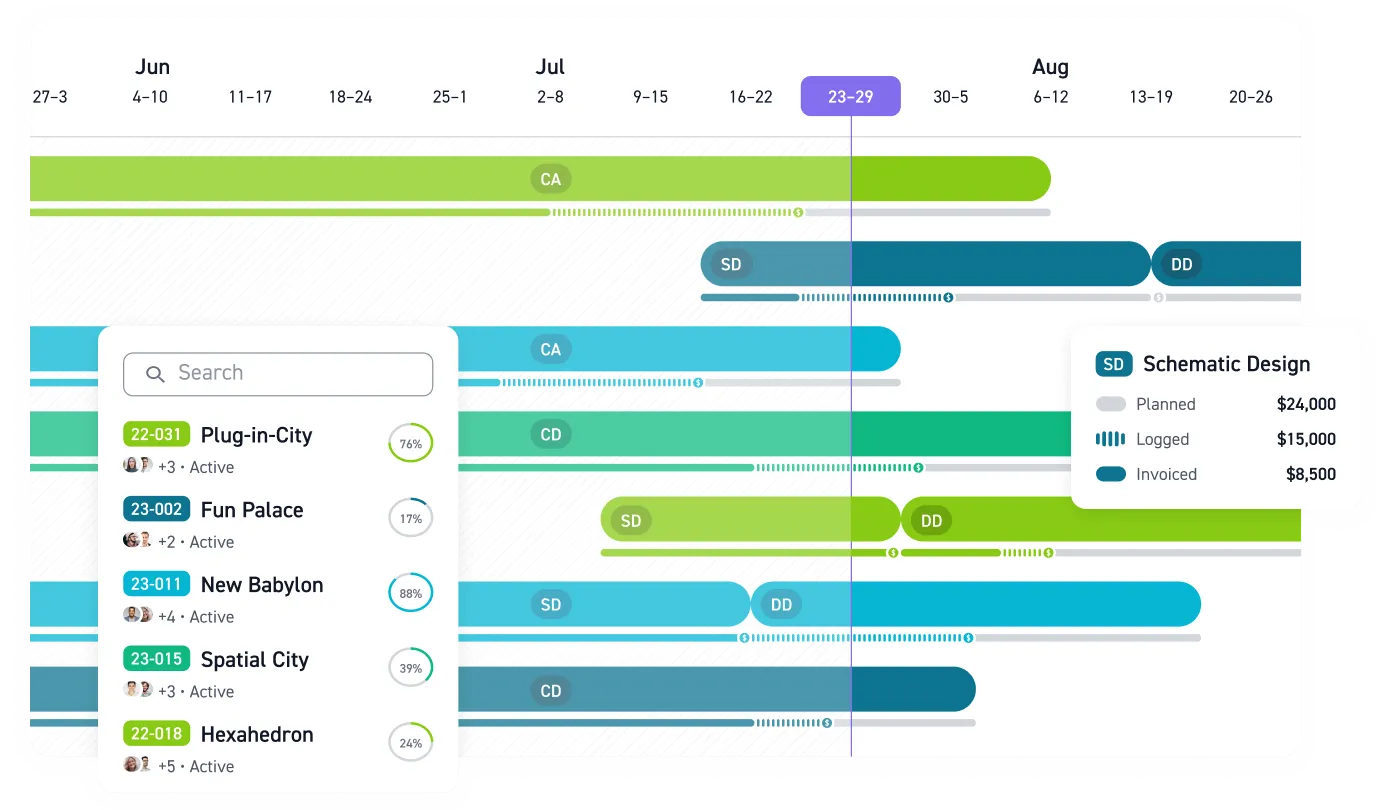


Many A&E project managers plan staffing with names down one spreadsheet column and a mental model of who's free. That works until a hold, scope change, or deadline collision turns the model stale. Resource management software replaces that model with live data: who is working on what, at which phase, against which budget. For a PM running concurrent jobs, that means planning next month, not reconstructing last one.
Why the Staffing Spreadsheet Breaks
A familiar failure: you open the staffing plan to check whether an engineer is free next month, while finance forecasts utilization from last week's version of the same file. By the time they reconcile, that engineer has been promised to multiple pursuits and a kickoff. The spreadsheet fails because A&E work runs on overlapping lifecycles, with design phases, permitting delays, client approvals, and construction schedules moving at different speeds.
Poor resource planning rarely announces itself as a scheduling problem. It shows up as:
- Staff quietly stretching work to stay busy while another team pulls weekends
- Projects drifting over budget because hours land wherever there's room to charge them
- Forecasts nobody trusts, built from stale exports
- The same people over-booked on every pursuit
These symptoms compound as a firm grows. Principals lose line of sight into every project, monthly financials arrive too late to course-correct, and utilization rates become utilization estimates.
What Resource Management Software Actually Does
Generic project management tools organize tasks and deadlines within a single project. Staffing software allocates people, hours, and fees across every concurrent project, which is where A&E firms actually live. Many firms track utilization. The question is whether that view is current enough to act on.
Four realities of A&E work define what the software has to handle:
- SD, DD, CD, and CA carry different staffing intensity, so a flat project timeline hides phase-specific pressure
- Principals, PMs, and production staff carry different billable targets and can't be swapped interchangeably
- Staffing decisions have to happen before projects ramp up, which requires accurate backlog data
- Staff often work across several projects at once, so a project-by-project view hides one person's total load
A tool that misses any of these sends you back to workarounds: side spreadsheets, hallway staffing meetings, and utilization math done by hand.
The Utilization Numbers Worth Managing
Utilization only helps when PMs can see it in time to change the staffing plan. Healthy utilization means enough billable work to stay profitable, with room left for business development, training, and long-term investment. For an engineering PM juggling disciplines and subconsultants, that ceiling is easy to blow past. Once teams run above a sustainable target, they risk team burnout, and the firm underinvests in everything that isn't a deadline.
A PM who checks capacity on Monday can move an engineer off an idle week before it becomes a write-off. A PM who finds out at month-end can only explain it. Real-time dashboards close that gap. Color-coded capacity views show when someone is under-allocated, over-allocated, or within target range, so the fix happens this week instead of next quarter.
On Fixed Fees, Staffing Discipline Is the Margin
Many small A&E firms work on lump-sum contracts. The fee is set, so hours consumed are the only variable left, and every misallocated week comes straight out of profit. Overstaffed teams exceed their budgets because people look for somewhere to charge their time.
Realization rate shows where this leaks. Write-offs and scope creep turn billable time into lost margin, even when a team looks busy on paper.
Utilization alone tells half the story; a team can be highly billable and still unprofitable if the work is underpriced. Good software puts utilization next to phase budgets and realization so you can manage all three levers at once.
Choosing a Tool and Making It Stick
When you evaluate options, test each one against the workflows a spreadsheet can't hold:
- Phase-based budget versus actuals in A&E terms (SD, DD, CD, CA), not generic task buckets
- Real-time utilization by person and role, with alerts when workloads move outside target ranges
- Capacity forecasting that handles project pauses, hold statuses, and expected resume dates
- Billable time tracking, with QuickBooks Online integration
Monograph was built for this list, exclusively for A&E firms. Monograph's MoneyGantt™ puts the timeline and fee burn in one visual, so a PM sees planned, logged, and invoiced amounts for every phase without a second system. Capacity heatmaps expose over-allocated staff before deadlines collide. Workbench, a 30-person California firm, reported 8x faster staffing, a 4x faster billing process, and 75% less unbilled fees after moving from BQE Core to Monograph.
Rollout matters as much as selection. One improvement roadmap treats resource management as four connected areas: people, processes, tools, and culture. Software adopted without the other three stalls. In small firms, staff take their cue from whether the principal embraces it. Firms that follow this path quickly see who is overloaded and which projects are trending over budget.
Stop Staffing From Last Week’s Spreadsheet
Fixed-fee margin disappears when staffing decisions lag behind the work. If your PMs are reconciling spreadsheets, chasing utilization numbers, and finding budget problems at month-end, they are already working with stale information.
Monograph gives A&E firms live visibility into capacity, phase budgets, time, and invoicing in one system built around how architects and engineers work. Monograph's MoneyGantt™ shows planned, logged, invoiced, and paid amounts by phase, while capacity views help PMs rebalance work before overload becomes burnout or idle time becomes a write-off.
Your next staffing decision matters. Compare your spreadsheet process to live capacity planning, then decide what your PMs need before the next deadline hits. Book a demo.
Frequently Asked Questions
When should an A&E firm move from spreadsheets to resource management software?
Move when staffing decisions depend on more than one person's memory. If PMs check one spreadsheet while finance forecasts from another, the system is creating risk. The trigger is concurrent projects, pauses, phase changes, and people split across multiple jobs.
How does resource management software protect fixed-fee project margin?
Fixed-fee margin depends on controlling hours after the fee is set. Resource management software shows planned hours, actual time, and remaining budget by person and phase, so PMs can rebalance work before a phase burns through its fee.
What utilization target should A&E firms manage toward?
Manage toward firm-set targets by person, role, and week. The useful view is not just firm-wide utilization. PMs need enough detail to fix workload problems while there is time.
Will resource management software replace weekly staffing meetings?
No. It should make those meetings shorter and more useful. The software gives everyone one live view of capacity, project phases, and budget pressure, so the meeting can focus on decisions.
How do we get staff to trust the system instead of keeping side spreadsheets?
Start by making the data useful to people entering it. When PMs use the data to prevent weekend crunches, protect budgets, and make workload decisions visible, the side spreadsheets start to disappear.