



Firm management software runs an A&E firm’s work and money in one system: pipeline and proposals, phase budgets, timesheets, invoicing, the QuickBooks Online connection and firm-level reporting. The five tools that compete for that job differ most on pricing transparency, contract handling and utilization reporting. Monograph is the best fit for a 5 to 100 person A&E firm, because it bills fixed fee, hourly, consultant pass-through and retainer work in one portfolio on a phase data model while QuickBooks Online stays the ledger. BQE Core suits firms that want general ledger and payroll in the same product, and Deltek Ajera suits mid-sized firms of 30 to 199 people that are retiring QuickBooks. BigTime suits time-and-materials practices that want a published entry price, and Harvest plus QuickBooks is the baseline most firms start from.
A mechanical, electrical and plumbing (MEP) practice or a structural practice runs more concurrent projects and more contract types than an architecture studio of the same size. Civil practices face the same demands, and these engineering firms also work with more outside disciplines, so contract handling and utilization decide more for them than phase fees do.
Five Tools Cover the A&E Firm Management Market at Different Price Points
Two of the five tools publish a price and two send you to a sales call. Vendor pages are current as of October 20, 2026. Ratings come from the September 17, 2026 G2 and Capterra capture:
Firm Management Software Replaces the Stack Between Proposal and Payment
A 20-person structural firm runs a proposal in Word, a pipeline spreadsheet one partner maintains, hours in a tracker, invoices built in QuickBooks, and a utilization sheet the office manager rebuilds every month from timesheet exports. Firm management software replaces that stack with one system of record for pipeline and work, with billing connected to both. The fee you proposed stays connected to the hours your team logs, and the invoice you send describes the same project.
Six capabilities decide whether a tool is that system or another tracker:
- Phase budgets: Each phase carries its own fee, and hours burn against it.
- Time tracking and billing: Staff log hours to phases, and those hours reach invoices; fixed-fee phases bill by percent complete.
- Document capture: You attach contracts and consultant bills to the project record. Receipts belong there too.
- Client portal: Clients view and pay their invoices online through the system.
- Utilization: The system reports billable share of labor by person and firm.
- Workflow automation: The system generates draft invoices on a schedule and routes them to a reviewer.
Three Criteria Separate These Tools in Practice
All five tools log time and send invoices, so build your initial shortlist around pricing transparency and contract handling. Then compare how you track utilization and carry work through to payment.
Pricing model and transparency
Only Harvest prints a full price list, BigTime prints its entry tier, and BQE Core and Deltek route you to a sales conversation. BQE Core’s pricing page describes per-user pricing by module with a custom quote and no effective date, and a Foundations package comes first before Accounting, customer relationship management (CRM), human resources (HR) or Payroll modules attach. Deltek’s Ajera product page offers to connect you with an expert, and its comparison sheet says pricing is subject to change without notice.
Monograph sells annual subscription plans with a 5-seat minimum. The cost guide for A&E firms covers pricing for each firm-size band.
Phase-based fees and contract types
- Monograph: The phase is the unit everything else attaches to. Budgets, staffing, time and billing all attach to the phase, and billing follows American Institute of Architects (AIA)-style progress billing.
- BQE Core: It documents percent-complete billing by phase and names five contract types, the broadest named set of the five. Entries past an Hourly Not To Exceed (NTE) cap switch from billable to non-billable on their own (BQE NTE behavior).
- Deltek Ajera: It documents percent-complete billing by phase but has no named NTE type. Billing above a time and expense contract amount shows a “Maximum Exceeded” flag the biller can adjust.
- BigTime: It documents task-level percent complete and lets you label tasks as phases. NTE hard caps appear on a marketing comparison page, while its help-center budget article describes no automatic stop.
- Harvest: Its help center states that separate phases within one project aren’t possible, and its budget warnings never block an entry.
Monograph documents fixed-fee, hourly, consultant pass-through and retainer billing within one project or portfolio, but it doesn’t document a named NTE contract type. If capped hourly contracts are most of your book, test that workflow in a demo.
Utilization reporting and pipeline-to-payment flow
- Monograph: Monograph multiplies lead hours by win probability and sets them against each employee’s compensation hours, so you see projected overload before a proposal is signed. Monograph also multiplies proposed budgets by win probability and distributes the result across phase timelines to forecast revenue; none of the other four documents capacity weighted by win probability.
- BQE Core: Utilization by person, office, phase or activity comes from the CORE Insights add-on, and a Forecast Revenue workflow compares estimated and actual revenue by employee.
- Deltek Ajera: It documents an Employee Utilization report against target percentages, and its Project Workload report forecasts remaining phase contract amounts.
- BigTime: Its pricing page lists utilization reports under Resource Management; its help center maps resource allocation to Premier.
- Harvest: It shows team capacity on Teams and sells scheduling separately as Forecast.
Monograph’s QuickBooks Online connection keeps project and accounting records consistent, and time entries and payroll stay out of it. BQE Core and BigTime each document a native connection, Ajera is built to be the accounting system rather than connect to one, and Harvest copies invoices and optional payments into QuickBooks.
How Each Tool Performs for an A&E Firm
Monograph leads for a 5 to 100 person A&E firm that keeps QuickBooks Online. For firms replacing that ledger, BQE Core leads when the product also has to carry capped hourly contracts. Ajera fits mid-sized firms with an accounting lead.
Monograph
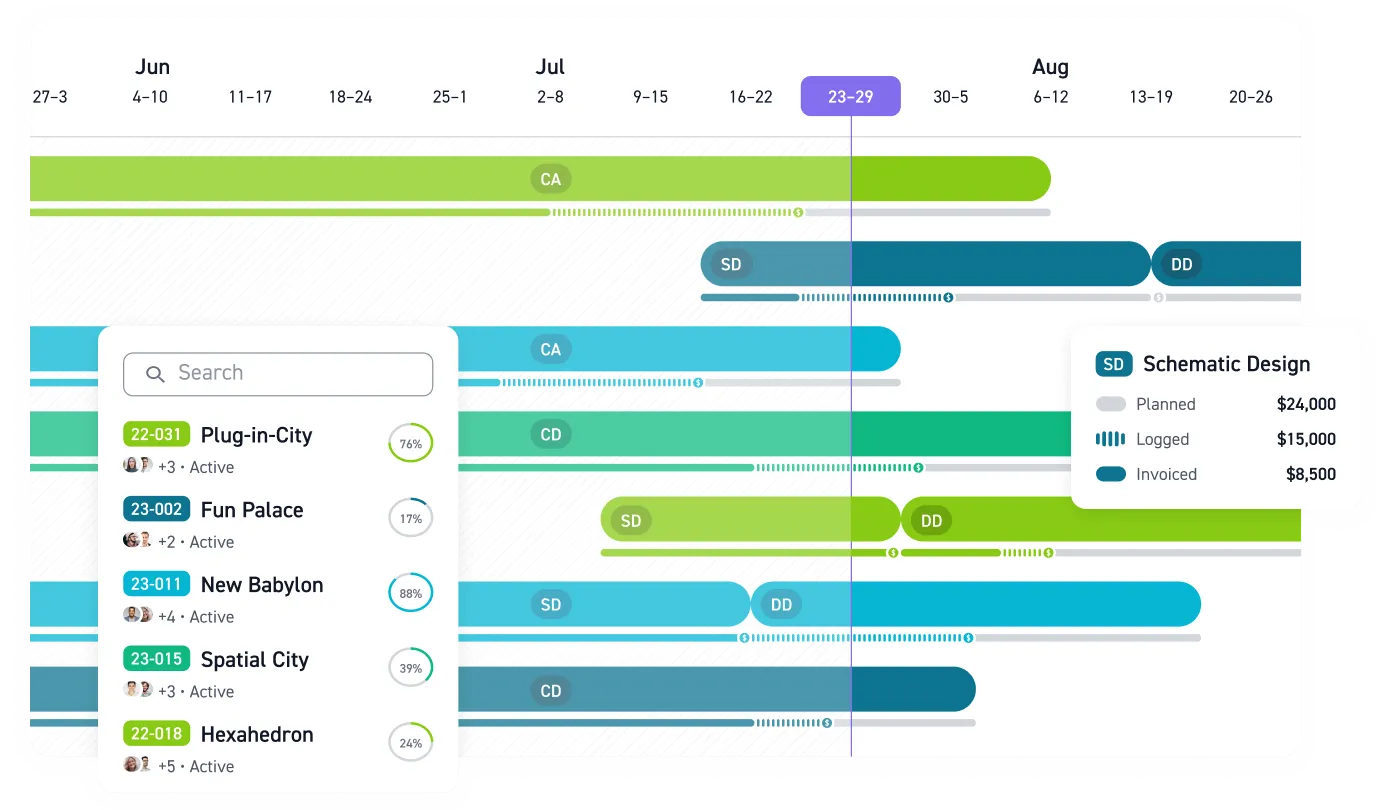
Monograph is firm management software built exclusively for A&E firms by three co-founders with architecture degrees, and its phase-based data model follows the Architect’s Handbook of Professional Practice. Its signature view is MoneyGantt™, a view that combines a Gantt timeline with budget-to-cash tracking, so you read schedule and fee burn on one screen.
- Project work: Pipeline, phase budgets, timesheets and billing sit in one system, and staff log time against phases.
- Billing workflow: Monograph generates monthly draft invoices with expenses and consultant bills and routes them for review. Stripe collects client payments and pays subconsultants.
Monograph is trusted by 16,000+ architects and engineers across 2,000+ firms, and it targets firms of 5 to 100 people. In the September 17, 2026 capture, it holds 4.5 from 29 G2 reviews and 4.5 from 236 Capterra reviews. It’s sold on annual subscription with a 5-seat minimum. Garrison Architects reports a billing cycle twice as fast with Monograph.
Monograph has no general ledger or accounts payable of its own, and it has no payroll, so QuickBooks Online handles those. The product doesn’t document a client portal or a named NTE contract type. A firm that depends on capped hourly contracts should test that workflow in a demo.
Head-to-head detail is in Monograph vs. BQE and Monograph vs. Ajera. For the time-tracker baseline, see Monograph vs. Harvest.
Monograph fits a 5 to 100 person A&E firm that keeps accounting in QuickBooks Online. It puts phase budgets, staffing, time and billing in one system project managers will open daily. It bills fixed fee, hourly, consultant pass-through and retainer work in one portfolio. It has no general ledger or payroll of its own, so firms replacing QuickBooks should look at BQE Core or Ajera.
BQE Core
BQE Core is Monograph’s most direct competitor and the deepest invoicing product of the five, with percent-complete billing by phase and separate or joint phase invoices. The Foundations base covers time and expense, billing, project management and reporting, and separately priced modules add Accounting, CRM, HR and Payroll, with payroll tax filing powered by Gusto. Projects nest four levels deep, and contract type can’t change mid-project, so you set it right at setup or not at all. The September 17, 2026 G2 and Capterra capture records a 2026 dropdown change that truncates long project and phase names, so staff can’t tell which phase they’re logging time to. In that capture, BQE Core holds 4.3 from 453 G2 reviews and 4.5 from 793 Capterra reviews, and alternatives are in BQE Core alternatives.
BQE Core fits a 15 to 200 person firm that wants general ledger and payroll in one product. It also suits firms that bill capped hourly contracts, since it documents a named Hourly Not To Exceed type. Entries past an Hourly Not To Exceed cap switch from billable to non-billable on their own. A firm that needs phase-name navigation should note the dropdown truncation reported in the September 17, 2026 capture.
Deltek Ajera
Deltek Ajera is built for firms moving accounting out of QuickBooks entirely. Its native accounting and payroll take QuickBooks’ place. It has no native QuickBooks connection and reaches it only through Workato middleware.
- Accounting conversion: Deltek’s conversion guide says Ajera includes projects, accounting, payroll, banking, receivables and payables in one system, and that preparing the conversion “requires significant effort and may take time.”
- Deployment and add-ons: Payroll in ajeraCore requires the Payroll add-on (Ajera payroll help). Deltek is moving Ajera to the cloud (Ajera support timeline), so a new buyer should assume a subscription.
PSMJ Resources (PSMJ) defines mid-sized firms as 30 to 199 employees in its 2018 PSMJ software study. That definition is why Ajera reads as over-built for a firm under 100. Ajera includes in-house certified payroll and a Schedule Manager that Deltek’s help notes is unavailable in the smaller ajeraCore edition. Both suit the upper end of that band. A 25-person civil firm would pay for accounting tooling it has no department to run.
Ajera holds 4.1 from 202 G2 reviews and 3.6 from 62 Capterra reviews in the September 17, 2026 capture, the lowest Capterra score of the four rated tools. Alternatives are in Deltek Ajera alternatives.
Deltek Ajera fits a firm in the 30 to 199 band. That firm is retiring QuickBooks. It also has an accounting lead to own the conversion. A firm under 100 that keeps QuickBooks should look at the other tools first.
BigTime
BigTime is professional services automation sold across accounting, information technology services, consulting, architecture and engineering, so its entry tier is time and billing rather than A&E project control. Essentials covers time and expense, billing and invoicing, rate management, approvals and the QuickBooks connection. Advanced adds custom invoice templates and a client portal. Premier adds Project Budgeting, multi-level approvals and the Sage Intacct connection. In the September 17, 2026 capture, BigTime holds 4.4 from 1,791 G2 reviews and 4.6 from 662 Capterra reviews, the largest review base of the four rated tools.
Budgeting for an A&E buyer starts at Premier. Confirm resource allocation separately: the help center maps it to Premier, while the pricing page lists Resource Management as a standalone option. Phases are tasks you rename, and percent-complete billing runs at that task level. Alternatives are in BigTime alternatives.
BigTime fits a time-and-materials-heavy firm of 10 or more. That firm wants published entry pricing. It can live with task-level rather than phase-level budgets. Budgeting starts at Premier and phases are tasks you rename, so a firm that needs true phase budgets should look at the other tools.
Harvest plus QuickBooks
Harvest plus QuickBooks is the time-tracker-and-spreadsheets baseline, and its structural gap is the missing phase budget for staff to log hours against.
- Budgets: Harvest budgets at the project and task level in hours or fees and recommends a separate project per phase, and its own budget article says Harvest “does not have robust budget reporting.”
- Time and billing: Timers, native desktop and mobile apps, retainer invoices, a public price list and a copy of invoices into QuickBooks Online are all there.
A seven-phase MEP project means you create seven Harvest projects and keep consultant bills in QuickBooks. Percent-complete billing isn’t documented, and scheduling is a separate paid Forecast product, so you reconcile fee earned against fee billed in a spreadsheet every month.
Harvest plus QuickBooks fits a firm under 25 people. Its projects are single-phase or hourly. Phase-based fixed-fee work strains the setup, since each phase needs its own Harvest project and the fee reconciles in a spreadsheet. A firm with multi-phase projects should look at the dedicated tools above.
Architecture Firms Should Decide on Phase-Based Fees First
An architecture firm’s fee is a phase schedule, so the first filter is whether the tool budgets and bills by phase. The AIA best-practice rule of thumb allocates a fee as 10% schematic design, 25% design development, 40% construction documents, 5% bidding and 20% construction administration, according to the AIA fee allocation. That’s five budgets per project, and a tool with one project-level budget can’t tell you that construction documents is 80% spent at 50% complete while schematic design came in under.
Stipulated sum dominates the discipline: in the AIA’s Architecture Billings Index (ABI), 73% of responding firms regularly use it, according to the January 2026 ABI. For a studio, that puts percent-complete billing by phase ahead of capped hourly handling. The consistent pick for a studio of 5 to 100 people is Monograph, for the reasons on the architecture firms use case. Architecture-only firms under 15 people should see the small-firm software guide.
Engineering Firms Need Contract Flexibility and Utilization Above All
An engineering firm’s contract mix is wider than an architect’s, so the first filter is whether the tool carries fixed fee and hourly work in the same portfolio and also handles capped hourly work. In interviews with nine engineering firms, the American Council of Engineering Companies (ACEC) Research Institute’s 2024 ACEC lump-sum study found lump-sum work ranged from roughly 20% to 80% of firms’ business. The study also notes that state transportation departments often contract cost-plus-fixed-fee with an NTE limit. A 30-person structural firm can hold a fixed-fee subconsultant contract under one architect and an hourly retainer with a developer in the same month, and a capped hourly contract with a school district adds work the system has to bill without a side spreadsheet. An MEP practice can run fixed-fee subconsultant work under an architect while passing its own consultant bills through to the client.
Utilization is the second filter because labor is the margin. The Deltek Clarity A&E Industry Study’s 47th edition, covering nearly 900 firms for fiscal 2025, reports a Clarity utilization median of 58.9% on a labor-dollar basis, down 2.2 points and the lowest since 2021. A firm running 40 concurrent projects across three disciplines can’t wait for quarter-end to learn one studio is at 48%.
- Contract and accounting scope: Within this comparison, BQE Core has the broadest named contract types and Ajera documents utilization against target percentages, but Ajera’s accounting scope reads as over-built for a firm under 100 that keeps QuickBooks.
- Monograph fit: Monograph’s billing mix and probability-weighted capacity forecast fit this setup. Stripe subconsultant payouts also support the workflow; test capped hourly billing.
The engineering firms use case walks through that multi-discipline setup. Engineering firms should rank contract flexibility first and utilization second. BQE Core has the broadest named contract types, and Monograph’s billing mix and probability-weighted capacity forecast fit a firm that bills fixed fee, hourly and pass-through work. Test capped hourly billing in a demo before you commit.
Firm Size Narrows the Shortlist Faster Than Features Do
Firm size narrows the shortlist faster than features do, and three bands cover the range: 5 to 15, 15 to 50 and 50 to 100 people. The cost guide covers pricing for each of these bands. Monograph’s 5-seat minimum and Ajera’s mid-size design center mark the two edges of that range. Find your band first, then compare features.
5 to 15 people: Pick Monograph if any project has more than one phase, and stay on Harvest plus QuickBooks only while every project is single-phase and hourly. Monograph’s 5-seat minimum matches the floor of this band, and Ajera’s design center, by the PSMJ mid-size definition, sits well past it. 15 to 50 people: Monograph is the default. This is the core of its target and the band where you stop being able to hold the pipeline in your head. BQE Core is the alternative if you need payroll and general ledger in the same product, and BigTime at Premier is the alternative for mostly time-and-materials work. 50 to 100 people: Monograph still fits and keeps QuickBooks Online as the ledger. Deltek Ajera is designed for this band and makes sense only for a firm committed to leaving QuickBooks, with an accounting lead to run the conversion. BQE Core is the candidate when native accounting and a named NTE contract type matter more than phase-name navigation. Price that choice as a full first year before you compare per-seat numbers.
Book a Monograph Demo to See Pipeline-to-Payment in One System
Monograph connects pipeline, phase budgets, staffing, timesheets and billing. The firm operating system guide explains how those pieces connect, and current plans are on the pricing page. Book a demo to see that connected workflow with your firm’s project structure.
Frequently Asked Questions
What is the best firm management software for architecture and engineering firms?
Monograph is the best fit for a 5 to 100 person A&E firm. It uses the phase as the structural unit for budgets, staffing, time and billing, and it keeps QuickBooks Online as the ledger. BQE Core is the right answer when you need general ledger and payroll in the same product. It also names a not-to-exceed contract type, which suits capped hourly contracts. Deltek Ajera is the right answer for a 30 to 199 person firm that is leaving QuickBooks and has an accounting lead.
What is the best firm management software for architecture firms?
Monograph is the best fit for architecture firms. An architecture fee is a phase schedule, and Monograph budgets and bills by phase with AIA-style progress billing while MoneyGantt™ shows fee burn against the schedule. A studio whose work is mostly stipulated sum doesn’t need the contract and accounting machinery BQE Core and Deltek Ajera carry. It needs a design-centric interface a project architect will use for time entry without an accountant’s training. Studios under 15 people should read the small architecture firm guide.
What is the best firm management software for engineering firms?
Monograph is the best fit for most MEP and structural firms of 5 to 100 people. Civil firms get the same recommendation, unless capped hourly work dominates their book. BQE Core documents a named Hourly Not To Exceed type, and Monograph doesn’t. Set up a capped hourly school-district contract in a demo and test how Monograph handles hours past the cap. Shortlist BQE Core if the result doesn’t fit how you bill NTE work.
How much does firm management software cost per user?
Two of the five vendors publish a per-user price. Harvest lists Teams at $108 and Enterprise at $168 per seat per year, and BigTime lists Essentials from $20 per user per month. BQE Core and Deltek Ajera provide custom quotes, and BQE prices by user and module. Monograph sells annual subscription plans with a 5-seat minimum and lists current plans on the pricing page, and the A&E firm cost guide covers pricing for firms of 5 to 15 and 15 to 50 people, with a separate band for 50 to 100. Request quotes from the two quote-only vendors before you compare per-seat numbers.
Is dedicated firm management software better than Harvest plus spreadsheets?
Yes, once any project has more than one phase. Harvest’s help center says separate phases within a project aren’t possible, so the fee you agreed by phase gets reconciled against hours in a spreadsheet outside the tool, and that spreadsheet is where overruns hide until the phase closes. Dedicated firm management software puts the hours on the phase as they’re logged, bills the phase by percent complete, and carries the proposal through to payment in one record. Harvest plus QuickBooks still works if your projects are single-phase and hourly. Switch the day you sign a five-phase fixed-fee contract.
